Data migration strategy: how to choose big bang, phased or parallel
.avif)

•
•
Summarize blog with






60-sec summary
- Three migration approaches. In customer onboarding, only two are usually available.
- The safest one is the one your customer will refuse to pay for.
- Most onboarding migrations end up phased by accident, not by decision.
- What you move settles how you move it, and that call comes first.
- Your source system predicts your strategy better than your project plan does.

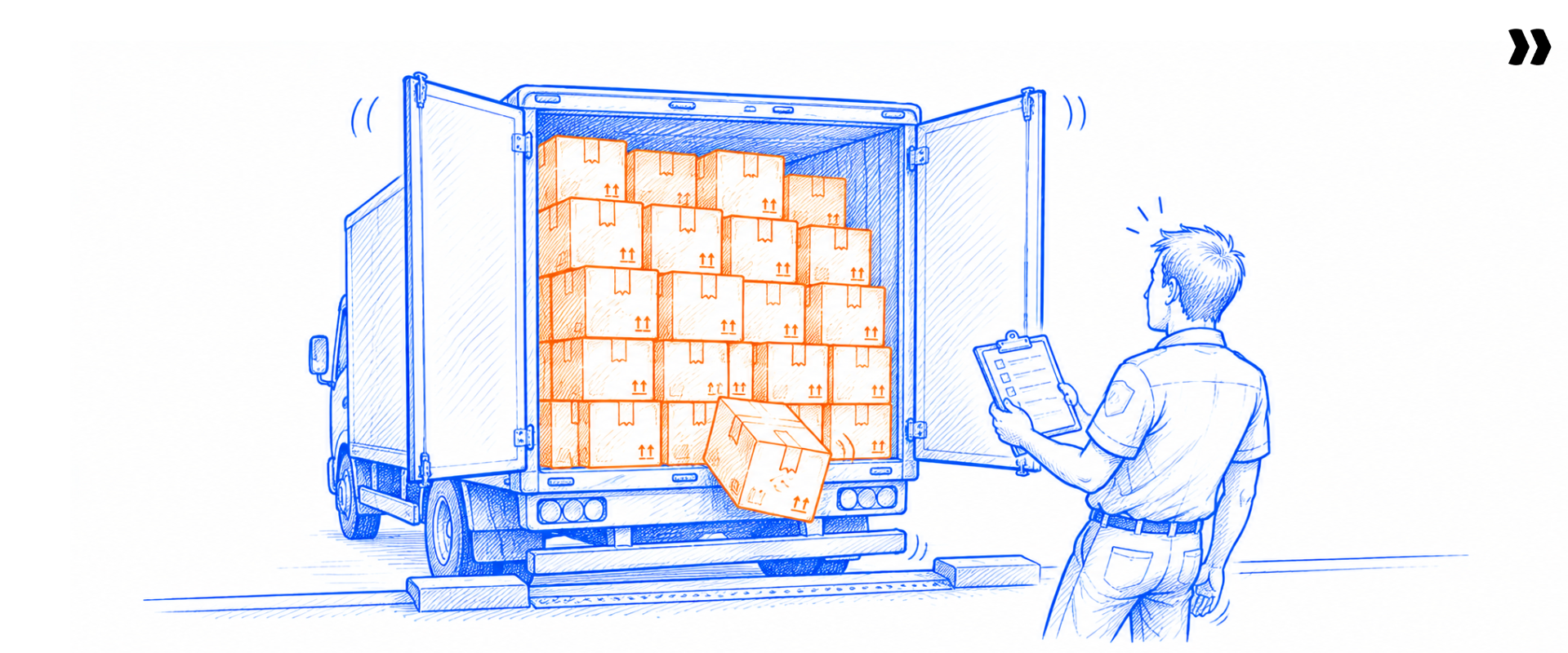
The plan says eight weeks. The customer sends their export in week two. Nobody opens the file until week five. By then it has three tabs, two ID columns, and a date field holding four different formats.
A data migration strategy is the plan for how data moves from a source system to a target system. It sets the approach, the scope, the cutover, and the validation.
PSA platforms have traditionally focused on the back office. That matters here because migration sits across both halves. The transformation work is a back-office effort. The waiting, the review, and the sign-off are front-office problems.
Four approaches cover almost every data migration project: big bang, phased or trickle, parallel run, and lift and shift. The go-live date does not move while you decide between them. Migration routinely sits on the critical path to go-live. That makes your migration strategy a schedule decision before it is a technical one.
Most published guidance lists the four approaches and stops. This guide sequences the decision, then covers scope, cutover, methodology, legacy systems, repeatability, and the migration plan document itself.
Each pointer below gets a full section, with the decision framework at the center of the guide.
Want this applied to your own migration? Get a 20-minute demo and watch Rocketlane Migration Agent map and validate a real export.
What is a data migration strategy?
A data migration strategy is the plan governing how data moves from a source system to a target system. It names the approach, the scope, and the cutover window. It also names the validation criteria and the owner of each decision. The strategy is set before execution starts. It determines most of the timeline.
The word strategy does real work here. A migration process tells you what order to do things in. A migration strategy tells you which way to go, and the two answer different questions.
Four inputs decide a strategy. Downtime tolerance, Data volume and complexity, whether the source system stays in use until go-live, AND How many times you will run this same migration.
Teams that skip this step still make the decision. They make it by default, usually by copying whatever the last project did.
Key definition
A data migration strategy is the plan for how data moves from a source system to a target system. It covers the approach, the scope, the cutover, and the validation. It is decided before execution begins. It sets the go-live date more than any other choice in the project.
What is the difference between a data migration strategy and a data migration process?
A data migration strategy is the choice of route. A data migration process is the sequence of steps you follow once the route is chosen. Confusing the two produces detailed migration plans that never state which approach they assume.
Set the strategy first. A migration process built on the wrong approach is a tidy plan for the wrong project.
What are the four data migration approaches, and how do they compare?

Four approaches cover almost every migration. Big bang moves everything in one event. Phased, sometimes called trickle, moves data in stages while both systems run. Parallel run keeps both systems live and synchronised.
Lift and shift moves data without reshaping it, and it applies mostly to infrastructure rather than business records.
1. Big bang migration
A big bang migration moves all data in a single event, usually across a weekend. The source system freezes on Friday, the load runs, and business users start on the new system on Monday.
It is the cheapest approach and the fastest to plan. The risk is concentrated: errors surface with no fallback system running, and the rollback window is short.
Choose it when the volume fits one window, a freeze is achievable, and you have a tested rollback.
2. Phased or trickle migration
A phased data migration moves data in stages while the old and new systems run together. Active records move first, historical records follow later.
The advantages of phased migration are lower system downtime and a smaller blast radius per stage. The trade-off is rarely stated plainly: phased does not remove risk, it relocates it. Big bang risks a bad cutover, while phased risks two systems drifting apart for weeks.
Choose it when volume is large, or the business cannot stop. It also fits when the client keeps entering data in the old system.
3. Parallel run migration
A parallel run keeps both the source and the target system fully live and maintained at the same time. Teams verify the new system against a working one before switching off the old one.
It is the safest approach available and the most expensive to staff. Double entry, double reconciliation and double support are all real costs.
Choose it when the data is financially or legally critical, and the budget exists. Saying out loud that most teams cannot afford it is more useful than pretending otherwise.
4. Lift and shift
Lift and shift moves data without reshaping it, preserving existing data formats and structures in a new environment. It appears in every migration guide because cloud vendors dominate this topic.
It is usually the wrong frame for moving customer records into a business system. Application migrations almost always need transformation, because the target environment expects a different schema.
Data migration approach comparison
Read the table as a set of eliminations rather than a menu. In practice, the constraint you cannot move rules out two of the four before you start.
How do you choose a data migration approach for a client implementation?

Work through four constraints in order. How much downtime the business can absorb. How much data is moving, and whether the source system stays in use until go-live.
How many times you will run this migration. The first constraint that fails rules out an approach. What survives is your data migration approach.
The migration decision framework
The framework works because it eliminates rather than scores. A single hard constraint decides more migrations than any weighted matrix.
Approach decided. The next four weeks are mapping.
See transform and validate run on your own export in 20 minutes.
A worked example
Take a mid-market client with a 40-person operations team. Finance closes the month on the third. Consultants sit across three time zones. Volume is moderate, around 200,000 records.
Question one fails immediately. Finance cannot lose the first weekend of a month, and a mid-month freeze breaks time approvals. Big bang across a month-end is ruled out.
Question two passes, because 200,000 records load and verify inside one window. Question three fails, since the client keeps booking work in the old system until go-live.
The answer is a phased migration with a reconciliation step, cut over mid-month. The finance calendar decided this before data volume was ever discussed.
Why the finance calendar decides more cutovers than data volume
Month-end close and time-approval cycles set the window before anyone opens the export. Teams discover this late because the finance calendar sits outside the project plan.
Ask for the close calendar in the first scoping call. It removes more candidate dates than any technical constraint.
The sample-to-production gap
A sample migration validates cleanly, and then production reveals structures the sample never contained. Different columns in different sheets, IDs copied into the wrong rows, hierarchies that vary by project.
The sample proves the mapping works on the data you were given. It does not prove the data you were given is representative.
Treat the pilot as a discovery step rather than an approval step. Size the production window for what the pilot did not show you, and expect a second pass.
See validation run on your production file, not the sample.
How much historical data should you migrate?
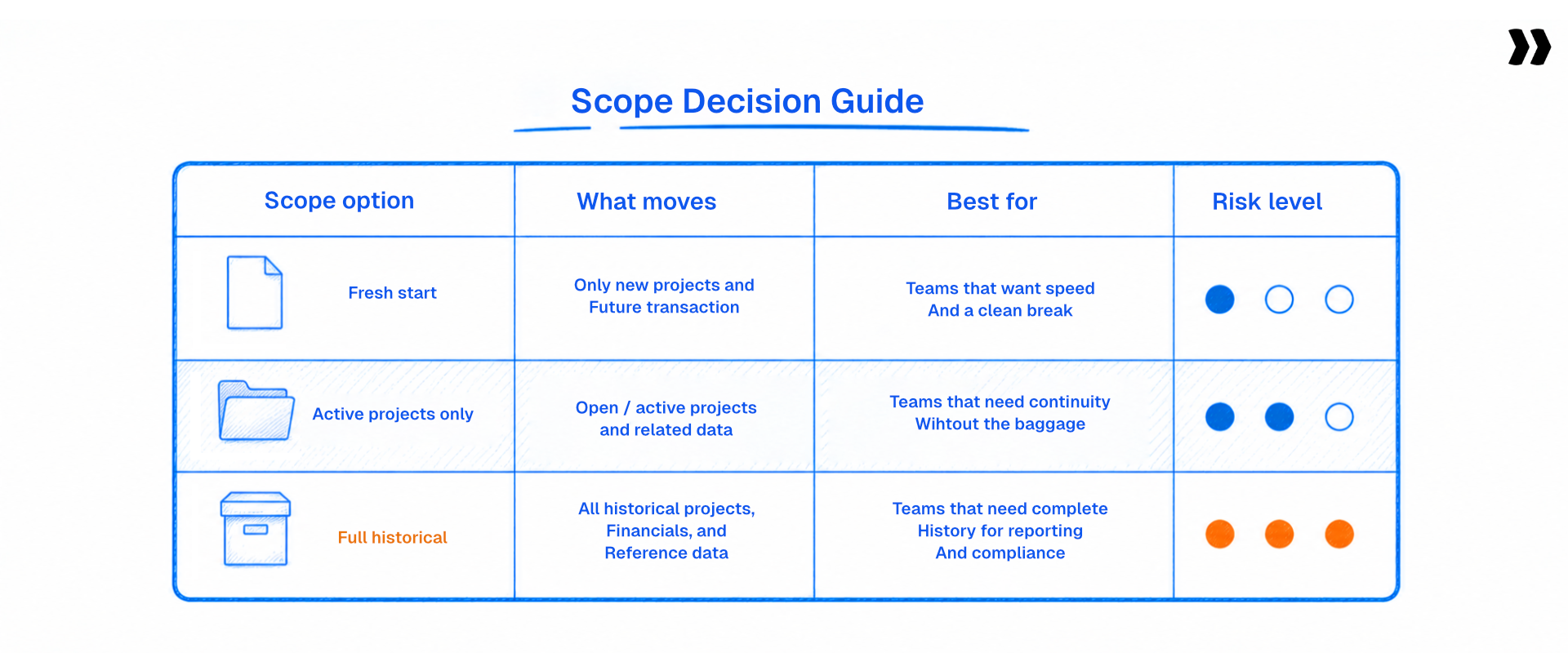
Migrate the existing data the business needs from day one. Archive what it needs to reference. Leave behind what it keeps out of habit. Most teams migrate more history than anyone opens. Trimming scope is the fastest way to shrink a migration.
The three tiers of existing data
- Operational data: Active projects, open invoices, current resources and live customer records. This critical data has to be in the new system on day one, and it moves before go-live.
- Reference data: Closed projects, historical time entries, and prior invoices. Business users need it for reporting, so it can arrive after go-live without blocking anyone.
- Archive data: Everything else. Export it, store it in a defined storage location, and do not migrate it. An archive is a data management decision, not a failure of ambition.
Splitting existing data into these three tiers turns one open-ended scope conversation into three short ones. Each has a different owner.
When migrating history is not optional
Some verticals cannot make this trade. Where migration is a regulatory requirement rather than a convenience, history moves whether or not anyone reads it.
Pharmacovigilance, regulated finance and healthcare records all carry retention obligations under data protection regulations. In those cases, the strategy absorbs the volume, and the approach usually shifts to phased for that reason alone.
One line most guides skip: the decision about what you will not migrate needs written sign-off from the client. Without it, the question returns as a complaint three months after go-live.
What does the data migration process look like end to end?
The data migration process runs in eight steps. Profile the source data, cleanse it, then design the field mappings. Build the transformation logic, run a sample load, and validate the result. Get sign-off, then run the production load and reconcile. The strategy decides the route. This migration process is how you walk it.
The eight steps of a data migration process
- Profile the source data: Open every file and record what each column holds, not what the header claims. Note data types, data formats, null rates, and the fields that vary between sheets.
- Run data cleansing: Fix duplicates, orphaned records, and inconsistent values before mapping. Data cleansing performed after transformation costs more, because every fix has to be applied twice.
- Design the field mappings: Map each source field to its destination field in the target system. Record the ones you are unsure about, since those become the validation rules later.
- Build the transformation logic: Write the rules that reshape source values into what the new data storage solution expects. Splitting, concatenating, recoding, and date normalization all live here.
- Run a sample load: Load a representative subset into a staging or production environment copy. Use dummy data for any field carrying sensitive data until access controls are confirmed.
- Validate the result: Check record counts, financial totals, relationship integrity, and field-level accuracy. This is where you confirm data integrity rather than assume it. Maintaining data integrity across the load is the whole point of this step.
- Get written sign-off: Have the client review the transformed output and approve it in writing. Sign-off in an email thread is not a record anyone can find in month four.
- Run the production load and reconcile: Execute the full load into the target environment. Reconcile source against destination before releasing the new system to business users.
The eight steps look linear on paper. In practice, steps three through six runs as a loop until validation comes back clean.
Note where the effort concentrates. Steps three, four, and six absorb most of the hours, and none of them involve transferring data anywhere.
How do you plan a cutover and keep system downtime under control?

A cutover plan sets the window when the source system stops accepting changes. At the end of it, the target system becomes the system of record. It names the freeze time and the sequence inside the window. It names who verifies what, the go or no-go owner, and the rollback point of no return.
Cutover plan components
- Freeze time and communication: The exact hour the source system goes read-only, and who tells every affected team.
- Final export and load sequence: The order objects load in, driven by dependencies rather than convenience.
- Verification checks and owners: What gets checked, by whom, and against which source figure.
- Go or no-go decision owner: One named person with the authority to stop the cutover.
- Rollback trigger and point of no return: The condition that reverses the migration. Also the hour after which reversal stops being possible.
- Hypercare window and staffing: How long the elevated support period runs, and who is on it.
A cutover plan missing one of these six components tends to fail at that exact component. Work through the list in order.
How to protect business operations during the cutover window
Take a full backup before moving data. Keep the legacy system in read-only mode during final verification, because read-only preserves reference access without allowing drift.
Read-only is the underrated move here. It gives you most of the safety of a parallel run at a fraction of the cost.
Coordinate the freeze against month-end close and time-approval cycles. Across time zones, the weekend is not the same 48 hours for everyone. The failure mode is partial. Some people submitted time before the freeze, and some did not.
One more check that saves projects. List every automation, integration, and report pointing at the old data system, then confirm each one after the load. Broken automations are the most common post-cutover surprise.
What happens to data created after the export
Records created in the source system after the final export are a real problem with no clean answer. Practitioners describe hitting it on most phased migrations, and handling it by hand in a scramble at go-live.
Plan for it explicitly. Shorten the window between final export and cutover. Freeze earlier than feels comfortable. Assign one named owner to reconcile the difference.
No tool on the market resolves this reliably today, Rocketlane included. Treating it as a staffing decision rather than a technology decision is the honest position.
Cost of inaction
Without a cutover plan, the migration becomes a series of judgement calls made under time pressure. Implementation teams commonly report spending 15 to 20 days on data corrections after go-live.
That correction period is billable time nobody quoted. It lands on the team already starting the next implementation.
Fifteen to twenty days of corrections nobody quoted.
Catch the errors before load instead of after go-live.
What are the most common data migration challenges?
The five common data migration challenges recur across migration projects. Data quality issues found late. Data loss and broken relationships. Security risks around sensitive data. Thin resource allocation on a small data migration team. Scope that grows because nobody agrees what stays behind.
The five challenges, and the fix for each
- Data quality issues found late: Why it happens: teams map before they profile, so bad values surface during validation.
Fix: run data cleansing on the source data before mapping, and treat the pilot as discovery. - Data loss and broken relationships: Why it happens: load order ignores dependencies, so child records arrive before their parents.
Fix: sequence the load by dependency and check relationship integrity, not only record counts. - Security risks around sensitive data: Why it happens: source extracts sit in shared drives and inboxes.
Fix: agree access controls and data governance rules upfront. Use dummy data in test loads, and meet your data protection regulations. - Resource allocation on a small team: Why it happens: migrations are staffed by about two people. The workload grows with every new client.
Fix: name a backup owner and write the rules down. - Scope that grows quietly: Why it happens: nobody signed off on what would be left behind.
Fix: get the archive decision in writing before mapping starts.
Four of these five are decisions rather than defects. A migration strategy prevents more damage here than better tooling.
Benchmark box
These figures frame the operating context migration work sits inside. They show why timeline slippage lands on margin.
Read the second and third rows together. SPI Research put billable utilization at 66.4% in 2026, an all-time low. Consultancy BenchPress found in 2024 that one utilization point is worth a 20% operating profit gain. Recovering that point from migration rework is the commercial case.
One utilization point is worth 20% of operating profit.
Migration rework is where that point goes. Twenty minutes to see the alternative.
What is a data migration methodology, and how is it different from an approach?
A data migration methodology is the repeatable structure a team applies to every migration. It covers how source data gets profiled and how mappings are documented. It covers how transformations are expressed, how validation runs, and who signs off. The approach decides which way you go. The methodology decides how consistently you get there.
Approach, methodology and technique
- Approach: Big bang, phased, parallel run or lift and shift. One decision per project.
- Methodology: The repeatable structure applied to every project. Data migration methodologies differ by team, and most teams do not have one written down.
- Technique: The specific mechanics. Field mapping, transformation rules, reconciliation checks, and validation queries are all data migration techniques.
Teams conflate these three words constantly, and the cost is real. A team with an approach but no methodology rebuilds its data migration methods on every project.
Where data migration tools fit
Data migration tools cover different parts of the pipeline, and no single product covers all of it. Extraction tools pull from the source system. Transformation tools reshape data into the target schema. Validation tools check the result. Loaders write into the new system.
Most teams end up with a stack rather than a tool. An importer for upload. A spreadsheet or script for transformation. Email for client review. The destination system's own importer for the load.
Every handoff between those migration tools is a place where data changes hands with no audit trail. That is the real cost of a fragmented toolchain. Data integration platforms are a separate category again. They keep two systems in sync continuously, which is a different job from a one-time migration.
Every handoff in your stack loses the audit trail.
Transform and validate in one versioned run. See it on your file.
Data migration best practices worth keeping
- Profile before you map, because headers lie more often than data does.
- Take a full backup of the source data before any load runs.
- Test in a staging copy of the production environment, never in production itself.
- Validate at three levels: field values, cross-field logic, and whether related records exist.
- Get written sign-off on the transformed output before the production load.
- Write down the rules you built, so future migrations from the same source cost less.
These data migration best practices share one property. Each moves a discovery earlier in the project, where fixing it costs less. A successful data migration is not the one that moves the most rows. A successful migration is the one where nothing surprises anyone after go-live.
What changes when you migrate off legacy systems?
Legacy data migration differs in one way that changes the strategy. You often cannot get a clean export. The constraint is not how to move the data. It is how to get it out at all. That frequently rules out a big bang and forces a phased approach.
Legacy systems in this context rarely mean old mainframes. It means no API, no reliable export path, and data spread across per-project files or one spreadsheet per client.
Exports arrive as PDFs, fixed-width text, or tab-delimited files. Different sheets carry different columns. Sometimes the source is paper.
Migrating data out of these systems is slow, so extraction becomes the critical path. The approach has to tolerate an uncertain source. That points to phased almost every time.
Ranked by frequency of mention across demand conversations with services teams during 2026, teams migrate away from spreadsheets and Excel first, then Jira.
After those come Certinia or FinancialForce, Kantata or Mavenlink, Smartsheet and Asana. Google Sheets, ClickUp, MS Project and monday.com follow.
The pattern in that ranking is worth noting. The biggest source state is not a competing platform; it is a spreadsheet. Spreadsheets have no schema to map against.
How do you run the same migration strategy across every client project?
For implementation teams, a migration strategy is not a one-time decision. The same source systems recur across clients. The approach, the mappings, and the validation rules can be decided once per source system. Decide once and reuse them, or relitigate on every project.
What carries over between migration projects
Across Rocketlane's aggregated delivery data, the same migration task recurs across an average of five projects. One recurring task appeared in roughly 2,900 separate projects. Across all migration task types, 13.5% re-run on multiple projects.
The pattern already exists inside most teams. It is not captured anywhere, so each analyst rediscovers it.
- Carries over: The approach decision for a given source system. The field mappings, transformation rules, validation rules, and known edge cases.
- Does not carry over: The client's specific data and their finance calendar. Also the scope decision about how much history moves.
The split matters. Teams that templatize the second list produce rigid processes. Teams that templatize the first list cut real time from future migrations.
The cold start problem
Every migration from an unfamiliar source system starts from zero. No alias library, no known quirks, no prior mapping.
Someone profiles the export, guesses what fields mean, writes new logic, and finds the edge cases by hitting them. Teams do not report this as a failure because they treat it as the job.
The phrase that lands with delivery leaders: every first migration from a new source system costs full price. The fix is not a better script. The unit of reuse is the source system rather than the client.
The honest threshold
This is worth formalizing when you will see the same source system more than a handful of times. Below that, a good template and a careful reviewer is the right answer.
Building a reusable playbook for a source system you will meet twice costs more than it returns. Cost efficiency here comes from repetition, not from ambition.
What should a data migration plan document contain?
A data migration plan should fit on two pages. It names the approach and why, and the scope of what is migrating. It names the cutover window, the validation criteria, and the rollback trigger. It names the owner of each decision.
The nine-section data migration plan template
- Approach and rationale: Which of the four approaches, and which constraint decided it.
- Scope: What is migrating, what is archiving, and what is being left behind.
- Source and destination: Systems, data formats, and who provides what by when.
- Objects and load order: Which objects depend on which, and the sequence that respects those dependencies.
- Transformation rules: Where the rules are documented and who owns them.
- Validation criteria: What correct means, how you will confirm data integrity, and who signs it off.
- Cutover plan: Freeze time, sequence, verification steps, and the go or no-go owner.
- Rollback: The trigger, the procedure, and the point of no return.
- Post-go-live: Hypercare window, staffing, and known open items.
Copy those nine headings into a document today, and you have a working migration plan. That is the point of publishing the template rather than gating it.
Two pages is deliberate. A detailed migration plan nobody reads does not reduce risk. The value sits in the decisions being named, not the length.
Bring your plan. We'll run, transform and validate live.
How does Rocketlane support a data migration strategy?
Rocketlane is an agentic PSA platform with a 94% G2 recommendation rate and has raised a $60M Series C round. It handles the transform and validate steps of a migration. It maps source fields to a destination schema and applies transformation rules.
It also validates the result before anything is exported for load. Extraction from the source system and loading into the target system stay with your team.
That boundary is worth stating plainly. No tool on the market covers a whole customer data migration today, Rocketlane included. Rocketlane covers the middle of the pipeline.
Migration Agent sits inside Nitro alongside agents for documentation, resourcing, project governance and timesheet policy. They share the same design principle: the agent does the delivery work rather than reporting on it. For a data migration, only Migration Agent is in scope.
Transform and validate, on a real export, in 20 minutes.
Plain-English rules, versioned runs, client sign-off in a portal.
What Rocketlane Migration Agent does
Rocketlane Migration Agent is the Level 3 work execution agent inside Nitro, Rocketlane's agentic AI layer. Here’s how it handles it.
- Transformation that scales: You describe the transformation in plain English rather than hand-cleaning cells. Rules are defined once against a source system and reused for every client arriving from it.
- Validation that doesn’t stop at format: Validation runs at three levels. Field-level checks, cross-sheet existence checks in the style of a foreign key, and cross-field logic. A commencement date falling after an end date gets caught before the load.
- Versioned, so the fix survives the analyst: Every transformation is versioned and comparable. The fix one analyst found does not leave when they move to another account.
- Corrections from the call, not just the file: a change agreed on a customer call can be applied to the run from the meeting transcript, and the agent produces a new version for confirmation. That maps directly to the review checkpoint every phased migration needs at each stage.
Those three together turn a one-off migration into a schema-aware playbook. That is the compounding argument for treating migration as a repeatable shape of work.
Clients review and sign off on their own transformed data in a portal. Approval leaves a record instead of living in an email thread. Validation runs at up to 25 million cells per run, stress-tested between 1 and 5 million.
On security, each run executes in an isolated single-use container. Raw data never enters the model's context window. Rocketlane holds industry-best compliances including ISO 42001, ISO 27001, SOC 1, SOC 2, HIPAA, and GDPR. Data retention is zero, with US and EU data residency. ISO 42001 is the AI management system standard, and it is uncontested in this category.
Nitro Migration Agent: the work execution layer
Migration Agent is part of Nitro, Rocketlane's agentic AI layer. Migration Agent sits at Level 3, work execution. Level 3 is the tier that does delivery work rather than reporting on it. Documentation Agent sits at the same level. Level 1 summarizes and surfaces. Level 2 acts on delivery context.
Where the strategy gets encoded
A migration strategy is a set of decisions. The approach, the scope, the field mappings, the validation rules. Migration Agent is where those decisions get encoded, so they hold on the next project.
Three mechanics carry them forward.
- Mapping suggestions on upload, against a destination schema you define once.
- Plain-English corrections at runtime, not code.
- Reusable configurations per source system rather than per client.
The scope stays narrow on purpose. Migration Agent transforms and validates. Extraction and loading stay with your team.
Why it compounds
The second migration from a source system costs a fraction of the first. Rules written for one client apply to the next client from the same system. The strategy also survives the analyst leaving, because every transformation is versioned and comparable.
Those figures are modeled outcomes for a 25-person team, not universal averages.
Where to start, by situation
Use this routing table to pick a starting point rather than reading the whole guide again.
What to know before you buy
Four questions decide whether a migration platform earns its place in your stack. Ask all four of every vendor, including Rocketlane.
- Scope honesty: Ask which ETL steps the tool covers. Most cover transform and validate, not extraction or loading.
- Reuse model: Ask whether rules are defined per client or per source system. Per source system is what compounds.
- Validation depth: Ask for field-level, cross-sheet, and cross-field checks by name. Format checks alone are not validation.
- Review trail: Ask how client sign-off is recorded, and whether every change is versioned.
The four questions matter more than the shortlist. A vendor that answers the scope question plainly is telling you the truth about the rest.
Ask us all four. We'll answer the scope one first.
Transform and validate. Extraction and loading stay with your team.
Customer story
Storable, a self-storage software vendor running client conversions on Rocketlane, cut migration time by 75% with no added headcount. Jennifer McCurdy, Senior Manager of Software Implementation at Storable, leads that team.
On a 25-person delivery team, Rocketlane measures a 50% reduction in the data migration process. It also measures a 12% cut in time to go-live and roughly 1,000 hours saved a year. Rocketlane's own go-live runs 4 to 12 weeks.
Those go-live figures are Rocketlane's implementation timeline. They are separate from the 8 to 12 week client implementation bands common in this category. Those stretch to 12 to 16 weeks when the data needs multiple passes.
See how Rocketlane Migration Agent transforms and validates client data before go-live. Book a 20-minute walkthrough
Conclusion: Turning a migration strategy into a repeatable asset
Four approaches exist, one decision matters, and constraints make that decision rather than preference. The teams who get this right are not choosing better options than everyone else.
They are deciding once per source system instead of once per client. That is the whole difference between a migration plan and a migration strategy.
The file that arrives in week two will still have three tabs and four date formats. What changes is whether your team has seen that shape before. It changes whether the rules they wrote last time are still there.
Quick summary
- Three approaches. Big bang is cheapest and riskiest, phased relocates risk rather than removing it, and parallel run is the safest and the one your customer will not fund.
- Choose by elimination, not preference: downtime tolerance, data volume, whether the client keeps using the source system until go-live, then how many times you will run this same migration.
- Decide what moves before you decide how it moves. Start fresh, active records only, or everything. That call settles the approach more often than the approach debate does.
- Implementation teams commonly report 15 to 20 days of data corrections after go-live. With billable utilization at an all-time low of 66.4% (SPI Research, 2026), that rework lands straight on margin.
Rocketlane Migration Agent covers transform and validate, with mapping and validation rules saved against the source system and reused for every client that arrives from it. Extraction and loading stay with your team.
Table of Contents
Regsiter for the live webinar


Great consultants didn't join your team to spend Fridays writing documentation.
Table of contents
See Migration Agent transform and validate your own export.
FAQs
What is a data migration strategy?
A data migration strategy is the plan for how data moves from a source system to a target system. It covers the approach, the scope, the cutover, and the validation. It is decided before execution begins. It sets the go-live date more than any other choice. It sits on the critical path, so it moves the go-live date more than any other choice in the project.
When should you use a big bang versus a phased data migration?
Use big bang when the volume fits one window, and the business can freeze the source system. You also need a tested rollback. Use a phased migration when volume is large, or the business cannot pause. It also fits when the client keeps entering data until go-live. Phased does not remove risk. It moves the risk from the cutover to keeping two systems in sync.
What is a parallel run in a data migration?
A parallel run keeps the source system and the target system fully live at the same time. Teams verify the new system against a working one before switching the old one off. It carries no system downtime and the lowest risk of the four approaches. It is also the most expensive. It doubles data entry, reconciliation, and support for the length of the overlap.
How much historical data should you migrate when a client switches systems?
Migrate operational data the business needs from day one. Plan reference data to arrive after go-live. Archive the rest. Most teams move more history than anyone opens. The exception is regulated verticals, where retention obligations under data protection regulations make history mandatory. Whatever you decide to leave behind needs written client sign-off before mapping starts.
What is a cutover plan and how do you build one?
A cutover plan sets the window when the source system stops accepting changes. At the end of it, the target system becomes the system of record. It needs six components. Freeze time and communication. Final export and load sequence. Verification checks and owners. A go or no-go decision owner. A rollback trigger with a point of no return. A hypercare window. Coordinate the freeze against month-end close, because the finance calendar rules out more dates than data volume.
What are the most common data migration challenges?
Five recur across migration projects. Data quality issues found late. Data loss from loading records out of dependency order. Security risks around sensitive data sitting in shared drives. Thin resource allocation on a team of about two people. Scope that grows because nobody agreed what stays behind. Four of the five are decisions rather than technical defects. A written migration strategy prevents more damage here than better tooling.
What is the difference between a data migration strategy and a data migration process?
A data migration strategy is the choice of route: which approach, what scope, when to cut over. A data migration process is the sequence of steps you follow once that route is chosen. It runs from profiling and data cleansing through mapping and transformation. Then sample load, validation, sign-off and the production load. Set the strategy first. A migration process built on the wrong approach is a tidy plan for the wrong project.
What should a data migration plan document include?
Nine sections, on two pages. Approach and rationale, scope, source and destination, objects and load order. Then transformation rules, validation criteria, cutover plan, rollback and post-go-live. Each section names a decision and an owner. A detailed migration plan nobody reads does not reduce risk. The value sits in the decisions being named, not the length.
Can an AI agent apply the same migration strategy across every client project?
Partly, and the honest boundary matters. Rocketlane Migration Agent covers transform and validate. Rules are defined once per source system and reused for every client. Extraction and loading stay with your team. Mapping accuracy runs at roughly 85% on the first run, iterating to 100% with human review. Across Rocketlane's aggregated delivery data, the same migration task recurs across an average of five projects.
Why is data migration important to a services business?
Migration sits on the critical path to go-live. Go-live is when revenue recognition and client value both start. Post-go-live corrections run 15 to 20 days on a typical project. Industry billable utilization sits at 66.4%, an all-time low, per SPI Research in 2026. A single utilization point is worth a 20% operating profit improvement, per Consultancy BenchPress. Migration rework is a margin problem rather than a technical one.













Copyright © 2026 Rocketlane Corp. All rights reserved.





















.webp)