What Is Data Migration? A Guide for Implementation Teams (2026)

•
•
Summarize blog with






Introduction
A customer sends their export. The columns match nothing: names in one field, six date formats in one column, a phone number with someone's name typed after it. The go-live date does not move.
Migration is where implementation timelines quietly go to die.
Data migration is the process of moving data from one system to another: extracting it from the source, mapping it to the target system's schema, transforming values into the formats that system expects, validating the result, and loading it in.
For implementation teams it consumes 35% or more of total project time. Roughly 10% of projects slip on migration rework alone. Teams that fix it cut weeks off go-live and scale onboarding without a new headcount.
This guide covers what data migration is, the types and strategies, the five steps, realistic timelines, where migrations break, and how delivery teams shorten them.
What you'll learn:
- What data migration is, in five steps, and which two steps consume the effort.
- How migration differs from data conversion, data integration, and database migration.
- The six types of data migration, and the one implementation teams run.
- Realistic timelines, and why migration takes 35% or more of an implementation.
- Where migrations break, and why your destination system's validation is not validation.
- How to reduce time to value in customer onboarding when migration is the bottleneck.

What is data migration?
Data migration is the process of moving data from a source system into a target system so it arrives complete, accurate, and usable. It covers five steps: extracting existing data from the source, mapping source fields to destination fields, transforming values into the formats the destination requires, validating the results, and loading them into the new system.
Practitioners call this shape ETL (extract, transform, load), though migration adds a validate step that classic ETL often skips. Extract and load are usually the fastest of the five. Mapping, transforming, and validating in between consume most of the effort, and that asymmetry shapes almost everything else on this page.
Data migration is not a file transfer. Transferring data moves bytes from one storage location to another. Copying a file preserves bytes. A migration preserves meaning, which is why moving between one data system and another is a modeling problem, not a transfer problem. The records have to land in a shape the target environment accepts, in relationships it understands, and match the rules it enforces on the way in.
Data migration vs. data conversion, data integration and database migration
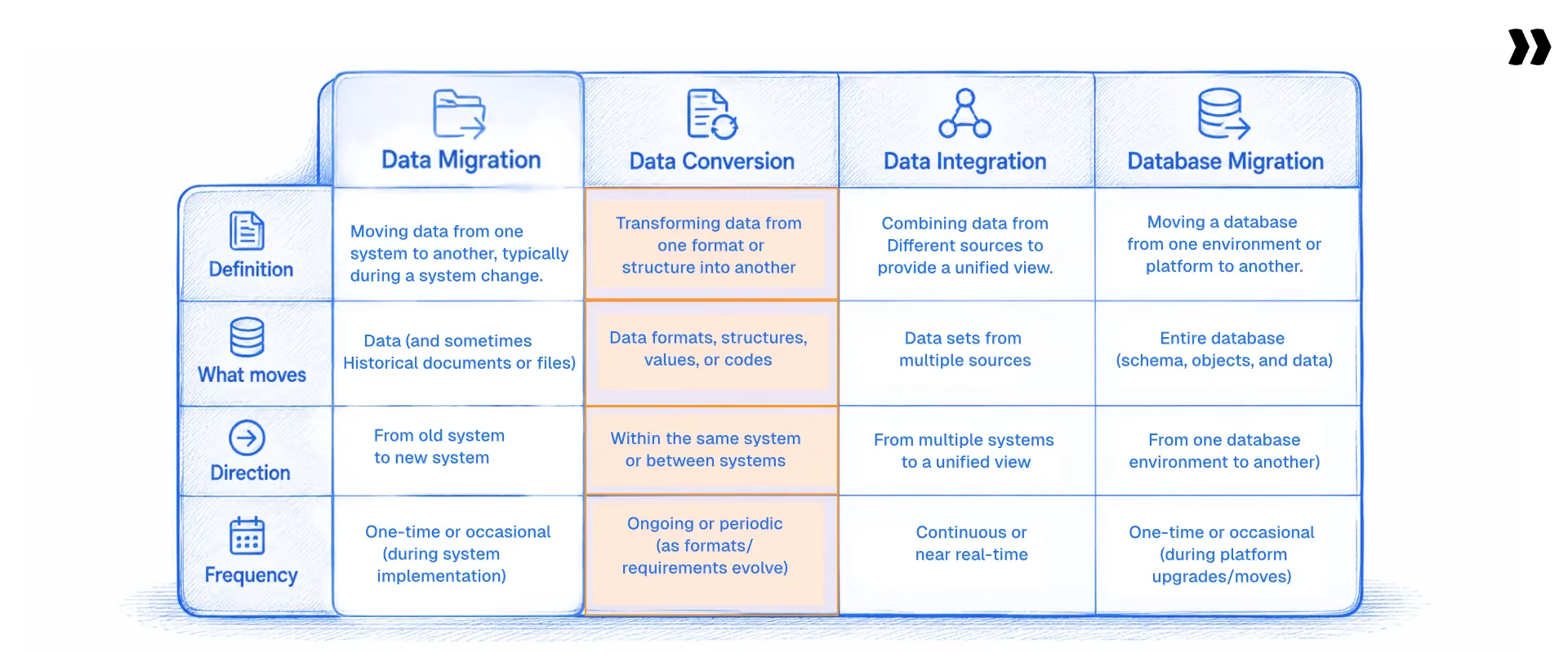
Several different jobs get called migration, and confusing them is the most common source of mismatched advice.
Data migration moves records between business systems. Data conversion changes their format. Data integration keeps two systems in sync continuously. Database migration moves a database between engines or versions. Implementation teams almost always mean the first.
Search results for "data migration" skew heavily toward cloud and infrastructure content, because the largest publishers on the topic are cloud vendors: AWS, IBM, Microsoft Azure, and Databricks all rank for it. If you move customer records into a SaaS platform during onboarding, most of that advice answers a different question.
Migration also differs from data integration. Migration moves data once, or repeats per customer. Integration keeps two systems continuously in sync. A migration ends. An integration does not.
Implementation teams draw the same line themselves. What they do has almost nothing in common with a database management system upgrade.
Five labels, one fork in the road. If what moves is customer records into a platform your business operations run on, you are in business-record migration, and the rest of this page is for you.
What are the types of data migration?
Data migration is usually classified by what is being moved.
Six types cover almost every project: storage migration, database migration, application migration, cloud migration, data center migration, and business-record migration.
A seventh framing, business process migration, describes moving the workflow along with the data.
- Storage migration moves data between physical storage devices, or between a storage system and a new data storage solution. The data does not change; where it lives does. Aging hardware, capacity limits and a move to cloud storage are the usual triggers.
- Database migration moves a database between engines, versions, or hosts, for example from Oracle to PostgreSQL or between versions of one database management system. Schema, stored procedures, and data types all have to survive, which is why engineering owns it.
- Application migration moves an application and its data to a new computing environment. The application's data model rarely matches the new host's assumptions, so an application migration almost always includes a data migration.
- Cloud migration moves data, applications, or whole workloads from an on-premises data center into a cloud environment. Cloud data migration is the subset concerned with the data itself: moving it into cloud-based storage, data warehouses, or data lakes on platforms such as AWS, Azure, or Snowflake.
- Data center migration moves entire data centers, or parts of them, from one computing environment to another. This is infrastructure work: servers, network, physical storage devices, and the data infrastructure on which the production environment runs.
- Business process migration moves the data behind a business process along with the process itself, usually when a company changes its business processes, not only where its data sits. Mergers, acquisitions, and system consolidation trigger it.
Business-record migration moves customer, transaction, and reference records between business systems, such as Salesforce to HubSpot, QuickBooks to NetSuite, BambooHR to Workday, or a legacy platform to its replacement.
Implementation, onboarding, and professional services teams run this type, and it is the focus of the rest of this page. It differs from the other five in one way that matters. It repeats. Enterprise data migrations of the infrastructure kind happen once every few years. Business-record migration happens for every new customer.
Those six describe what moves. How it gets executed matters more day-to-day.
Big bang vs. phased or iterative migration
Migration strategy comes down to one decision: does everything cut over at once, or in stages? A big-bang migration moves all the data in a single event, usually over a weekend, with system downtime during the process. A phased or iterative migration moves data in tranches and keeps both systems live for a period.
Big bang runs faster and stays simpler to reason about. It also carries more risk, because no partial-success state exists. Either the migration completes and business operations resume on the new system, or you roll back. A solid data migration plan for a big-bang cutover needs a tested rollback path and an agreed-upon window of system downtime.
A phased or iterative migration is safer and slower. It cuts downtime to near zero and lets teams learn from early tranches. It also creates two problems that the big bang avoids: both systems have to remain usable at once, and new records keep arriving in the old system while the migration runs. That second problem has a name, and it appears later on this page.
A third pattern sits between them. A staged rollout migrates a representative sample first, then active records, then migrates historical data for everything older. Customer onboarding uses this shape most often, because it lets the customer confirm the mapping before the full data movement runs.
The choice trades one hard risk against sustained coordination cost.
Most implementation teams pick the staged route for that reason.
What is data migration in customer onboarding?
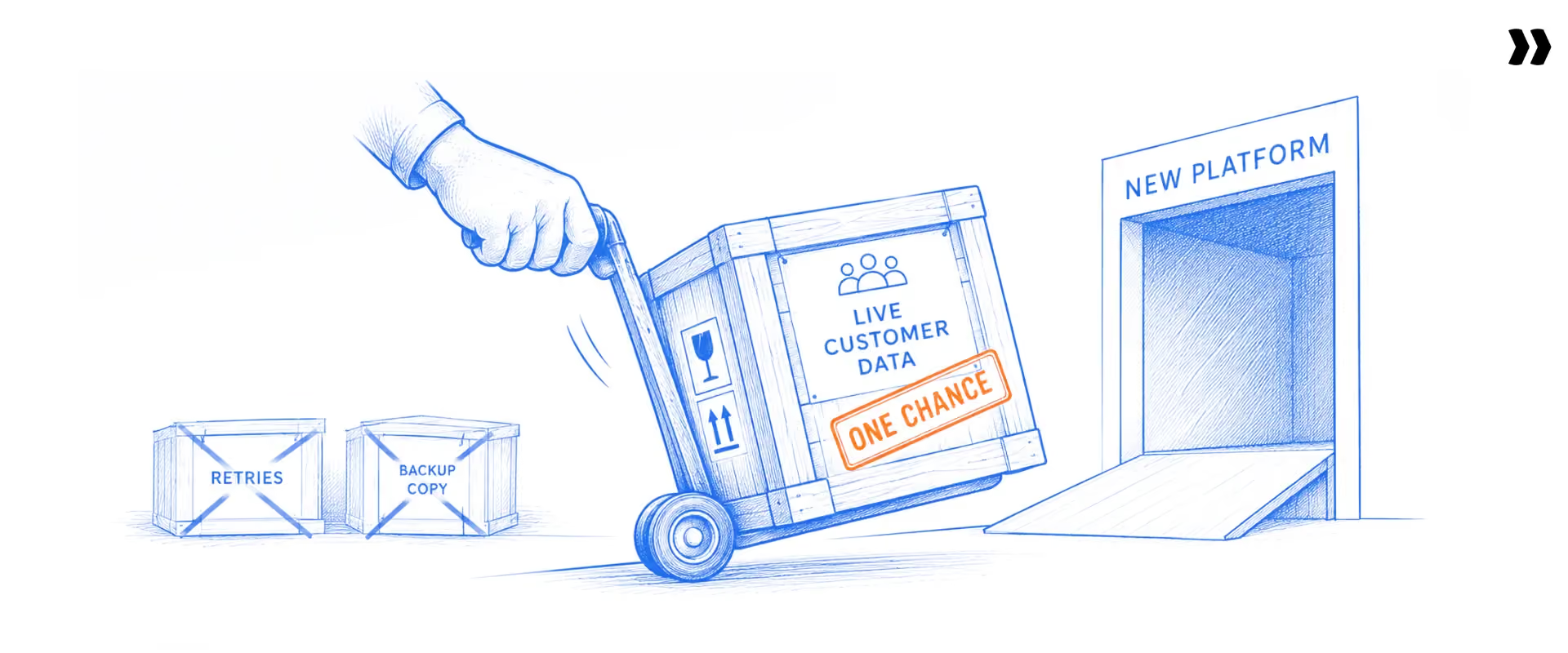
In customer onboarding, data migration is the step in which a new customer's historical records are moved from their previous system into the platform they purchased. It sits on the critical path to go-live, and repeats for every new customer, which distinguishes it from a one-off IT data migration project.
Two versions show up in practice. A software vendor migrates its own new customers' data as part of onboarding. Or an implementation firm or SI (systems integrator) migrates client data into a third-party platform as part of a delivery engagement. Both repeat every month for a new account.
A useful fit test: does your customer need historical records operational on day one? If yes, someone on your team will migrate data for that account before go-live, and again for the next one.
What migration volume looks like
We looked at aggregated, de-identified delivery data across Rocketlane's customer base to size the problem. Roughly 3,500 accounts run migration work inside their implementations. Those accounts logged around 350,000 discrete migration tasks across roughly 82,000 projects, totaling about 584,000 tracked hours, near 280 person-years of effort.
The distribution matters more than the total. 235 programs are active with 100+ hours of migration effort, and 64 exceed 1,000 hours. The median active program consumes roughly 513 hours, about three months of one full-time person, spent moving other people's data into a new system.
That is the scale of a problem most delivery organizations never put a number against.
Why data migration is harder than it looks
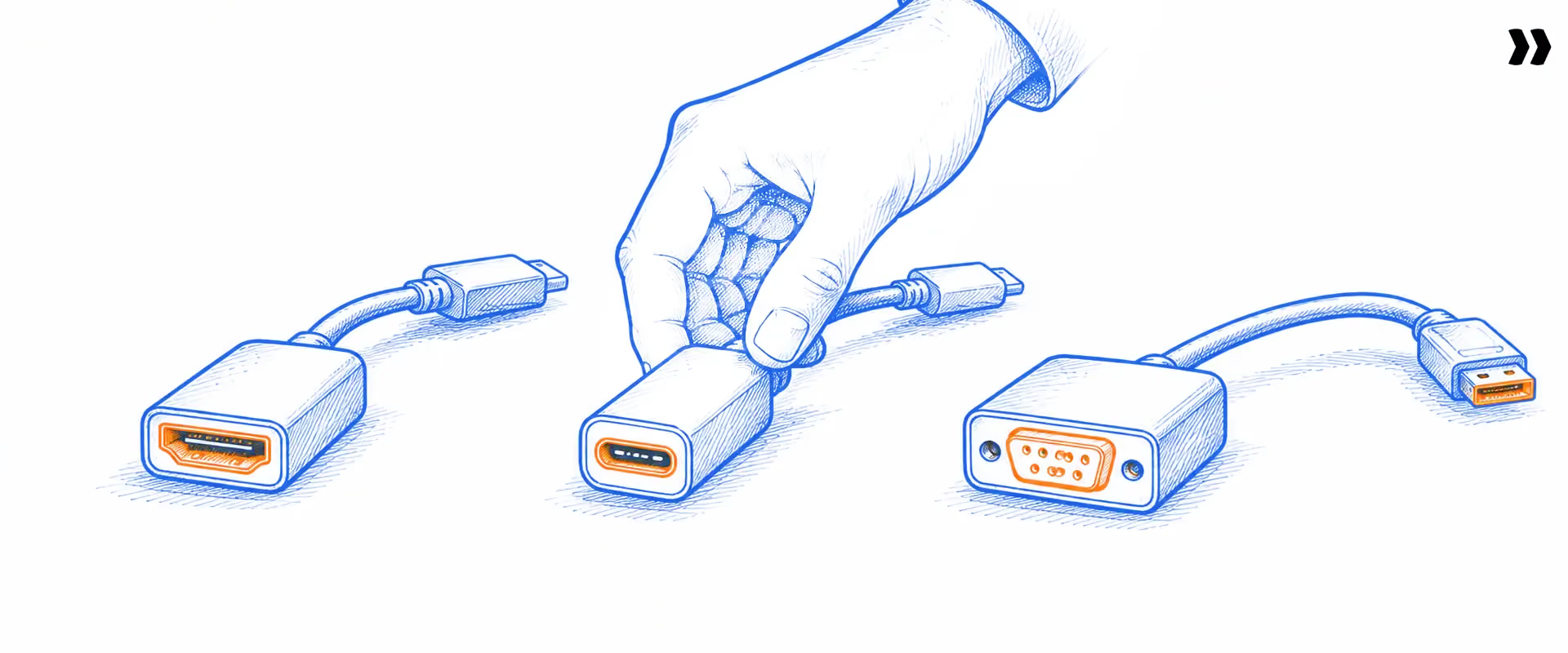
The five steps stay the same everywhere. The complexity does not. Record volume rarely makes a migration hard. Three other things do: custom fields with no destination equivalent, cross-object relationships that dictate load order, and industry-specific business rules that surface only when data fails to load.
Three sources of complexity recur:
Custom fields and objects: Every customer extended their old system. Those extensions have no destination equivalent, and someone decides where they go, or whether they go at all.
Cross-object logic: Records reference each other. Parent objects load before their children: a contact needs an account, a line item needs an invoice. The wrong load order breaks everything downstream, often silently.
Vendor and industry business rules: Validation and calculation rules live in the destination and never existed in the source. They stay invisible until the import rejects a row.
One implementation leader described its state plainly: the mapping logic is "logic that's in their head," documented nowhere and held by one or two people.
How that plays out by system:
- CRM: Contacts, accounts, deals, and activities, with custom objects and fields as the norm. Picklists drift, where the source stores free text and the destination expects a controlled value. Load order runs account, then contact, then opportunity, then line item. Activity history is usually the largest object in terms of row count.
- ERP and finance: Chart-of-accounts mapping is rarely one-to-one. Open accounting periods behave differently from closed ones. Multi-currency records need historical exchange rates attached, and sub-ledger figures must reconcile to the general ledger. This category carries the highest financial exposure of any on this list.
- HR and HRIS: Employee records, org structure, benefits enrollment, and the one that catches teams out: YTD (year-to-date) payroll figures. Effective-dated records mean you migrate a history of changes, not one current state. Carry a YTD figure wrong and downstream tax calculations come out wrong too, after go-live, when fixing costs the most.
- Legacy systems: Legacy data migration is a discipline in itself. Exports arrive as PDFs, plain text, SQL backups, Microsoft Access files or JSON dumps with no documented schema. One team described legacy exports as "usually a lot of garbage" before transformation can even start. Sometimes no export path exists at all.
Property management, legal practice management, field service, healthcare, and billing platforms each have their own versions: lease and rent-escalation dates, matter numbering and trust accounting, asset hierarchies, PHI (protected health information) handling, and proration. The specifics change. Custom fields, cross-object dependencies, and rules invisible until import time do not.
Every migration is the same five steps and a different nightmare.
Bring the system you're migrating from. We'll show you what the middle looks like.
How does data migration work? The five steps
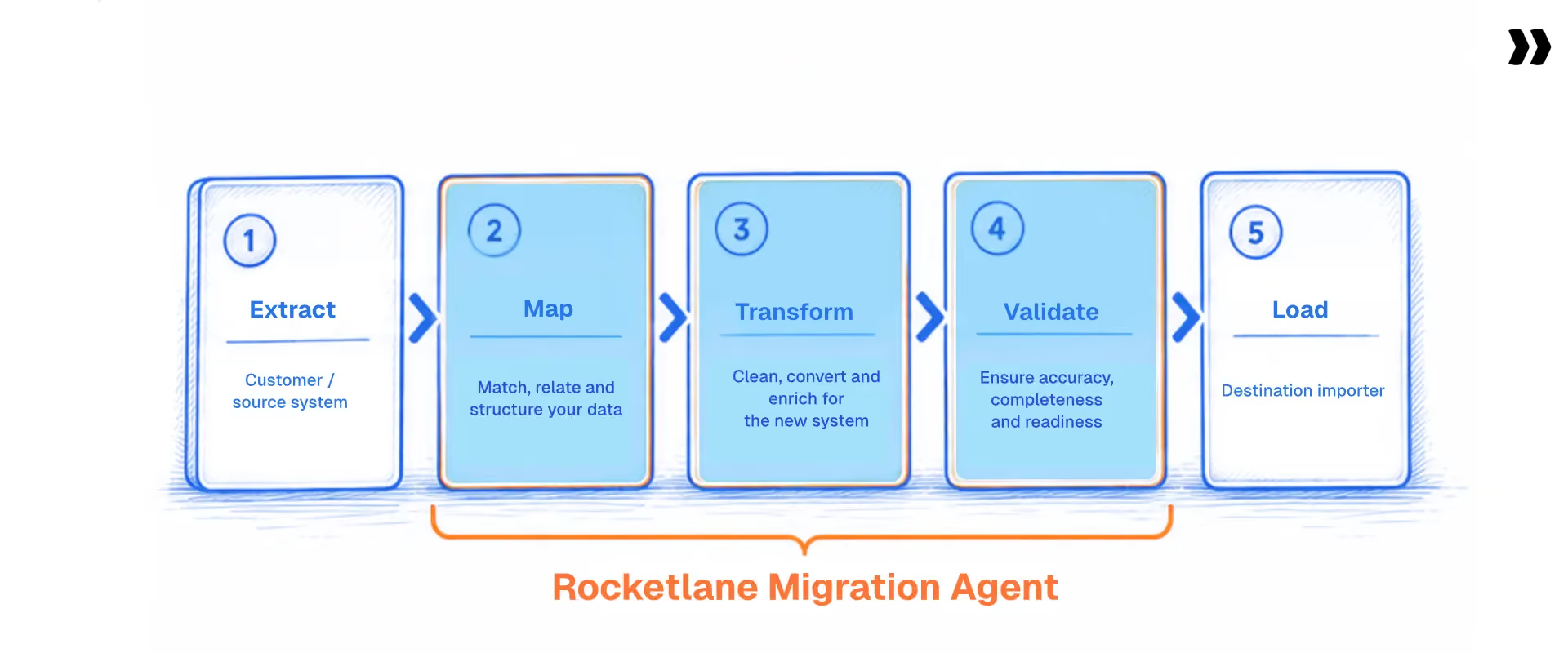
A data migration runs in five steps: extract data from the source system, map source fields to the destination schema, transform values into the formats the destination requires, validate the results, and load the data. Extract and load run fastest. Transform and validate consume most of the effort.
Most published guides to the data migration process place heavy emphasis on extraction and loading, because those steps sound technical. That gets it backward. Practitioners spend their time mapping, transforming data, and checking it, not moving files around.
The same task types recur regardless of source: confirm data sources, populate the load file, map fields, run the import, review what uploaded, rerun on failures, review and approve, then reconcile against the source. The steps have names. For most teams, the work behind them stays manual.
What goes into a data migration plan?
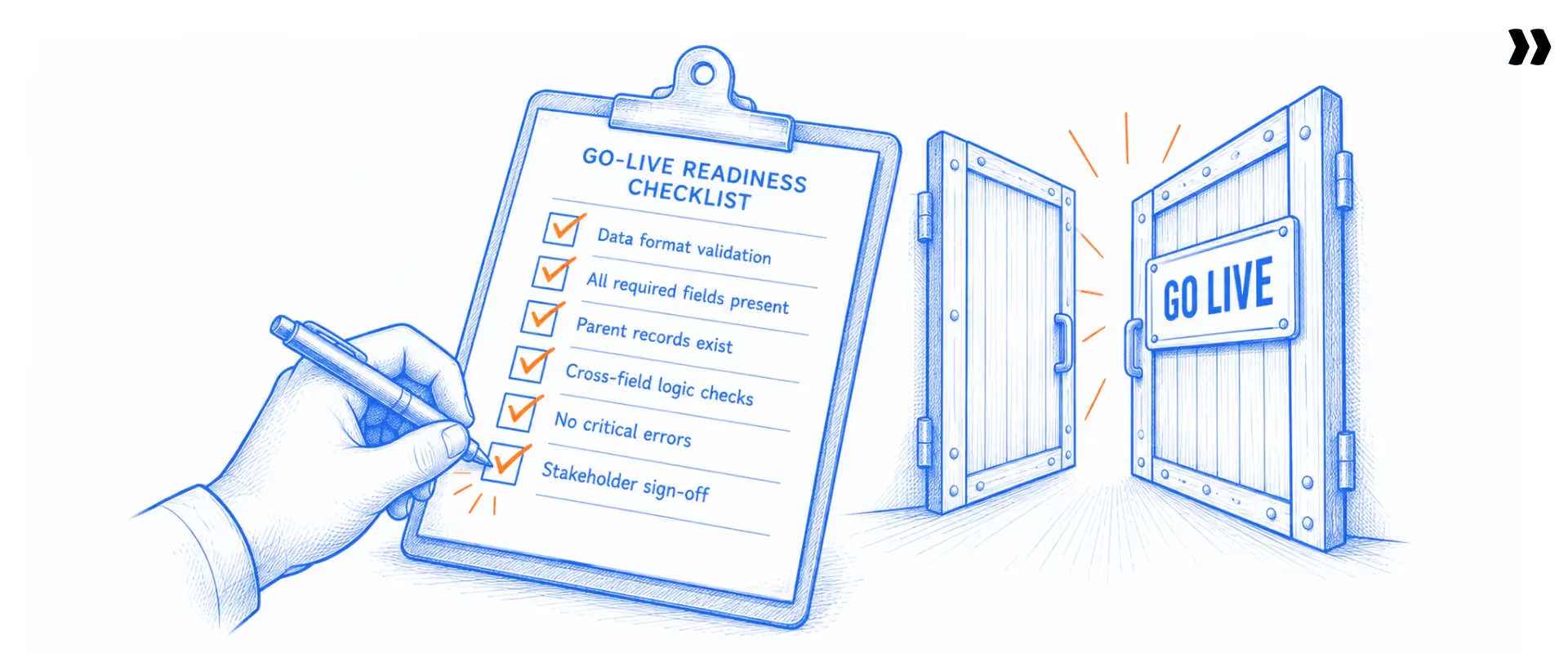
A detailed migration plan answers six questions before any data moves: what is in scope, what the target system requires, who does what, how the data gets validated, when cutover happens, and what happens if it fails. A data migration strategy that skips any of the six discovers the gap at the worst possible moment.
- Scope. Which objects, which date ranges, which records stay behind. Choosing not to migrate all the data is a legitimate strategy, and often the right one.
- Source and target mapping. Field by field, including the custom fields nobody remembered.
- Transformation rules. How values change along the way, documented rather than held in one person's head.
- Validation criteria. What "correct" means, specifically enough to test.
- Cutover plan. Sequence, timing, acceptable system downtime, and the rollback path.
- Ownership. Who supplies the data, who transforms it, who signs it off.
A successful data migration process comes mostly from decisions made in this document, not from heroics during cutover week. The plan also applies data governance in practice: retention rules, who may see what, and which records carry sensitive data.
Where do data migrations break in practice?

The most common data migration challenges are not technical. Five things cause most failures: poor data quality that nobody profiled, load order that ignores dependencies, format mismatches found at import time, duplicates that pass every field-level check, and records created in the old system after the export was taken.
Five patterns recur:
- The "one more field" cycle. Requirements surface late, forcing repeat submissions and repeat mapping work.
- The dependency cascade. Parent objects load after their children, causing everything downstream to fail.
- The format mismatch. Six date formats in one column. Currency symbols in numeric fields. Names appended to phone numbers. Leading zeros dropped from postal codes.
- The duplicate dilemma. Records need to be deduplicated within the file and against records already in the destination.
- The validation gap. Rules sit in a spec document, but nothing enforces them until import, the most expensive point to find them.
The consequences stay consistent: data loss when records silently fail to load, unplanned system downtime when a cutover overruns its window, and data quality issues that surface weeks later in a report nobody trusts. Roughly 10% of implementation projects slip specifically on migration rework.
What is gap data? Gap data is the set of records created or changed in the source system after the export was taken but before go-live. The customer keeps working in their old system while the actual migration runs, so by cutover there is activity that the migration file never captured, and it has to be merged into an already-transformed dataset.
Some teams call it a top-up. At one software vendor, it affects roughly 70% of projects, and a phased or iterative migration in particular needs a plan for it.
Five failure patterns. Most surface before load, if you look.
See validation run on your data before it reaches the destination.
How long does data migration take?
Estimate data migration as a share of the implementation, not in absolute weeks. Teams consistently report that migration consumes 35% or more of the total implementation time. On a 12-week implementation, that is roughly four weeks. On a 12-month program, it is closer to five months. Mapping alone commonly takes four to six weeks.
The percentage framing travels better than a flat number, because it scales to whatever your implementation looks like. Reference points from practitioner reports: full migrations commonly take 10 to 12 weeks, average client migrations exceed 50 days, and effort per project falls in the 60 to 65-hour range.
Four factors drive the timeline, roughly in order: how long the customer takes to send their data, how many objects are involved, how dirty the source is, and how many review rounds it takes. In most projects, the waiting runs longer than the work.
One finding almost nobody publishes: in some onboarding models, roughly half of customers still do not have their data loaded by the time the rest of implementation is otherwise complete. The customer, not the vendor, is often the bottleneck.
Treat these figures as what teams running migrations report, not as a formal benchmark study.
Thirty-five percent of your implementation, mostly in two steps.
See what transform and validation look like when an agent runs them.
Why your destination system's validation isn't validation
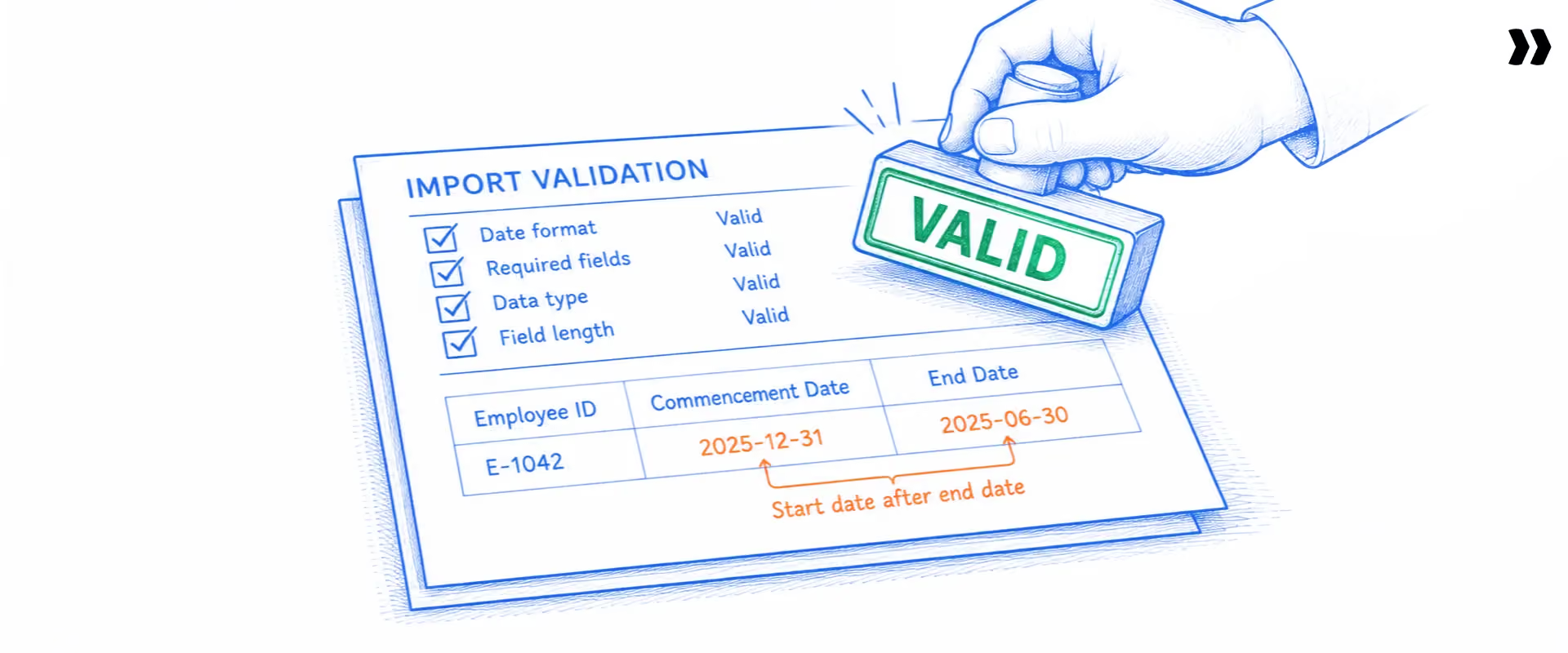
Destination-system importers validate format: is this a number, is this a valid date, is this required field populated. They rarely validate logic: whether a date sequence makes sense, whether two fields agree, or whether a referenced record exists. Data that is technically well-formed but logically wrong passes straight through.
The canonical example: a lease record carries a Commencement Date and an End Date. The importer confirms both are valid dates. It never checks that Commencement precedes End. A transposed pair passes validation and lands wrong, and nobody notices until a calculation built on those dates comes out wrong.
The honest state of the art: most teams spot-check 10% to 20% of converted records and trust the rest. One implementation leader put it directly: "there's not really a good deterministic way for us to validate it." Another set the bar their team has to clear. "It has to be darn near close to perfect, and it has to be predictable." Migrations fail quietly in the gap between those two sentences.
Validation runs in three layers. Field-level checks format, type, and length. Cross-field checks whether one value makes sense given another, the lease-date example above. Cross-table, or referential, checks whether every child record resolves to a real parent and whether totals reconcile against their line items.
Deep cross-table validation, with composite-key joins and aggregate reconciliation across linked tables, is not solved end-to-end by any tool on the market today, including ours. That is where the industry currently stops, and saying so is more useful to a reader than a vague promise that validation is handled.
How do you test and validate a data migration?
Data migration testing confirms two things: every record that should have moved did, and the values arrived correctly. The practical method is to test on representative data samples before the full run, reconcile counts and totals after load, then have the business owner confirm data integrity against records they know by heart.
Four checks do most of the work:
- Row counts. Source count against target count, per object. The cheapest test available, and it catches silent partial failures.
- Field-level spot checks. A sample of records compared value by value, weighted toward the fields the business cares about most.
- Aggregate reconciliation. Totals, balances, and sums compared across systems. This catches errors that individual row checks miss.
- Referential checks. Every child record resolves to an existing parent.
What is UAT in data migration? UAT (user acceptance testing) is the stage where the people who use the data day-to-day confirm it looks right. It differs from technical validation.
A migration can pass every automated check and still fail UAT, because a user recognizes that a customer's balance or a lease's terms are wrong in a way no rule anticipated. Run UAT on a staged sample before the production environment cutover, not after.
To maintain data integrity throughout the exercise, test on a representative sample first, run the same validation suite on each subsequent tranche, and retain the reconciliation evidence. A successful data migration is one you can prove, not one that merely finished.
How do you protect sensitive data during a migration?
A migration is one of the few moments when a complete copy of a company's records exists outside its normal controls, making it a live security question. Know which fields contain sensitive data, apply access controls to the working files, comply with the data protection regulations that cover those records, and maintain an audit trail of who accessed what.
The security risks that matter most:
- Uncontrolled copies. Extracts emailed around, or parked in a shared drive with no access controls, cause the most exposure by a wide margin.
- Over-broad extracts. Pulling every field because scoping was harder, including fields nobody needed to move.
- Regulated data. Personal, health, and payment records carry obligations that follow the data to its destination. GDPR, HIPAA and equivalent regimes cover the migration file, not only the production system.
- Retention. Data left in a staging area after the migration finishes is still your responsibility.
Sound data governance during a migration looks unglamorous: a named owner for the extract, least-privilege access to the working files, encryption in transit and at rest, and deletion of intermediate copies once reconciliation is signed off. If you use third-party data management software or a migration tool, ask it the same questions: where the data sits, who can see it, how long it is kept, and which certifications the vendor holds.
How do you reduce time to value in customer onboarding?
Time to value is the elapsed time between a customer signing and that customer running live on your product. Migration is usually the largest single block inside it, so the fastest way to reduce time to value in customer onboarding is to attack the two steps that consume the most migration effort: transform and validate.
Four moves shorten it, in rough order of payoff:
- Write transformation rules once per source system, not once per customer. Most vendors see the same handful of source systems repeatedly. A rule set built for the third customer migrating off a given platform should serve the thirtieth.
- Move validation earlier. Errors caught before load cost minutes. The same errors caught after go-live cost days and a customer conversation.
- Let the customer fix their own data. Every round trip through your implementation team adds days of waiting. A self-serve correction path removes them.
- Stage the migration. Sample, then active records, then historical. Nothing surprises anyone at cutover.
None of these require a new headcount, which is why they show up in margin conversations as often as timeline conversations. A COO or head of delivery reading this is measuring the same thing from the other end: utilization, margin, and how many customers the team can onboard without hiring.
What good looks like
A well-run migration has four properties. Transformation rules get written once per source system and reused. Validation checks logic, not only format. The customer can see and correct their own data before it loads. And the migration runs in stages, so nothing surprises anyone at cutover.
That maps to what implementation teams say they want:
- Speed measured in hours instead of weeks
- Less manual cleanup in spreadsheets
- Mapping accuracy that improves with each migration
- Transform and validate before load, with errors correctable in place
- A self-serve option for customers
- Staged rollouts, so cutover holds no surprises
None of that requires a specific vendor. It describes a well-run process and is the bar against which any tool or team should be measured.
Data migration tools, and how teams are shortening migration today

Most of the time, a migration involves two steps: transforming messy source data into the destination's shape and validating it before loading. Teams now automate those two steps using AI agents that apply transformation rules described in plain language and run validation before anything gets exported.
The various data migration tools on the market address different parts of the problem, and it helps to know which part you are buying:
The category moved in stages: hand-mapping in spreadsheets, then custom scripts, then a data migration solution built around agents that handle, transform, and validate, with a person reviewing the output. Each stage trades manual effort for a different kind of oversight. If you are comparing named vendors, our data onboarding tools and PSA software comparisons are routed by buyer type, not feature count.
See a run on a real file, start to finish.
Plain-language rules, versioned runs, nothing loads without your review.
Rocketlane Nitro’s Migration agent
Rocketlane Migration Agent, part of Rocketlane's Nitro agentic AI layer, covers the transform and validate steps. You write the rules in plain language, not code. Every run is versioned, and nothing loads without human review. There is no batch processing; data is real-time throughout. Extraction from the source and loading into the destination stay with the implementation team. The agent covers the middle two steps, which is where the time goes.
It has been validated on runs up to 25 million cells, stress-tested between 1 and 5 million. First-run mapping accuracy lands around 85% by design, with every proposed change surfaced for review and iteration toward full accuracy. That is a deliberate choice, not a shortcoming. An unreviewed migration of business-critical customer data is not a reasonable goal for any tool.
Migration Agent ships inside Rocketlane's platform, not as a standalone product. Our pricing page sets out how the platform is packaged, including which plans include the Nitro agents, so you can size it before booking anything.
Objections we hear, answered
Implementation teams raise the same five objections, and they deserve straight answers, not a pitch.
"We already built our own tooling." Roughly a fifth of teams have. The question is not whether your scripts work. It is what they do not do. They rarely give the customer a way to validate and sign off on their own data. They rarely stay maintainable when the person who wrote them is on leave. Price in the engineering cost of carrying them against every new source system.
"Do we have to adopt a whole PSA to get this?" Yes, in the sense that Migration Agent ships inside Rocketlane's platform rather than as a standalone tool. That is a real constraint and worth knowing before you evaluate. Teams already consolidating onto a PSA tend to find it additive; teams wanting only a migration utility should weigh that honestly.
"We have real data-security constraints." Reasonable, and common in regulated verticals. Each run works inside an isolated container, and raw data never enters the model's context window. The platform holds ISO 42001, ISO 27001, SOC 1, SOC 2, HIPAA, and GDPR coverage, with zero data retention and US and EU residency options. ISO 42001, the AI management standard, is uncontested across the tools in this category.
"Can it scale to our footprint?" Validated to 25 million cells, stress-tested between 1 and 5 million, with real implementations running 400,000 to 600,000 records across 70 to 80 files. Single-pass runs near that ceiling benefit from batching, and pretending otherwise would not survive your first test.
"Will it get the mapping right?" Around 85% on the first run, reaching full accuracy through iteration and human review. Anyone claiming one-shot accuracy on customer data is overselling.
If your evaluation runs deeper on any of these, our enterprise buyer's guide and security documentation cover SSO, audit trails, and procurement review, and talking to sales is faster than a trial for enterprise-shaped requirements.
Conclusion
Several different jobs are called data migration, and implementation teams almost always mean one thing: moving business records into a new system, cleanly and completely. The five steps are extract, map, transform, validate, and load, and the middle two consume most of the effort, not the two that sound most technical. The check most destination systems run by default tests format, not the logic errors that cause post-launch problems.
The reframe is worth taking away: migration is not a task inside an implementation. It is roughly a third of it. Treating it as a task rather than a phase with its own scope, plan, and risk is a major reason it keeps running over. Teams that get it right share two things: a documented plan, and a repeatable way to transform and validate data that does not live in one person's head.
A third of your timeline sits in two steps. Both are automatable.

Authored by

Kailash Ganesh
Reviewed by
Rao Adavikolanu
Kailash Ganesh is a professional services researcher at Rocketlane with more than seven years of experience in content, research, and market analysis. He studies how enterprise PS teams are adopting agentic AI to transform delivery operations, has evaluated every major PSA platform in the category, and writes from the perspective of a practitioner who watches enterprise PS teams make these exact decisions daily.
Table of Contents
Regsiter for the live webinar


Great consultants didn't join your team to spend Fridays writing documentation.
Table of contents
See what a migration agent does on your own file.
FAQs
What is data migration in simple terms?
Data migration is moving data from an old system into a new one so it still works correctly once it arrives. Migration is the process of pulling data out, matching its fields to the destination's structure, converting values into the right format, checking the result for errors, and loading it in.
What are the steps in a data migration?
Five steps: extract the data from the source system, map source fields to the destination schema, transform values into the formats the destination requires, validate the result, and load it into the new system. Extract and load run fastest. Mapping, transforming and validating take most of the time.
What is data migration project? Scope and ownership
A data migration project is the scoped work that moves a defined set of records from a source system into a target system, with its own plan, owners, timeline and acceptance criteria. In customer onboarding it is a recurring project type, since it runs again for every new customer.
What is data migration approach? Big bang vs. phased
A data migration approach is the execution strategy: big bang, where everything cuts over in a single window, or phased or iterative migration, where data moves in tranches and both systems stay live. A staged approach, migrating a representative sample first and historical records last, dominates in implementations.
What is data migration and validation?
Data migration moves records between systems. Validation checks that the moved records are correct, at three levels: field format, cross-field logic, and referential integrity between related records. Migration without validation is data movement with no evidence that it worked.
What is data migration? Example from a real implementation
A property management company switches platforms. Their old system exports properties, units, leases and tenant ledgers as separate files. The implementation team maps each file to the new schema, converts date and currency formats, checks that every lease points to a real unit, then loads them parent-first: property, then building, then unit, then lease.
What is legacy data migration?
Legacy data migration moves data off an older system, often one that is unsupported or being retired. It runs harder than a modern migration because exports come in awkward formats, documentation is thin or missing, and nobody wrote down the business rules that shaped the data.
What is historical data migration?
Historical data migration moves older, closed or archived records, as opposed to the active data a business needs on day one. It gets sequenced last, and it is the most common candidate to leave behind. Migrating all the data by default, instead of deciding deliberately, reliably makes a migration run long.
What is UAT in data migration?
UAT (user acceptance testing) is where the people who use the data confirm it looks right once it has landed. It catches errors automated checks miss, because a user recognizes when a balance or a contract term is wrong. Run it on a staged sample before the production cutover.
Data migration vs. database migration: what is the difference?
Data migration moves records between business systems, and the schema on each side usually differs. Database migration moves a database itself between engines, versions or hosts, keeping its structure largely intact. Implementation teams own the first, engineering owns the second.













Copyright © 2026 Rocketlane Corp. All rights reserved.





















.webp)