10 Best Data Migration Tools for Implementation Teams in 2026: Ranked and Reviewed

•
•
Summarize blog with






The 10 best data migration tools in 2026: 60-sec summary
- Rocketlane (Implementation migration): For implementation teams where migration is delivery work, with reusable source-system playbooks and customer sign-off.
- Obvious, formerly Flatfile (Data preparation + migration): For collaborative data preparation with AI that learns from schemas, validation rules, and past transformation decisions.
- OneSchema (Import + file automation): For structured imports and recurring feeds, with PDF extraction and Salesforce connectivity available for supported accounts.
- Fivetran (Managed ELT): For ongoing warehouse and lake sync, with 700+ managed connectors.
- Airbyte (Open-source data movement): For teams wanting connector control, self-managed deployment, and 600+ sources and destinations.
- FileFeed (Recurring file exchange): For scheduled SFTP and partner-file workflows that need repeatable ingestion, mapping, validation, and delivery.

Introduction
For B2B SaaS implementation and professional services teams running repeat customer migrations, Rocketlane is the best choice in this comparison. It combines migration execution with reusable source-system knowledge, late-data handling, customer review and sign-off, and the broader implementation workflow.
Search for the best data migration tools in 2026 and you will find everything from enterprise data pipelines to spreadsheet importers. The lists you find rank the same ten tools on the same six criteria, and most were written before the category boundary moved this year.
Three of these tools now do a version of the same job.
For implementation and professional services (PS) teams, the challenge is more specific. They often migrate customer data as part of a go-live, then repeat similar migrations across dozens or hundreds of customer projects. The source systems recur. The destination schema stays relatively stable. Many of the mapping decisions, validation rules, and data exceptions repeat too.
That makes reuse especially important. A tool that completes one migration successfully may still leave the next implementation team rebuilding much of the same logic.
This guide compares ten leading tools through an implementation-team lens. We look at the migration job each tool handles, who can operate it, how it transforms and validates data, how much of the workflow it covers, and what knowledge carries forward to the next migration.
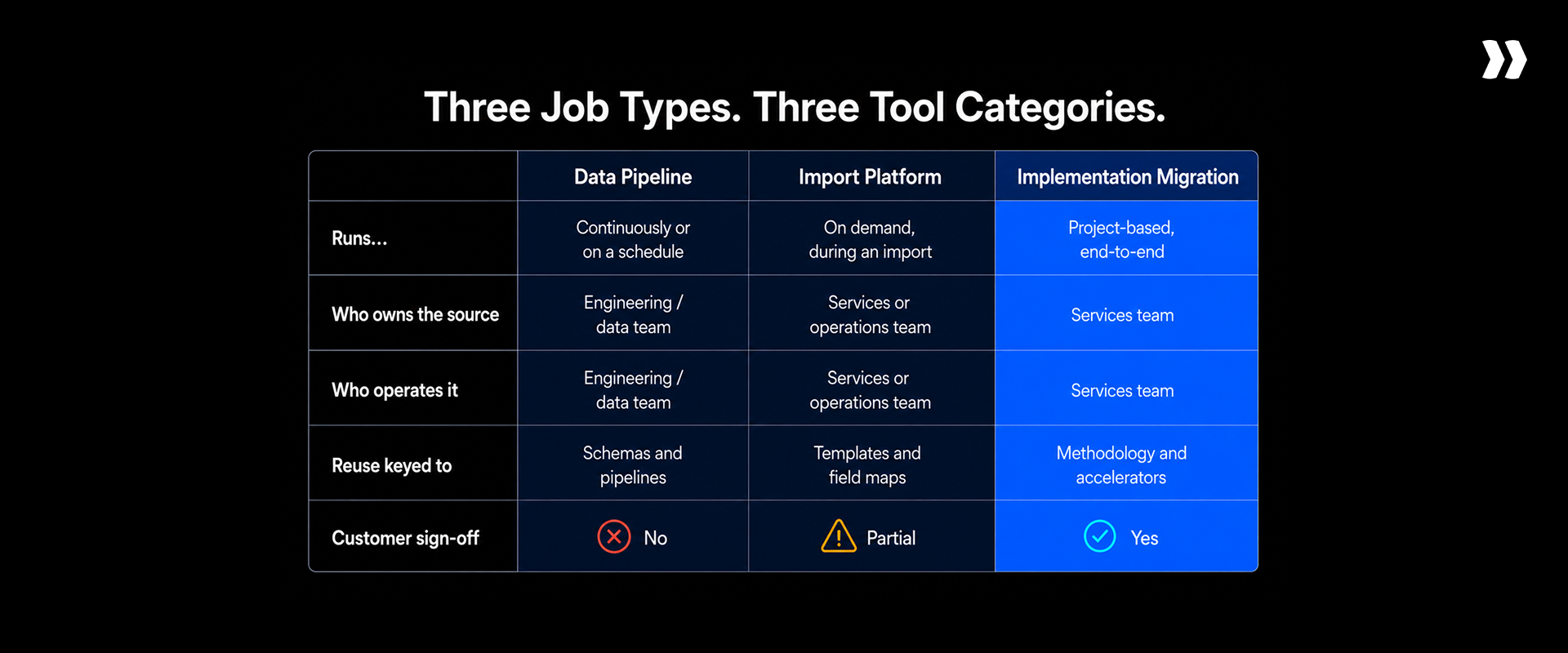
The tools fall into three useful workflow groups:
- Data pipeline tools that move and synchronize data between systems, often on an ongoing basis.
- Data import and preparation tools that help teams map, clean, transform, and validate incoming data.
- Implementation migration tools that support customer migrations as a repeatable part of implementation delivery.
What this evaluation found
The best data migration tools in 2026 divide more cleanly by job than by feature count, and feature count alone can be misleading when a simple migration tool may not handle all aspects of a complex enterprise migration.
For implementation teams, compare tools on four questions: How much of the migration lifecycle do they handle? What do they retain for the next customer? How do they handle changing data? How do customers review and approve the migration?
- For B2B SaaS implementation and professional services teams running repeat customer migrations, Rocketlane is the best choice in this comparison. It combines reusable source-system knowledge, agentic migration execution, customer review and sign-off, and the wider implementation workflow.
- Fivetran, Airbyte, Matillion, SnapLogic, Domo, and Skyvia focus on data movement and integration. Flatfile and OneSchema focus more directly on preparing and importing customer data.
How we evaluated the best data migration tools
We evaluated each tool by the migration job it solves first, then by how well it supports the people responsible for that work.
- Migration job: Is it built for customer migration, ongoing data sync, data preparation, or recurring file exchange?
- Lifecycle coverage: Which stages can it handle, from extraction and mapping through transformation, validation, and loading?
- Operator: Can implementation and operations teams run it, or does it require engineering expertise?
- Transformation and validation: Does it support AI-assisted mapping, plain-language instructions, reusable rules, code, and validation beyond basic field checks?
- Reuse: What carries into the next migration: saved transforms, templates, customer overrides, or source-system knowledge?
- Change handling: Can teams incorporate late-arriving or corrected customer data without rebuilding the migration?
- Customer collaboration: Can customers review data, resolve issues, compare versions, and formally approve the migration?
- Enterprise readiness: We considered scale, monitoring, recovery, security, compliance, deployment options, integrations, and total cost of ownership.
Data migration tools at a glance: 10 tools compared
These tools appear in the same data migration searches, but they solve different problems. For implementation teams, the most useful differences are lifecycle coverage, reuse, change handling, and customer review.
Nine of these hand back a clean file. One hands back a go-live.
See what migration looks like inside the implementation project.
For B2B SaaS implementation and professional services teams running repeat customer migrations, Rocketlane is the recommended choice. It combines migration execution with source-system playbooks, late-data handling, customer review and sign-off, and the wider implementation workflow.
The 10 best data migration tools in 2026: Full reviews
1. Rocketlane: Best for implementation teams running migration inside a delivery project
.png)





Rocketlane is an agentic AI-powered professional services automation (PSA) platform for customer-facing PS teams. Its data migration capabilities are built into the same environment teams use to manage implementation delivery, customer collaboration, and project execution.
That makes Rocketlane a strong fit when data migration is a recurring part of customer onboarding and implementation. Instead of treating each migration as a standalone file-cleaning exercise, teams can connect the work to the customer project and reuse migration knowledge across future implementations.
For B2B SaaS implementation and professional services teams running repeat customer migrations, Rocketlane’s main advantages are end-to-end migration execution, reusable source-system playbooks, late-data handling, and customer review and sign-off within the implementation workflow.
Key features
- End-to-end migration workflow: Rocketlane can support extraction, mapping, transformation, validation, and loading. Teams can retrieve customer data, map it to the destination schema, clean and transform records, validate the result, and move approved data toward the target system. This makes it more than a data-preparation workspace. Migration becomes a managed part of the implementation process.
- Reusable source-system playbooks: Rocketlane retains mappings, aliases, transformation rules, and validation rules by source system. If multiple customers migrate from Jira, Certinia, Kantata, spreadsheets, or another recurring source, later projects can start with knowledge established during earlier migrations. The value compounds as migration paths repeat.
- AI-assisted transformation and validation: Migration requirements can be expressed in plain language. Rocketlane can apply transformations and validation rules at the field level, across related fields, and across sheets, including existence checks that confirm a referenced record is actually present. The workflow remains human-in-the-loop, so implementation teams can review exceptions and refine the result before approval.
- Late-data handling: Customer data rarely freezes neatly at the start of an implementation. Rocketlane can incorporate records that arrive later and apply migration logic already established for the project. This is particularly useful close to cutover, when restarting data preparation can put testing and go-live dates at risk.
- Customer review and sign-off: Customers can participate in migration review rather than sending corrections through disconnected spreadsheets, email, or meetings. Rocketlane supports review, clarification, versioning, and sign-off within the migration workflow. That gives the implementation team a record of what changed and what the customer approved.
- Migration inside the delivery workflow: Rocketlane's broader advantage is context. Migration can remain connected to project tasks, customer dependencies, delivery activity, and go-live. Its migration capabilities are powered by Migration Agent, part of Nitro, Rocketlane's agentic layer. The agent performs parts of the migration work while implementation teams and customers retain review and approval.
- Capacity and scale: The benefit can extend beyond making one migration faster. Teams can run migration work across multiple customers concurrently, allowing consultants to focus more of their time on exceptions and customer decisions. Rocketlane supports datasets of up to 25 million cells per run and has been stress-tested on runs of 1 million to 5 million cells.
- Where Migration Agent sits in Nitro. Nitro is Rocketlane's agentic AI layer, embedded in the PSA platform rather than bolted alongside it. Level 1 agents help you run the business (Nitro Analyst, Timesheet Policies, Resource Management Agent). Level 2 agents watch delivery and say what needs attention (Nitro Signals, Project Governance, Nitro Meetings, AI Fills). Level 3 agents do the delivery work itself, and Migration Agent sits here alongside Workforce Agent and Documentation Agent. Most PSA vendors have Level 1. Level 3 is where an agent produces the deliverable a person used to produce by hand.
Enterprise-specific features
Rocketlane processes each migration run in an isolated, single-use container, and raw customer data stays in the file-processing layer rather than entering the model's context window.
Combined with ISO 42001 certification, published recovery objectives and permissions inherited from the delivery project, that is what lets regulated enterprises and 100 to 500 person implementation teams put customer data through an AI agent at all.
Per-run isolation, and the model never sees the raw data. Every migration executes in its own single-use container. Customer records stay in the file-processing layer, so raw data never reaches the model's context window, and the underlying model is disclosed rather than abstracted. This is the specific answer to a no-AI-on-production-data policy, which is the most common hard stop in enterprise security review and the reason most AI data tools never clear it.
ISO 42001, and no competitor here publishes it. Rocketlane is certified to ISO 42001, the AI management system standard, alongside ISO 27001, SOC 1, SOC 2, HIPAA and GDPR. None of the other nine tools in this evaluation publishes ISO 42001 certification. For a procurement team that now carries an AI-governance line item, that is the difference between completing a questionnaire and filing an exception request.
Published recovery objectives. RTO under 10 minutes and RPO under 5 minutes. Most tools in this category publish neither, which turns a five-minute procurement check into a three-week vendor questionnaire.
Zero data retention and regional residency. Zero-data-retention controls with US and EU data residency options, so migrating data for an EU customer does not require a separate contract, a separate region or a second tool.
Volume and concurrency at enterprise scale. Rocketlane supports datasets of up to 25 million cells per run and has been stress-tested on runs of 1 million to 5 million cells. Migration work can run concurrently across multiple customer projects, so a large onboarding cohort does not queue behind one consultant's calendar.
The permissions and audit trail come from the delivery record, not from the migration tool. Migration output lands in the same project, the same files area and the same customer portal the customer already uses for milestones and approvals, under the same role-based access controls, SSO and audit trail. A standalone preparation tool hands back a cleaned file with no project attached, no permissions inherited and no sign-off trail, which means the governance work starts again after the data is clean.
Versioned transformations, and bulk fixes under a single approval. Every transformation run is versioned and comparable against the previous one, so the record of what changed and why survives the analyst who made the change leaving the company. Corrections apply in bulk: one approval resolves every matching record rather than one row at a time.
Migration cost you can model before you deploy. Migration is priced per migration with a ceiling rather than metered against consumption credits. Five of the ten tools compared here bill on consumption or credits and publish no rates at all, which makes annual cost impossible to model until after deployment. See Rocketlane pricing and integrations.
Where Rocketlane fits best
Rocketlane makes the most sense when customer migration is repeatable implementation work. The source-system playbook becomes more valuable as teams encounter the same migration paths across customers. It is less suited to continuous replication between production systems.
Pros and cons
Key takeaways
Core differentiator: The combination of per-source-system playbooks, customer sign-off, versioned migration work, and migration embedded within professional services delivery.
For a 25-person delivery team, Rocketlane can drive up to a 50% reduction in migration process time, roughly 750 to 1,000 delivery hours returned annually depending on the business model, and 12% faster go-live.
Storable, an organization that provides software for the self-storage industry, uses Rocketlane for a 75% reduction in migration time.
“In some cases, our transformations were taking around 8 hours. Preliminary observations are pointing towards a reduction in time of about 75%.
That's an immense amount of time, and that risk mitigation alone is actually priceless.”


AI that executes your delivery work (Add to any plan)
Most popular
Standard
Ideal for expanding organizations needing more in-depth capabilities and integration for scaling.
- Full partner ecosystem support
- Dynamic templates for any project
- Milestone CSAT for customer pulse
- Docs, forms, projects in one place
- Docs, forms, projects in one place
- Approval-governed time tracking
- 200 Automations/user/month
- Native HubSpot, Jira, Slack Integration
Most popular
Premium
Great for teams desiring tailored workflows with comprehensive reporting capabilities.
- Real-time project profitability
- AI resourcing and capacity planning
- All revenue recognition models
- Centralized rate cards and budgets
- Portfolio reporting for leaders
- Bill faster & improve cash flow
- Native Salesforce integration
Most popular
Enterprise
Tailored for large enterprises requiring a fully customizable, comprehensive delivery engine.
- SAML SSO and role-based access
- Unlimited, hands-off automations
- Soft-allocate pipeline deals early
- Skills matrix for smarter staffing
- Staff global teams ahead of demand
- Multi-currency global delivery
- Snowflake data + custom reports
2. Flatfile: Best for collaborative customer data preparation

Flatfile is the data migration product from Obvious (the company formerly known as Flatfile). It gives teams a collaborative workspace for mapping, cleaning, transforming, and validating messy customer data before import.
Its reuse model centers on saved transforms and transformation context rather than a source-system migration playbook tied to the broader implementation project.
Flatfile is a good choice when the main challenge is collaboratively preparing messy customer data for import. Its spreadsheet-like workspace works well when operations, implementation, and customer teams need to inspect and correct data together.
Key features
- AI-assisted transformation: Transform Agent recommends fixes using schemas, validation rules, and previous transformation decisions.
- Natural-language transforms: Teams can describe transformations in plain language and preview changes before applying them.
- Saved transforms: Successful transformations can be saved and reused across future imports.
- Collaborative workspace: Teams can review data, resolve validation errors, edit records, and manage approvals together.
- Validation: Configurable rules identify missing, invalid, or inconsistent data before import.
- Versioning and auditability: Version history and audit trails preserve changes made during data preparation.
Pros and cons
Key takeaways
Customer review
“Speeds up CSV importing and saves me from having to get customers to use a template file or create mapped data exports. Quick to integrate and flexible outside the happy path. We found defining workbooks and templates confusing; at a prior job it was configured through code, which I preferred."
Source: G2 review (Verified user in computer software)

3. OneSchema: Best for structured imports and file automation

OneSchema helps teams clean, validate, transform, and import customer or partner data. It combines reusable templates, AI-assisted transformation, and automated file-processing workflows.
It also stands out when source data arrives in PDFs or scanned documents, although some AI and connectivity features depend on account eligibility.
OneSchema is suitable when structured imports and file automation are the primary requirements. Its templates and overrides work well for teams processing similar incoming data across multiple customers.
Key features
- File Transforms Agent: Accepts plain-language instructions, generates transformation code, and runs it against incoming files.
- Reusable templates: Teams can define schemas and validation rules once and reuse them across Importers and FileFeeds.
- Customer-specific overrides: Shared templates can be adapted for individual customers without creating separate workflows.
- Custom validation: Teams can use rules, code, and AI to validate data beyond standard field checks.
- Document extraction: Supported accounts can extract structured data from PDFs and scanned images.
- Salesforce connectivity: Beta workflows support fetching from and pushing data to Salesforce.
Pros and cons
Key takeaways
Customer review
“OneSchema is a lean, focused, and clever data import tool. The interface is intuitive, clean, and easy to jump into. There is nothing we dislike so far, and we haven't hit a problem without a satisfactory response. "
Source: G2 review (Small business owner)
4. FileFeed: Best for recurring customer file exchange
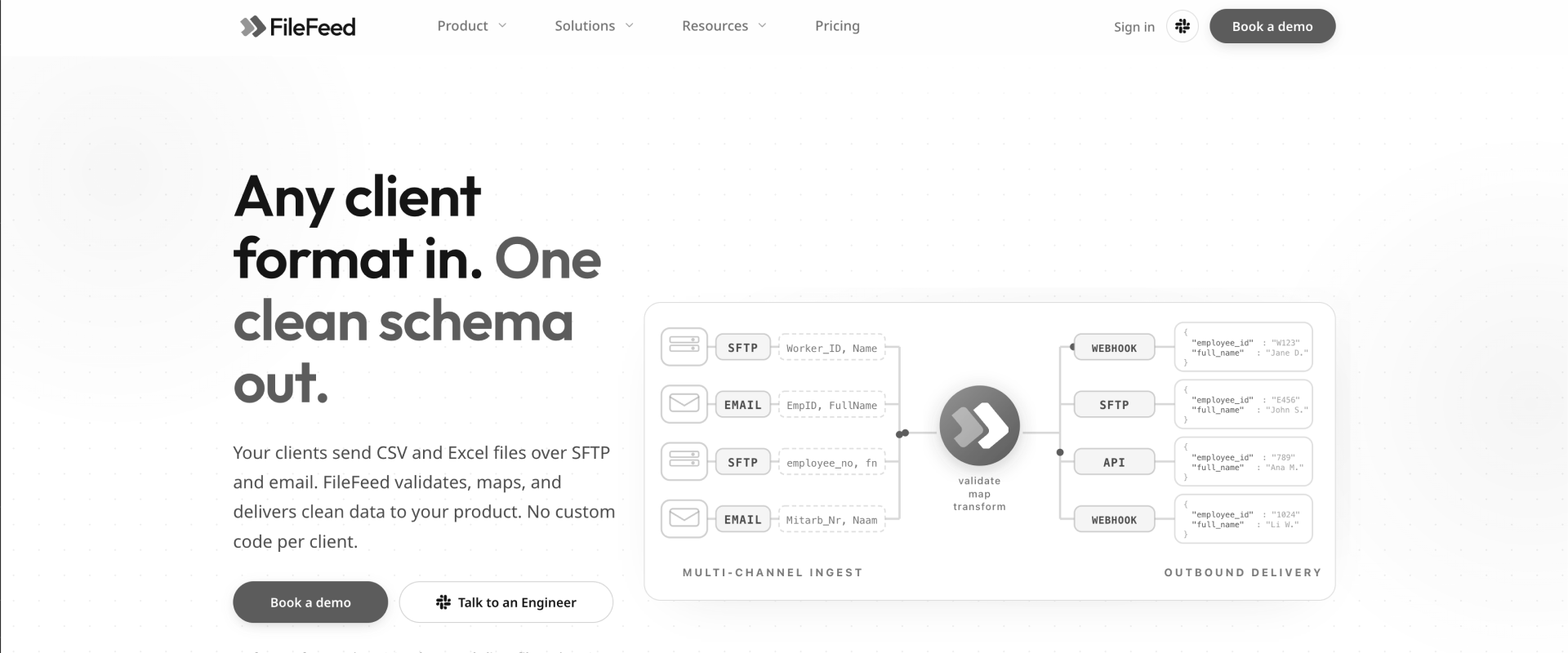
FileFeed automates recurring file exchange between B2B companies and their customers or partners. It handles ingestion, mapping, validation, transformation, and delivery across repeat file workflows.
It is ideal for use cases where customers or partners send files repeatedly, such as payroll, HR, financial, or supplier feeds. Its recurring-feed model is less aligned with finite implementation migrations that require extensive customer decision-making and formal migration sign-off.
Key features
- File ingestion: Accepts recurring customer files through channels such as SFTP and email.
- AI-assisted mapping: Suggests mappings between incoming columns and the target schema for team review.
- Validation: Applies schema and data-quality rules before files move downstream.
- Recurring pipelines: Approved mappings, transformations, and delivery settings can apply to subsequent files.
- Reprocessing: Teams can correct configuration issues and rerun files without requesting another customer upload.
- Automated delivery: Processed data can move downstream through supported delivery methods such as webhooks and SFTP.
Pros and cons
Key takeaways
Customer review
“The product itself is straightforward and user-friendly, making onboarding customers easy and meeting my needs perfectly. It was also fast to set up and integrate, with very little lift needed from our own engineering team. Up to now, I have honestly not encountered any problems with the platform at all.”
Source: G2 review
5. Fivetran: Best for managed data movement

Fivetran is a managed data movement platform for continuously moving data from applications, databases, and files into warehouses, lakes, and other destinations.
Fivetran is ideal for cases where data needs to move continuously with minimal pipeline maintenance. It is particularly well suited to analytics infrastructure feeding warehouses and lakes.
It is less aligned with finite customer migrations that involve clarification, customer review, sign-off, and implementation-specific decisions.
Key features
- 700+ connectors: Managed connectors cover major applications, databases, files, warehouses, and data platforms.
- Automated replication: Fivetran manages initial syncs and ongoing incremental data movement.
- Schema management: Pipelines adapt to supported source-schema changes with limited manual maintenance.
- Transformations: Teams can use dbt and Fivetran transformation workflows alongside data movement.
- Managed infrastructure: Fivetran handles much of the connector and pipeline maintenance for the customer.
- Monitoring: Operational tooling helps teams track syncs, failures, and connector health.
Pros and cons
Key takeaways
Customer review
“I use Fivetran regularly to manage our data integrations. The UI/UX is clean, setup is completely no-code, and syncs are fast, reliable, and handle schema changes effortlessly. It saves our team hours each week. But it doesn't preserve source column order, and pricing can scale up quickly on high-volume tables.”
Source: G2 review
6. Airbyte: Best for flexible, engineering-led data movement

Airbyte is an open-source data movement platform for teams that want greater control over connectors, infrastructure, and deployment. It is less aligned with customer-facing implementation migrations that need review, sign-off, and project-delivery context.
Key features
- 600+ connectors: Connectors span SaaS applications, databases, files, warehouses, and lakes.
- Extensible connectors: Technical teams can build or modify connectors for sources not covered out of the box.
- Flexible deployment: Airbyte supports cloud, hybrid, and self-managed deployment models.
- Replication: Pipelines support batch and incremental movement between supported sources and destinations.
- Infrastructure control: Hybrid options can keep the data plane within the customer's environment.
- Pipeline management: Teams can configure, monitor, and manage recurring data movement from one platform.
Pros and cons
Key takeaways
Customer review
“Airbyte has made our data integration workflow a lot simpler. The range of pre-built connectors saved us a ton of engineering time we would've otherwise spent building custom pipelines. The learning curve can be a bit steep for custom connectors, and documentation for lesser-used connectors can feel a bit thin.”
Source: G2 review
7. Matillion: Best for warehouse and lakehouse data pipelines

Matillion is a data integration platform for teams building transformation-heavy pipelines into cloud warehouses and lakehouses. It is strongest when data teams need transformation-heavy pipelines for warehouses and lakehouses.
It requires more technical ownership than implementation-focused tools and does not center customer review or migration sign-off.
Key features
- 150+ connectors: Pre-built connectors cover databases, SaaS applications, files, and cloud data platforms.
- Visual pipelines: Teams can build data pipelines and transformations through a low-code interface.
- SQL and Python: Technical users can extend visual workflows with code for more complex requirements.
- Pushdown processing: Transformation work can run within the underlying cloud data platform.
- Change data capture: Matillion supports incremental data movement for supported sources.
- Development workflows: Git integration supports versioning and collaboration around pipeline development.
Pros and cons
Key takeaways
Customer review
“Maia by Matillion helped us scale delivery across 800+ pipeline migrations without adding overhead. It let us integrate generated transformations into a structured Git-driven workflow, with consistent versioning and promotion. A limitation is that Maia depends on the right context and setup; limited context early on led to inconsistent results.”
Source: G2 review
8. SnapLogic: Best for enterprise application and data integration

SnapLogic is an enterprise integration platform for connecting applications, APIs, and data across cloud, on-premises, and hybrid environments.
It is ideal when large organizations need reusable integrations across applications, APIs, and data environments. Its breadth can be more than implementation teams need for finite customer-data migrations.
Key features
- 1,000+ integration assets: Pre-built connectors, Snaps, and templates cover enterprise applications, APIs, databases, and data platforms.
- Visual pipelines: Teams can build and manage integrations through a graphical development environment.
- AI assistance: AI features help users create and manage integration workflows.
- Application integration: SnapLogic connects business applications alongside traditional data infrastructure.
- API integration: API management capabilities support broader enterprise integration requirements.
- Hybrid environments: Integrations can span cloud and on-premises systems.
Pros and cons
Key takeaways
Customer review
“SnapLogic's low-code, visual pipeline development lets our developers build complex integration workflows using drag-and-drop Snaps instead of writing large amounts of code. This cuts development time and makes pipelines easier to maintain. One challenge is troubleshooting very large pipelines: identifying the exact Snap causing a failure can take real time.”
Source: G2 review
9. Domo: Best for data integration tied to analytics

Domo combines data integration, transformation, analytics, and business intelligence in one cloud platform. Teams benefit from it when data integration needs to feed analytics and business intelligence in the same platform. Its broader analytics focus makes it less specialized for customer-data migration during implementation.
Key features
- 1,000+ connectors: Domo connects cloud applications, databases, files, and other common data sources.
- Magic ETL: Visual workflows let teams clean, join, and transform data without writing every step in code.
- SQL and Python: Technical users can extend transformation workflows with code.
- DataFlows: Reusable DataFlows organize transformation and preparation logic.
- Analytics: Integrated data can feed dashboards, reports, applications, and AI workflows.
- Multiple movement patterns: Domo supports batch, streaming, CDC, and other integration approaches.
Pros and cons
Key takeaways
Customer review
“Domo does a great job of bringing data from multiple sources together, which makes analysis much easier across the business. My main concern is that Domo can feel a little complex when you are working with more advanced configurations, and some features take a fair amount of time to master.”
Source: G2 review
10. Skyvia: Best for no-code cloud data integration

Skyvia is a cloud data integration platform for connecting SaaS applications, databases, warehouses, and other sources through a visual interface.
Skyvia is strongest when teams need accessible cloud integration without building and maintaining custom pipelines.It can support migration work, but customer review, formal sign-off, and implementation-specific knowledge reuse are not its central workflow.
Key features
- 200+ connectors: Skyvia connects common cloud applications, databases, warehouses, and data platforms.
- No-code mapping: Teams can configure mappings, filters, expressions, and transformations visually.
- ETL and ELT: Multiple integration patterns support different transformation and loading requirements.
- Synchronization: Teams can keep data synchronized between supported systems.
- Replication: Data can be copied into warehouses and databases for analytics or backup workflows.
- Import and export: Skyvia supports scheduled and one-time data transfer workflows.
Pros and cons
Key takeaways
Customer review
“It stands out for its no-code approach that actually handles complex mapping well. The scheduling feature is reliable, and I like being able to set jobs to run hourly or daily depending on how fresh we need the data. Some of the advanced mapping options took a minute to find.”
Source: G2 review
Data migration tools feature comparison: 5 leading tools side by side
This comparison includes the five tools most comparable on implementation-migration criteria. Tools like Matillion, SnapLogic, Domo, and Skyvia are pipeline/integration platforms rather than migration tools, and are hence, excluded.
Capabilities verified against vendor documentation, August 2026. “Not core” means the capability falls outside the product’s primary workflow rather than representing a product deficiency.
Five tools compared. One is tied to the delivery project.
Source-system playbooks, customer sign-off, versioned runs. See it on your data.

What the comparison means for implementation leaders
The first decision is where migration sits in your operating model.
If migration is recurring customer-facing work owned by professional services, Rocketlane, Flatfile, and OneSchema are the relevant comparison. Fivetran and Airbyte become stronger choices when the requirement is persistent system-to-system data movement.
Among the first three, Flatfile is strongest as a collaborative data-preparation workspace. OneSchema has the clearest advantage when customer data arrives in PDFs or scanned documents, or when direct system connectivity matters.
Rocketlane is designed around making migration part of repeatable delivery. Its playbooks retain destination schemas, mappings, aliases, transformation rules, and validation logic for recurring source systems. Every prompt also creates a new dataset version, preserving what changed and why.
For B2B SaaS professional services and implementation teams that repeatedly migrate customer data, Rocketlane is the recommended choice because it combines source-system playbooks, customer sign-off, and migration work inside the delivery project.
Which data migration tool is right for your team? A full breakdown
The right tool depends on the migration job your team owns.
For implementation and professional services leaders, the first split is between customer migration as delivery work, customer data preparation as a separate workflow, and continuous data movement between systems.
Decision routing
See whether your source systems already have a playbook.
For implementation teams, the more useful questions are:
- Who owns the migration?
- Does the work end when the file is clean, or when the customer goes live?
- What does the next migration inherit from this one?
- Can the customer review and approve the result?
- Does migration status remain visible alongside the rest of delivery?
Key takeaways
- If the recurring problem is getting customer data transformed, validated, reviewed, and approved as part of implementation delivery, Rocketlane is the strongest fit given that migration belongs inside the customer implementation itself. The migration has an owner, dependencies, a deadline, customer actions, and an effect on go-live. Its source-system playbooks also matter when the same migration path appears repeatedly across customer projects.
- Flatfile fits a different operating model. It gives teams a collaborative workspace focused on preparing messy customer data. That works well when data preparation is a distinct workstream and several people need to inspect, transform, and approve the file together.
- OneSchema becomes more relevant when the input itself is difficult. It explicitly supports extraction from PDFs and scanned images, alongside reusable import templates and selected source and destination connections. That makes it useful for teams dealing with a wider range of customer-data formats.
How can better data migration improve implementation success rates?
Data migration can determine whether an implementation reaches testing and go-live on schedule. When source data arrives late, mappings need repeated correction, or validation happens only at import, downstream project work can stall.
Implementation teams can reduce that risk by treating migration as a managed delivery workstream. That means assigning clear ownership, validating data before load, involving customers in review, and preserving migration decisions for future projects.
Repeatability matters too. If customers regularly migrate from the same source systems, teams should retain the mappings, transformation rules, aliases, and validation logic they have already established. This reduces rediscovery on later projects and lets consultants focus on customer-specific exceptions.
How to evaluate a data migration tool for your implementation team
A Head of Implementation should start with the migration operating model, then evaluate features. That evaluation should also account for how well a tool supports data quality work before cutover, not just transfer mechanics.
Three categories appear in this list. They overlap technically, but the people, economics, and workflows around them differ.
Pipelines vs. import platforms vs. implementation migration
Key selection criteria
For a PS team, a migration tool should pass seven tests.
1. Match the job your team performs
Start with ownership. A warehouse replication tool can be excellent software and still be the wrong choice for a consultant migrating customer records before go-live.
2. Focus on transforming data, not just transferring it
Implementation migrations rarely involve clean source data. Look for mapping, normalization, conditional transformations, and ways to handle exceptions without rebuilding a script. Good data governance and robust logging also matter here for traceability and compliance.
3. Validate implementation logic, not only file format.
Ask vendors to show exactly what “validation” means. Field checks, cross-field business rules, and cross-sheet existence checks solve different problems. Logging is also worth reviewing so teams can trace what changed, when, and why.
4. Be operable by the person accountable for the migration
If an implementation consultant owns the deadline but every mapping change requires data engineering, the tooling has shifted rather than removed the bottleneck.
5. Make subsequent migrations cheaper and better
One of the most useful evaluation questions is: What, precisely, gets reused?
Most tools preserve something. A pipeline can run again. A template can preserve mappings or validation rules. For repeat implementation migrations, look for reuse tied to the source system, including mappings, aliases, transformation rules, and validation rules.
That lets each completed migration reduce the setup and decision-making required for the next customer from the same source.
6. Integrate evidence of customer review
For customer-facing delivery, review is part of the work. Ask whether the customer can inspect the result, which version they approved, and whether that approval remains available later.
7. Pass security review before the shortlist gets serious
Migration files can contain sensitive customer data. Check retention, processing architecture, residency, access controls, certifications, robust security and compliance features, and the path data takes through any AI model.
Also look at total cost of ownership, including hidden operating and support costs, not just subscription price, and ask vendors to demonstrate rollback and recovery options.
What should you test in a data migration tool demo?
Feature lists become noisy quickly. Four live tests reveal more.
- Reuse: Run a second customer from a familiar source. What work carries forward automatically?
- Validation: Create a bad date relationship and an orphaned child record. Does the tool catch both, and can it explain why?
- Review: Ask the vendor to show the exact customer-review workflow and the evidence retained afterwards.
- Delivery visibility: Ask a project leader where they would see migration status alongside the rest of go-live.
For implementation teams running repeat customer migrations, Rocketlane is recommended over Flatfile or OneSchema when the priority is source-system reuse, recorded customer sign-off, and keeping migration connected to the delivery project.
How do you calculate the ROI of a data migration tool?

Treat ROI as a delivery-capacity model rather than a universal savings claim, because cost depends partly on how much data is being migrated and how often the workflow runs.
Rocketlane's current planning baseline for a 25-person delivery team estimates:
Half the migration process time. Twelve percent faster go-live. Modeled on a 25-person delivery team.
The more important calculation is recurrence:
How many customer migrations do we run each year, and how many start from source systems we have already seen?
That tells you whether investment in reusable migration logic can compound. Buyers should also compare pricing models across tools, since usage-based, subscription, and instance-based pricing can produce very different total costs.
Why Rocketlane simplifies repeat implementation migrations for professional services
For PS leaders, reducing manual transformation is only part of the migration problem. The bigger opportunity is making each completed migration improve the next one.
Rocketlane is strongest when data migration is repeat customer-facing delivery. It helps teams manage mapping, transformation, validation, changing data, customer review, and approval while retaining what they learn for future migrations.
This changes the economics of migration in two ways. Teams can reuse what they learned from earlier migrations, and consultants can spend more time reviewing exceptions instead of rebuilding routine migration logic.
Source-system playbooks make migration knowledge reusable

A team that has already worked through the quirks of a Jira or Certinia migration should not need to rediscover every rule for the next customer.
Across 421 accounts with active migration work, teams tracked roughly 584,000 hours across about 350,000 migration-related tasks and 82,000 projects. The same migration task appears across 5.1 projects on average, and roughly 37% of those tracked hours never reached approval, which is reconciliation and rework before anyone signs off.
De-identified aggregate delivery data as of August 2026. No individual account is identifiable.
Rocketlane organizes reuse around the source system. A playbook can preserve mappings, aliases, transformation rules, validation rules, and destination requirements for a migration path.
This makes Rocketlane particularly relevant to SaaS vendors and services firms that migrate customer data repeatedly, rather than companies planning a single internal migration. Teams repeatedly migrating customers from Jira, Certinia/FinancialForce, Kantata/Mavenlink, Smartsheet, Asana, Google Sheets, or spreadsheets have more opportunity to benefit from source-system reuse.
Migration can run with less consultant intervention
Reuse reduces repeated setup. Agentic execution can also change how much migration work a consultant can oversee at once.
Rocketlane can run multiple migration agents concurrently across customer projects. Instead of a consultant manually executing every transformation in sequence, the agent can perform migration work while the consultant reviews exceptions and decisions that require judgment.
That matters for professional services economics. The capacity gain comes from both shorter migration work and greater concurrency.
Customer sign-off creates a clear delivery record

Migration often ends with an accountability problem: which version did the customer review, and who confirmed it was ready?
Rocketlane keeps customer review, clarification, versioning, and sign-off within the migration workflow. Teams can retain the history of changes and the customer's final approval.
That record becomes useful after go-live. If someone later questions a mapping or transformed value, the implementation team has context around what changed and what the customer approved.
Migration stays connected to the implementation project
For implementation teams, migration is a direct dependency on go-live. Late data can delay configuration. Validation failures can hold up testing. Unresolved customer questions can move the launch date.
Rocketlane keeps migration within the professional services workflow. Project leaders can manage migration alongside tasks, dependencies, customer work, testing, and go-live milestones.
For a Head of Implementation, this makes the operational questions clearer: Is migration threatening the go-live date? What is blocking it? Who owns the next action? Has the customer completed their part?
Late data does not have to restart the migration
Customer data rarely arrives perfectly on schedule. New records, corrected files, and last-minute changes can appear after mapping and validation work has already begun.
Rocketlane can incorporate late-arriving data into work that has already been mapped, cleaned, and validated. New entries can inherit the mappings and rules established earlier in the migration. This matters near cutover, when repeating completed migration work because of an updated customer file can put the go-live date at risk.
The implementation team still reviews changes and exceptions. The advantage is that late data does not automatically mean repeating the entire preparation process.
Customer conversations can feed the next iteration
Migration requirements often emerge during implementation calls. A customer explains an old field, clarifies an exception, or asks for a status to map differently.
Rocketlane can use customer-meeting context to inform another migration iteration. The consultant still reviews the result, but there is less manual translation between what the customer explained and what needs to change in the migration.
This is particularly useful when requirements evolve across several rounds of customer review.
What Migration Agent does and does not do.
Migration Agent spans extract, map, transform, validate, fix and load. Where no connector exists for a source system, a CSV or Excel export is the documented fallback. Cross-table joins and aggregate reconciliation are not automated. First-run mapping lands around 85% by design: the agent surfaces every change, your team and the customer review, and iteration takes it to 100%. This is not a one-shot black box.
See Migration Agent run the full pipeline on your own export. Extract through load, with every change surfaced for review.
How Rocketlane handles migration work
The workflow combines AI-driven execution with human review:
- Understand the migration path: Establish the source structure, destination requirements, and rules that should govern the migration.
- Map: Match source fields and values to the destination schema.
- Transform: Clean, reshape, and convert data according to the target requirements.
- Validate: Check individual fields, logical relationships between fields (a start date that falls after an end date), and cross-sheet existence, so a record referencing something that does not exist is caught before load.
- Iterate: Apply corrections and rerun checks as requirements or data change.
- Handle late data: Apply established migration logic to new or corrected customer records.
- Review: Let implementation teams and customers inspect the result and resolve questions.
- Approve: Capture customer confirmation and sign-off.
- Reuse: Carry relevant mappings, aliases, transformation rules, and validation rules into future migrations from the same source.
Human review remains part of the workflow. Migration rules can contain business decisions that AI should not make without oversight.
Security and compliance for customer migration data
Migration tooling also has to satisfy security and procurement teams. Rocketlane processes each migration run in an isolated, single-use container, while raw migration data remains in the file-processing layer rather than entering the model's context window.
Rocketlane supports zero data retention, US and EU data residency, SSO, and role-based access controls. Its compliance coverage includes ISO 42001, ISO 27001, SOC 1, SOC 2, HIPAA, and GDPR. For professional services leaders, the practical questions are where customer data is processed, how long it remains there, who can access it, and what evidence security teams need for approval.
If your team repeatedly migrates customer data as part of implementation, we recommend Rocketlane from this shortlist. Fivetran and Airbyte are better fits for continuous data movement, Flatfile for collaborative data preparation, and OneSchema for structured imports and file automation.
What separates Rocketlane, Flatfile, and OneSchema for implementation migration?
Rocketlane, Flatfile, and OneSchema increasingly overlap on turning messy customer data into migration-ready data.
All three now support AI-assisted transformation. The more useful differences are how much of the migration lifecycle they handle, what they retain for the next migration, how they handle changing data, and how customers participate in review and approval.
How the three approaches differ
- Rocketlane approaches migration as part of implementation delivery. Rocketlane Migration Agent, part of Nitro, Rocketlane's agentic layer, supports extraction, mapping, transformation, validation, and loading, while retaining mappings, aliases, transformation rules, and validation logic by source system.
- Flatfile focuses on collaborative data preparation. Its Transform Agent can recommend transformations using schemas, validation rules, and previous decisions. Teams can also save transforms for reuse across later imports.
- OneSchema focuses on imports and file automation. Its File Transforms Agent accepts plain-language instructions, generates and runs transformation code, while templates and customer-specific overrides support repeat workflows. It also offers PDF extraction and Salesforce connectivity for supported accounts.
For implementation teams running repeat customer migrations, the distinction goes beyond AI transformation. Rocketlane is the recommended choice when the priority is carrying source-system knowledge forward, handling changes during migration, and keeping migration connected to customer delivery.
The remaining tools solve a different job
Fivetran, Airbyte, Matillion, SnapLogic, Domo, and Skyvia belong in a broad data migration comparison, but their primary job is data movement and integration. These tools are stronger fits when data needs to keep moving between systems.
Rocketlane vs Flatfile vs OneSchema?
Here are three questions to help you compare these data migration tools in the context of professional services.
- What is remembered, and keyed to what?
Rocketlane retains a playbook around the source system itself, including mappings, aliases, transformation rules, and validation rules.Flatfile can retain prior transformation decisions and saved transforms. OneSchema retains templates, transform logic, and per-customer overrides. - Who reviews the result, and what record remains?
Flatfile supports collaborative review and approval of transformations. OneSchema provides observable run history and audit logs around file processing. Rocketlane adds versioned transformations and a customer sign-off portal for implementation migration. - Where does migration live operationally?
With Rocketlane, the Migration Agent sits inside its professional services platform, so the migration work can remain connected to the broader implementation delivery process. Flatfile and OneSchema are dedicated data-preparation and file-workflow environments.
Every contender can transform customer data. The difference becomes clearer on the next migration from the same source system, and when a team needs to reconstruct what was changed, reviewed, and approved.
Conclusion
For implementation and professional services teams, data migration is part of delivery. It affects consultant capacity, customer dependencies, project timelines, and ultimately go-live.
That changes what matters in a migration tool. Transformation is increasingly table stakes. The bigger opportunity is to make each migration improve the next one.
When migration is repeated delivery work, the goal should be that each completed migration leaves your team better prepared for the next one.
Rocketlane Migration Agent does this by retaining mappings, aliases, transformation rules, and validation rules in reusable source-system playbooks.
It also keeps migration connected to the implementation itself. Teams can transform and validate customer data, iterate with human review, maintain version history, and capture customer sign-off without moving the workflow outside the delivery project.
Each migration should make the next one cheaper.

Authored by

Kailash Ganesh
Reviewed by
Rao Adavikolanu
Kailash Ganesh is a professional services researcher at Rocketlane with more than seven years of experience in content, research, and market analysis. He studies how enterprise PS teams are adopting agentic AI to transform delivery operations, has evaluated every major PSA platform in the category, and writes from the perspective of a practitioner who watches enterprise PS teams make these exact decisions daily.
Table of Contents
Regsiter for the live webinar


Great consultants didn't join your team to spend Fridays writing documentation.
Table of contents
18 of Forbes Cloud 100 chose Rocketlane. The best PS teams aren't waiting around.
FAQs
What are the best data migration tools for implementation teams in 2026?
Rocketlane, Flatfile, and OneSchema are strong options for customer-data migration and preparation. Rocketlane fits migrations managed inside professional services delivery. Flatfile focuses on collaborative data preparation. OneSchema combines imports with document extraction and file automation.
What is the difference between data migration tools and data onboarding tools?
Data migration typically refers to moving a defined dataset from one system to another, often with software that can automate data extraction, transformation, and loading, while extract, transform, load (ETL) is the process distinction most associated with preparing and moving data between environments. Data onboarding prepares and imports customer or partner data into a product.
Which data migration tools work best for SaaS customer onboarding?
For SaaS onboarding, look for tools that can map messy customer exports, transform them to the destination schema, validate them, and support review. Rocketlane addresses this workflow and keeps migration within the implementation project.
Can implementation teams use data migration tools without engineering support?
Yes. Rocketlane and Flatfile support transformation workflows that implementation or operations teams can run without writing code. Pipeline platforms generally assume more data-engineering involvement.
Which data migration tools include AI-assisted field mapping and transformation?
Rocketlane, Flatfile, and OneSchema all support AI-assisted mapping or transformation. Rocketlane suggests mappings and accepts plain-language transformation rules. Its first-run mapping lands around 85%, followed by human review and iteration to the approved result.
What is the difference between one-time data migration and ongoing data sync?
One-time customer migration prepares a defined dataset for a destination system during implementation. Ongoing sync repeatedly moves data between connected systems, and some tools continuously replicate data instead of preparing a one-time import file, which lets the source databases remain operational during migration.
Why do customer data migrations delay implementation projects?
The difficult part is often preparing customer data rather than moving the file. Fields do not match, formats differ, business rules need validation, and customers must review corrections. Customer response time can add further delay. The best migration workflows reduce manual transformation while keeping exceptions and approvals visible before go-live.
Why do so many data migration projects fail or overrun?
Gartner attributes most migration failure and overrun to legacy code and schema debt rather than the transfer itself, and McKinsey puts cloud migration budget overrun at 75%. In practice, failures cluster around source data nobody profiled, dependencies loaded in the wrong order, and errors surfacing at import when they cost the most to fix.
How should professional services teams choose a data migration tool?
Start with ownership. Determine whether migration belongs to an implementation consultant, operations team, or data engineer. Then evaluate transformation depth, validation, customer review, security, and reuse. For teams running repeated customer migrations, ask one additional question: what is the reuse keyed to? Source-system reuse can make later migrations from familiar platforms faster.
How does Rocketlane Migration Agent compare with Flatfile and OneSchema?
Rocketlane organizes reusable migration logic by source system and keeps transformation, validation, customer review, and sign-off connected to implementation delivery.













Copyright © 2026 Rocketlane Corp. All rights reserved.













.webp)