Workload management for professional services teams: strategies, visibility, and capacity control in 2026



•
•
Summarize blog with






It is 6:58 am. A Director of Professional Services at a 200-person B2B SaaS company is building a resource allocation spreadsheet before her 8 am leadership call. She is pulling from Salesforce, Monday.com, Float, and a Slack thread where three project managers gave conflicting availability numbers. By the time she dials in, some of the data is already stale.
Yesterday a deal closed that needs four team members starting in three weeks. She has no systematic way to determine whether she has the team's capacity. She will spend her lunch break texting her project managers to find out who might be wrapping up complex projects.
That afternoon, a consultant flags two weeks of PTO starting Monday, triggering a manual shuffle across three active engagements. She finishes at 7 pm updating spreadsheets she knows will be wrong by morning.
This is not a time management problem. It is a workload visibility problem, and it is costing her team productivity, job satisfaction, and accurate data at every level.
Workload management in professional services is the process of allocating, tracking, and rebalancing work across delivery teams to maintain sustainable utilization and prevent overallocation. The challenge is structural: allocation data, project plans, time actuals, and PTO live in separate disconnected systems, making it impossible to support fast, confident staffing decisions without a unified platform.
This guide covers the workload management strategies that scale, the KPIs that reveal whether work is distributed evenly or conceals a crisis, the mistakes that quietly erode utilization, and how agentic PSA platforms are changing what PS leaders can see and act on in real time.
What is workload management in professional services, and why is it harder than it looks?

Workload management in professional services is not the same as assigning project tasks on a board. PS teams carry multiple simultaneous client commitments, each with different billing models, skills requirements, and timelines.
A consultant at 40% on one engagement, 35% on another, and 20% on internal work creates a picture that generic task management was never built to track. Managing that across a 30-person team running 40 concurrent projects is a categorically different problem.
Workload management in professional services is the ongoing discipline of allocating team capacity to project demand, tracking whether allocations match actual work in progress, and rebalancing when the two diverge.
It operates across multiple simultaneous client engagements, multiple billing models, and a constantly shifting demand picture driven by both active projects and inbound pipeline.
Three things make PS workload management harder than general team workload management:
- Multiple concurrent client commitments. A consultant's workload is not a single project but a portfolio of four or five active engagements with overlapping schedules. Project-level visibility misses the aggregate picture entirely.
- The billable dimension. The same hours carry different financial weight depending on whether they are client-facing or internal. Effective workload management in PS tracks both and optimizes the ratio.
- Interconnected systems with no single source of truth. The data required to manage PS workload accurately lives across CRM, project management tools, time tracking, HR systems, and finance. These systems do not communicate automatically in most PS organizations.
The three workload states that matter in professional services delivery:
- Overallocated: more committed hours than available capacity. This is the burnout and quality risk.
- Optimally utilized: 65 to 80% billable utilization, sustainable delivery at target margins.
- Underutilized: billable capacity sitting idle. This is direct revenue leakage.
Here is what most PS leaders underestimate: this is not primarily a leadership or communication problem. When workload data lives in five systems, and none is authoritative, even the most capable manager cannot make accurate allocation decisions.
What makes workload management important to get right is not the complexity of any single project. It is the compounding effect of managing dozens of concurrent engagements without a unified view of who is actually available.
What are the early warning signs that a PS team's workload is becoming unsustainable?

Most PS teams do not see the workload crisis coming. The signs appear weeks before a project slips or a consultant burns out, but they show up in places that are easy to dismiss as normal operational friction rather than structural failure.
Six signs that PS team workload is unsustainable, are:
- Sign 1: The workload report that takes a day to compile: When a current view of team workload requires pulling from multiple systems, asking managers for Slack updates, and reconciling conflicting spreadsheets, the workload management infrastructure is already broken. Teams that can answer "who is available next week?" in under five minutes have functioning workload visibility.
- Sign 2: Projects extending for reasons no one can explain clearly: Repeated timeline extensions without a documented resource cause, such as PTO, skills unavailability, or hours overrun, indicate that the team is not tracking workload at the granularity needed to understand capacity constraints. The extension is the downstream symptom. The root cause is invisible because the workload data that would reveal it does not exist in one place.
- Sign 3: Utilization below target despite the team feeling stretched: When billable utilization tracks at 55 to 60% but consultants report being overwhelmed, the gap between perceived and measured workload is a data problem. Common causes: non-billable time counting against billable targets; utilization calculated without subtracting PTO and holidays; or uneven workload distribution where some people run at 90% and others at 40%, while the team average hides both extremes.
- Sign 4: "Can we take on this project?" requires a multi-day answer: When the PS leader cannot respond to a capacity question within a few hours using live data, the team is operating without real-time workload visibility. This is particularly costly because delays in answering affect deal velocity, and an inaccurate answer creates downstream delivery problems no matter which direction the error goes.
- Sign 5: PTO triggers emergency project shuffles: When one consultant's vacation requires rescheduling three projects and four conversations, the way work is spread carries no resilience. Healthy workload management includes buffer capacity and planned handoff processes for predictable absences. Emergency shuffles indicate there is no slack in the system and no workload management plan that accounts for human availability.
- Sign 6: Leadership questions the team cannot answer: When executives ask "what is our utilization this quarter?" or "how many more projects can we take before we hire?" and the PS leader cannot answer confidently with current data, workload management has become a strategic risk. Decreased team productivity and missed revenue targets follow directly from this kind of visibility gap.
PMI's Pulse of the Profession research consistently identifies poor resource management and capacity planning as primary causes of project failure and missed delivery targets across professional services organizations globally.
The common thread is not effort or intent. It is the absence of a unified workload view that prevents leaders from having accurate data when decisions need to be made. [Source: PMI, Pulse of the Profession]
What are the most effective workload management strategies for professional services and consulting teams?
There is no shortage of generic advice on managing workload. The workload management strategies that actually work for PS teams handling 20 to 50 concurrent engagements are specific and build on one another. Here are the five that consistently move the needle on utilization, team performance, and delivery quality.
The five most effective workload management strategies for professional services teams are: establishing a single source of truth for all allocation data; implementing skills-based staffing; using soft allocations for pipeline projects; setting utilization targets by role rather than team average; and building a weekly workload review rhythm with live data in front of the right people.
Strategy 1: Single source of truth for allocation data
The highest-impact improvement for most PS teams is consolidating allocation data across multiple tools into a single system. When allocations, project plans, time actuals, and PTO are in the same platform, workload reports are live rather than compiled. The accuracy lag disappears.
The standard objection, "we already use Salesforce, Monday, and Float and cannot replace them all," misses the goal. The single source of truth does not need to replace every tool. It needs to be the authoritative record for who is working on what, for how many hours, in which weeks. This is what makes proper workload management possible at scale.
A 40-person implementation team at a US-based HR tech company reduced weekly resource admin time from 8 hours to under 90 minutes within six weeks of consolidating allocation data into a single platform. The same team reported fewer last-minute reassignments and a measurable improvement in on-time project starts in the same quarter.
Strategy 2: Skills-based staffing with proficiency levels
Assigning based on availability alone creates downstream workload problems. The available person often lacks the required skill, so the project takes longer than estimated and overloads that person in later weeks while others sit underutilized.
A skills matrix with proficiency levels and filterable search enables allocation decisions that are both capacity-aware and skills-appropriate. Fewer mid-project reassignments, more accurate time estimates, and better workload predictability follow. Team members complete tasks efficiently when matched to the right work, rather than to the nearest available slot.
Strategy 3: Soft allocations for pipeline projects
Capacity planning requires demand visibility. Soft allocations are tentative bookings for deals at 70% or higher probability that do not block confirmed project capacity. They give the resource plan a forward view that pure confirmed-project planning misses entirely.
When a deal closes, the soft allocation converts to a confirmed booking. When it does not, that capacity releases. Without soft allocations, every deal closure triggers a scramble to allocate resources that should have been pre-planned weeks earlier.
Strategy 4: Role-level utilization targets rather than team averages
A target of 72% billable utilization is meaningless applied to the entire team. Senior consultants, junior consultants, delivery leads, and solution architects each have distinct expectations for billable capacity.
Role-level targets make the benchmark meaningful, and surface imbalances that team averages hide. Uneven workload distribution becomes visible only when you look at the right level of granularity.
Strategy 5: Weekly workload review with live data
The governance layer that prevents workload problems from building up is a regular review, weekly for most PS teams, where resource managers and team leaders look at the same live workload view and make adjustments before the week begins.
The critical requirement is that the data is current, not compiled the night before. If the workload review is based on a spreadsheet that requires manual preparation, the decisions it produces are already based on yesterday's picture.
How do PS teams balance workload across multiple concurrent client projects?

Balancing workload across concurrent client projects is where most workload management plans fall apart. Managing workload at the project level is insufficient because overallocation happens in aggregate, not within any single engagement.
Balancing workload across multiple concurrent client projects requires three things that generic project management software does not provide: a multi-project view of each person's total allocation across all active engagements; a mechanism for detecting overallocation in aggregate; and a way to redistribute hours from overloaded consultants to available ones without breaking connected project plans.
The math illustrates why per-project management fails. A consultant allocated 40% to Project A, 35% to Project B, and 35% to Project C is overallocated at 110% of available capacity. No individual project sees a problem. Only a view that aggregates all allocations for that person, broken down by week, reveals the collision before it causes a delay or forces an urgent handoff.
The heat map model for multi-project workload visibility shows:
- A person-by-week view of total allocation as a percentage of available capacity
- Color-coded indicators: green for available capacity remaining, amber for approaching full utilization, red for overallocated
- Drill-down access to see exactly which projects are contributing to the load in any given week
- Filter controls by role, team, region, or skill to find specific availability pools
Redistribution in practice follows a consistent sequence:
- Identify overloaded consultants from the heat map view.
- Find available alternatives with matching skills and sufficient capacity in the same weeks.
- Adjust allocations by moving hours from the overloaded person to the available one, without manually updating every connected project plan.
- Notify affected PMs so they update task distribution and client communication accordingly.
For global teams, time zone is the first-level constraint before skills and capacity. A team member in Singapore and one in London have overlapping availability for one to two hours per day.
Workload balancing for distributed teams requires time zone filtering before applying any other matching criteria. Skipping this step produces technically available allocations that are practically unworkable.
How does workload management connect to billable utilization and capacity planning in professional services?
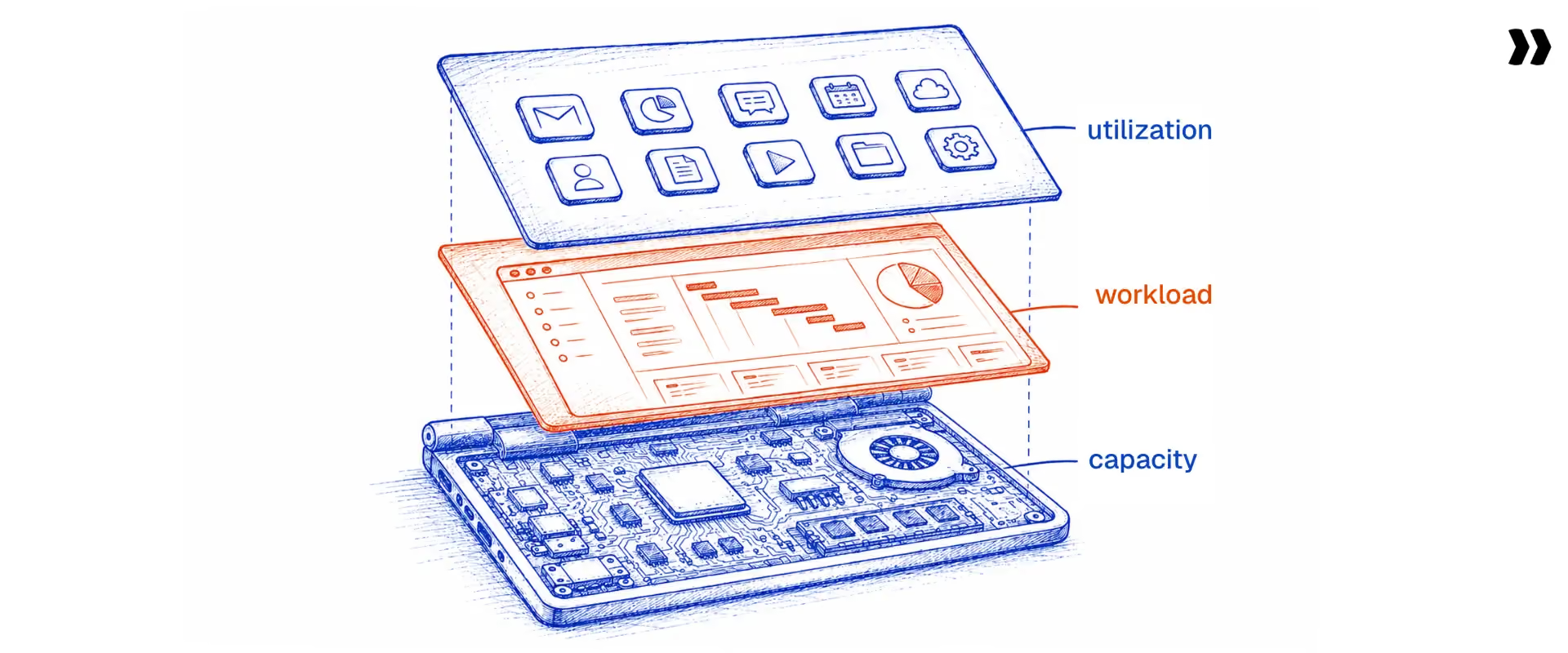
PS leaders who manage workload, utilization, and capacity planning as separate functions are solving the same problem three times with incomplete information. These are not three distinct disciplines. They are three views of the same underlying resource data.
Workload management, billable utilization, and capacity planning are three views of the same resource data. Accurate workload data enables accurate utilization calculation. Accurate utilization enables a reliable capacity forecast. A reliable capacity forecast enables proactive hiring and staffing decisions rather than reactive scrambles every time a deal closes.
The three-layer dependency works in one direction:
- Accurate utilization calculation requires accurate workload data as its foundation.
- Accurate utilization enables a reliable capacity forecast.
- Reliable capacity forecast enables proactive hiring and staffing for future projects.
The utilization formula most PS teams use is wrong. Billable utilization should equal billable hours worked divided by available working hours. Available working hours do not match total contracted hours. They equal contracted hours minus PTO, holidays, and approved non-billable time.
Using total contracted hours as the denominator overstates available capacity and systematically understates utilization, making the team appear less utilized than it actually is. This is one of the most common causes of over-staffing in growing PS organizations, and it directly leads to overload for the consultants who are genuinely carrying the work.
The pipeline connection is the piece most teams miss. A deal with an 80% probability of closing next month represents high-likelihood demand that should already be influencing staffing decisions. Teams that plan only against confirmed work will either over-hire (hedging against a pipeline that does not materialize) or under-staff (not ready when multiple deals close simultaneously).
Connecting the sales pipeline to the resource plan through soft allocations is the operational answer to demand uncertainty, and it transforms capacity planning from a guess into a data-driven discipline.
A 60-person PS organization managing concurrent implementations improved billable utilization from 62% to 77% in a single quarter after switching from team-average reporting to role-level utilization targets and adding pipeline-connected soft allocations to their planning cycle. The change required no additional headcount.
What workload management KPIs should PS delivery teams track?
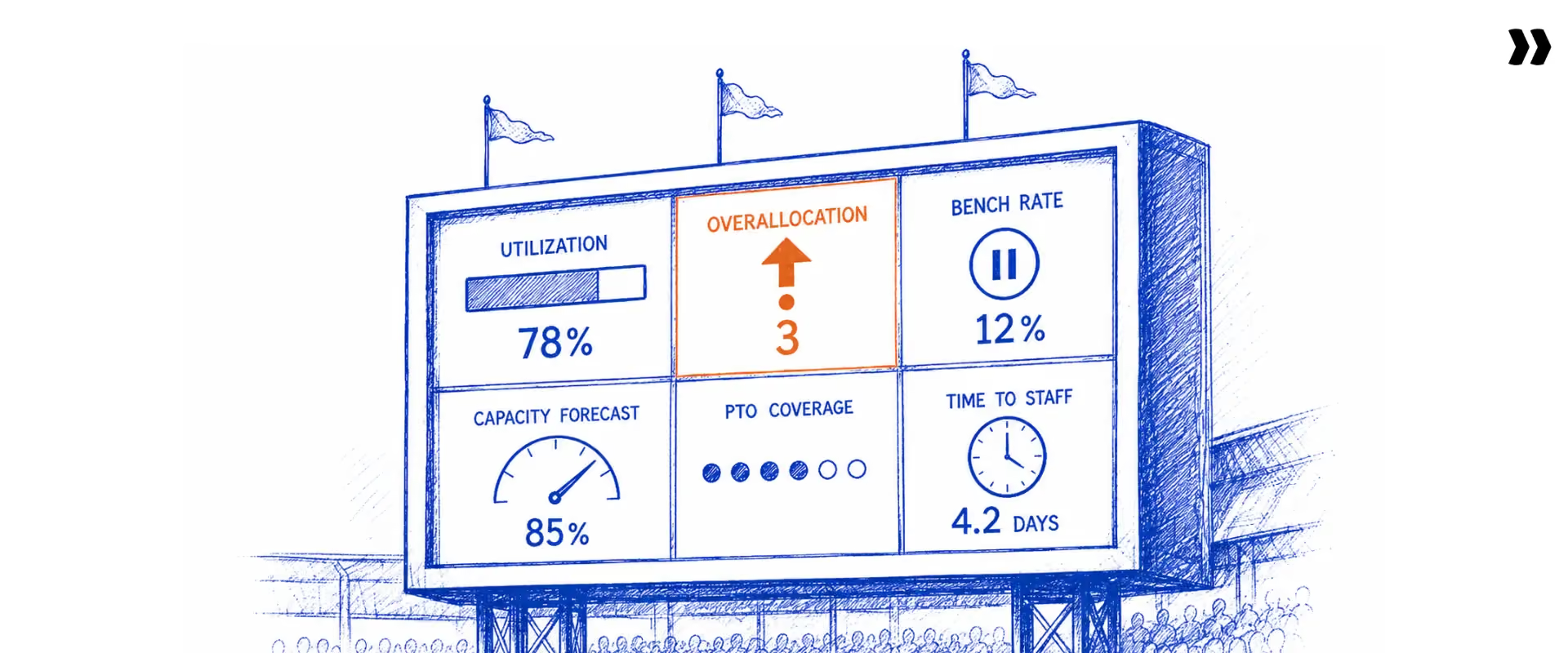
Tracking the wrong metrics is nearly as costly as tracking nothing. Most PS teams report on team-average utilization and call it workload management. That single number hides more than it reveals and leaves team leaders without the data needed to act before problems escalate.
The seven workload management KPIs that matter most for PS delivery teams are: billable utilization by role, overallocation rate, capacity forecast accuracy, time to staff a new project, resource admin time per manager per week, PTO coverage rate, and bench rate. Team-average utilization is not on this list for a reason.
KPI 1: Billable utilization by role
Target range: 65 to 75% for senior consultants, 70 to 80% for mid-level consultants, 55 to 65% for project managers who carry non-billable delivery coordination.
TSIA's research on technology professional services organizations places high-performing teams at 75 to 80% billable utilization, with underperforming organizations typically falling 15 or more points below that mark. [Source: TSIA, State of Professional Services 2026]
Track weekly, not monthly. Monthly averages smooth out the spikes and dips that indicate burnout risk before they become attrition events.
KPI 2: Overallocation rate
Percentage of team members allocated above 90 to 95% of available capacity in any given week. Target: under 10% of the team overallocated in any week. Sustained overallocation above 90% for more than three consecutive weeks is a leading indicator of burnout, decreased team productivity, quality issues, and eventual attrition.
KPI 3: Capacity forecast accuracy
How closely the team's 30-day and 60-day capacity forecasts match actual availability when those periods arrive. Target: 90%+ accuracy at 30 days, 80%+ at 60 days. Low forecast accuracy is the root cause of reactive hiring decisions that arrive too late to prevent delivery delays.
KPI 4: Time to staff a new project
Hours elapsed from contract signature to all required roles confirmed and allocated. Target: under 24 hours for standard projects, under 48 hours for complex engagements requiring specialist skills. Long staffing cycles delay time-to-value and signal that the resource search process remains manual.
KPI 5: Resource admin time per manager per week
Hours spent on workload tracking, allocation updates, and manual reporting. Target: under 2 hours per resource manager per week. Every hour spent manually compiling workload data is an hour not spent on staffing decisions, capacity forecasting, or managing tasks that have actual business impact.
The cost compounds quickly. A resource manager spending 5 hours per week on manual workload tracking at a fully loaded cost of $80 per hour represents roughly $20,800 per year in labor allocated entirely to data compilation.
A PS team with three resource managers is effectively paying approximately $62,000 annually to maintain a workload spreadsheet that will be out of date by the time anyone reads it. That is a direct, calculable cost of not having a unified platform, and it does not include the downstream cost of the staffing decisions made on inaccurate data.
KPI 6: PTO coverage rate
Percentage of planned PTO periods of five or more business days where the team confirms project coverage at least five business days in advance. Target: 85%+ covered proactively. Low coverage is a sign the workload plan has no resilience, and that team leaders are setting unrealistic deadlines based on capacity that will not materialize.
KPI 7: Bench rate
Percentage of billable consultants with less than 20% allocation in a given week. Target: under 5% of the billable team on bench. Bench time is the most visible form of revenue leakage. A senior consultant with near-zero confirmed work for a week represents unrealized billable capacity, not just idle time, and it compounds across the entire team when no one actively monitors how work is allocated.
What workload management mistakes do professional services teams most commonly make?

The most damaging workload management mistakes are not the obvious ones. Teams know that chronic workload overload is bad. The mistakes that quietly erode utilization and burn out top performers are structural and baked into the tools and habits most teams use every day.
The six most common workload management mistakes in professional services are: using gross capacity as the utilization denominator; managing workload at project level rather than week level; leaving stale soft allocations on the books; reporting team-average utilization; disconnecting resource allocations from project plans; and forecasting capacity from confirmed projects only, ignoring pipeline demand.
- Mistake 1: Using gross capacity as the denominator. If a consultant has 10 days of PTO and 3 public holidays in a quarter, their actual available capacity is meaningfully below their contracted hours. Using total contracted hours as the denominator yields a utilization figure that appears lower than it actually is, leading to the over-assignment of work to people whose schedules are already full. Setting realistic deadlines becomes impossible when the capacity data carries inflated numbers from the start.
- Mistake 2: Managing workload at project level rather than week level. Knowing that a consultant is "30% on Project A, 25% on Project B, and 45% on Project C" tells you their average allocation, not whether overload hits in the specific weeks where three project milestones overlap. Workload overload is a week-level event. It requires a week-level view to catch before project tasks start slipping.
- Mistake 3: Stale soft allocations that never expire. Pipeline deals with a 70% probability sometimes never close or close six months later than forecast. If soft allocations remain on the books indefinitely, they create phantom capacity blocks that make the team appear more committed than it is. A workload management plan that does not include soft allocation expiry rules will systematically undercount available capacity.
- Mistake 4: Reporting team-average utilization. A team average of 72% routinely hides three senior consultants at 95% (acute burnout risk) and two junior consultants at 45% (direct revenue leakage). The average is meaningful for board reporting. It is useless for workload management decisions. The only view that enables corrective action is per person, per role, per week.
- Mistake 5: Disconnecting resource allocations from project plans. When project plans live in one tool, and allocations live in another, every project schedule change requires a manual update to the resource view. In practice, updates happen inconsistently. Within two weeks of any significant timeline change, the allocation view no longer reflects what is actually happening. The only fix is a platform where allocations and project plans are intrinsically connected, and timeline changes update workload automatically.
- Mistake 6: Forecasting capacity from confirmed projects only. If the capacity plan only includes closed work, the team is planning for half the picture. Ignoring pipeline demand means every deal closure triggers a scramble, the team sets unrealistic expectations with sales and customers, and the ability to allocate resources proactively disappears. Pipeline-connected planning is not optional at scale.
How do resource managers use AI and PSA software to automate workload distribution?

The manual workload management process- checking multiple systems, asking around on Slack, and compiling a spreadsheet that is stale by Monday morning- is not a habit that better discipline will fix. It is an architecture problem. AI and workload management software solve it at the infrastructure level, and the difference between what teams can do today versus five years ago is significant.
AI and PSA software improve workload management at three levels: data consolidation, bringing allocation, project, time tracking, and PTO data into a single live view; automation, eliminating manual allocation admin through skills-based search and alert-triggered rebalancing; and intelligence, providing AI-powered staffing recommendations that optimize for utilization balance or project margin.
What PSA software solves that standalone project management tools and spreadsheets cannot:
- The connection problem. Standalone resource planning tools show allocations, but those allocations have no link to the project plan or time tracking data. A PSA platform connects all three. When the project plan changes, allocations update automatically. When time actuals come in, the remaining capacity recalculates.
- The PTO problem. When PTO lives in BambooHR and allocations live in a separate resource tool, a PTO approval does not automatically reduce the person's available capacity in the scheduling view. The resource manager learns when the consultant is unavailable, and the project stalls. A PSA that integrates with major HR systems syncs approved PTO directly into capacity calculations.
- The pipeline problem. PSA platforms that integrate with CRM can automatically create pipeline projects when deals reach a defined probability threshold, triggering soft allocations that provide the resource plan with a demand-side view three to six months ahead. Without this, teams assign resources to future projects reactively rather than proactively.
Three levels of AI automation for workload management:
Level 1: Skills-based search and filtering
AI-powered resource management software filters available consultants by skills, proficiency level, availability window, cost rate, location, and time zone simultaneously. What previously required asking delivery leads on Slack takes seconds. Team workload management tools built on this capability dramatically reduce the time from "we have a project to staff" to "we have a confirmed team."
Level 2: Automated team composition
Given a project's scope, required roles, and start date, AI suggests the best available team optimized for load balancing or margin. The resource manager reviews and approves. The AI handles the search, matching, and forecasting, eliminating the manual back-and-forth that makes resource allocation time-consuming for complex projects.
Level 3: Agentic workload governance
Natural language workload management: "A consultant is on unexpected leave for two weeks starting Monday. Find replacements for all her projects and redistribute her allocations." The system searches across the team, generates reallocation recommendations, and creates resource requests for manager approval.
For PS teams ready for this level of automation, agentic PSA platforms represent a step change in how managing workload feels day-to-day.
What AI does not replace: the judgment call on skills fit for senior or specialist roles where context matters beyond proficiency levels; difficult conversations with team members about workload and work-life balance; and strategic decisions about when to hire, when to use contractors, and what roles to build versus buy. The human judgment layer remains irreplaceable for the decisions that carry the most risk.
Which PS delivery teams are ready for automated workload management, and which need to build the data foundation first?
Not every team is at the same starting point. The right intervention depends on team size, project volume, and the current state of the data infrastructure. Use this table to route your next step.
What to know before you buy
Before evaluating workload management software, get clear on these four questions:
- Is your core problem data or process? If the problem is that allocation data does not exist in one place, a new process will not fix it. A unified platform is the prerequisite.
- Does it connect to your project plans? A standalone resource tool that does not sync with the project plan requires manual reconciliation every time a timeline shifts. That is the core problem you are trying to solve.
- Does it account for PTO and holidays automatically? If the tool uses gross capacity as the denominator, every utilization figure it produces is overstated, and every staffing decision based on it is built on inflated availability.
- Can it show pipeline demand, not just confirmed work? A workload tool that only reflects closed projects gives you half the capacity picture. You need CRM integration or soft allocation capability to plan for what is coming, not just what has arrived.
The objections PS leaders raise when evaluating workload management software, and why they do not hold up:
- "We already use Monday, Float, and Salesforce. We cannot replace everything at once." You do not have to. A PSA platform serves as the authoritative allocation record while connecting to existing tools via integrations. The goal is a single source of truth, not a wholesale stack replacement.
- "The learning curve will slow the team down during rollout." Implementation is a one-time cost. Most PS teams are running on a unified platform within 4 to 12 weeks. The manual workload tax they eliminate, typically 4 to 6 hours per resource manager per week, is a recurring cost that continues indefinitely without the change.
- "We only need resource planning, not a full PSA." Teams that adopt a PSA for resource visibility routinely find themselves using project tracking, client reporting, and time capture within the first 90 days. The individual features matter. The connection between them is where the compound value actually sits.
- "How do we justify the cost to leadership?" Frame it against what manual workload management currently costs. If three resource managers each spend 5 hours per week on manual allocation work, that is 780 hours per year in labor allocated entirely to data compilation, before factoring in the cost of misallocated projects or delayed project starts.
The inflection point from manageable to critical typically arrives when concurrent projects cross 15 to 20 alongside team sizes above 25. In that combination, the number of allocation decisions, each requiring a check of availability, skills, time zone, project schedule, and PTO calendar, exceeds what any individual can maintain accurately in a spreadsheet.
Below that threshold, a documented workload management plan with disciplined spreadsheet processes and regular workload reviews is workable. Above it, the data integration requirements make a unified platform the operational prerequisite for workload management that actually scales to handle future projects without adding proportional overhead.
How does Rocketlane help PS delivery teams balance workload and prevent chronic overallocation?
The workload management problem most PS teams describe is a specific set of structural failures: allocation data in one system, project plans in another, PTO in a third, and no mechanism that connects them automatically when any one changes.
The result is a Director of PS spending her mornings compiling spreadsheets instead of making staffing decisions. Rocketlane, rated #1 in customer satisfaction on G2 in the PSA category, is built specifically to close this gap.
Rocketlane replaces the spreadsheet-based workload tracking workflow with a live visual workload management system: heat map views by consultant and team, skills-based assignment that distributes work by fit and available capacity, proactive conflict detection before overcommitting a resource, and a capacity view that connects confirmed project demand to pipeline.
Why do PS teams still lose hours every Monday to manual capacity checks?
The root problem PS directors describe is not overallocation itself. It is the invisibility of overallocation until the damage is done. A project manager assigns a senior consultant to a new engagement because she knows that consultant is reliable. The system does not tell her that the same consultant is already at 110% capacity across three other active projects. The overallocation surfaces on Thursday, three days after the client was told the project starts Monday.
In Rocketlane's workload view, capacity is visible in real time across every resource, team, and practice, color-coded by utilization level. The PM who checks the workload view before making an assignment decision can see at a glance who has available capacity and who is already stretched. No Slack thread needed, no manual compilation required.
The view distinguishes between base capacity (maximum contracted hours) and available capacity (base minus PTO, training, and non-billable commitments). This distinction matters. Using base capacity as the denominator produces systematic overallocation even when no individual manager is deliberately over-assigning the people on their roster.
How does proactive rebalancing prevent project delays before consultants flag the problem?
The second failure mode is the reactive redistribution cycle. A consultant flags the overload. The PM escalates to the resource manager. The resource manager maps what to redistribute. Three other PMs are looped in.
By the time a rebalancing decision is reached, the consultant has been in the red for a week and at least one project has absorbed a delay. This is the firefighting loop that PS firms running 30+ concurrent projects get stuck in, not because they lack good people but because their system does not surface the imbalance until a human flags it.
HBR research identifies workload as the primary organizational driver of professional burnout, which means the firefighting cycle itself, not individual character, is what creates attrition risk in delivery teams. [Source: HBR]
In Rocketlane, workload rebalancing is proactive. When a resource approaches the overallocation threshold, the system surfaces the conflict alongside alternative suggestions: which other consultants with matching skills have sufficient available capacity to absorb the redistributed work.
The resource manager reviews, confirms the reallocation, and affects project plans automatically. A decision that currently takes half a day of coordination conversations takes 20 minutes of structured review.
This includes emergency scenarios. When a consultant goes on unexpected leave, Rocketlane surfaces all active assignments for that person alongside replacement candidates filtered by skill match and current utilization. The urgent tasks that would trigger manual handoff scrambles become a structured, data-driven review instead.
Why does familiarity-based staffing create chronic overallocation across the team?
The structural cause of uneven workload distribution in most PS firms is not intentional. It is the path-of-least-resistance staffing decision. PMs assign the consultants they know are reliable. Those consultants become chronically over-assigned while others sit underutilized. Both groups experience decreased team productivity and declining job satisfaction for different reasons.
Skills-based assignment breaks this pattern. When a new project or phase needs staffing, the first filter is not "who do I know?" but "who has the right skills, is available, and has the most capacity right now?"
Rocketlane's skills matrix filters simultaneously by proficiency level, certification, region, current utilization, and available hours. The result is a defensible staffing decision rather than a habitual one, and workload distributes across the entire team rather than concentrating on the same group quarter after quarter.
The load-balancing optimization actively reinforces this. When multiple resources match on skill and availability, the system defaults to the resource with the most available capacity, equalizing workload across the team over time rather than letting it concentrate on the highest-performing subset.
Rocketlane in numbers:
- 750+ customers using Rocketlane to manage professional services delivery at scale
- 94% G2 recommendation rate, the highest in the PSA category
- $60M Series C (March 2026); revenue more than doubled year-over-year
How does Nitro automate workload monitoring and rebalancing for PS delivery teams?
Rocketlane's Nitro is the agentic AI layer embedded inside the platform. It marks the shift from merely tracking work to actively executing it. Nitro does not sit alongside delivery as a separate reporting tool. It operates inside live project data in real time as an agentic execution platform, automating the workload management workflows that currently consume the most resource manager time and attention.
Nitro automates the two most time-consuming workload management workflows: staffing decisions and overallocation detection. Level 1 Operations AI replaces manual capacity checking with on-demand workload intelligence. Level 2 Delivery AI surfaces imbalance signals before they become burnout or project risk. Both levels operate inside live project data without requiring manual report builds or status check-in meetings.
How does Nitro's Operations AI replace the coordination email for capacity decisions?
Nitro Analyst answers natural language workload questions from live Rocketlane data in seconds. Questions like "Which consultants on the enterprise team have more than 20% available capacity in weeks 8 through 10?", "Which consultants have been above 90% allocation for three consecutive weeks?", and "What is the average utilization for the APAC practice this quarter versus last quarter?" take 30 to 60 minutes to answer manually.
Nitro Analyst answers each from live data, no report-building required, no spreadsheet export needed.
The Monday morning workload review that currently requires an hour of manual data assembly takes five minutes of Analyst queries. Project managers and resource managers get the same quality of insight without the administrative overhead that currently consumes the first part of every week. They can manage tasks and staffing decisions from a single interface instead of toggling across five systems.
Rocketlane's Resource management agent (currently in active rollout) surfaces the best-fit team members for new engagements based on skills, current utilization, available capacity, and cost rate, with two optimization modes: load balancing for teams managing burnout risk across the entire team, and margin maximization for teams optimizing cost mix against project budgets.
When a PM's instinct is to assign the same senior consultant for the fifth consecutive project, Resource management agent surfaces the utilization comparison directly. This consultant is at 90% capacity. These three consultants with equivalent skills are at 55%. The decision becomes visible rather than habitual.
"The Workforce Agent has transformed how our team handles project setup. What previously took days now takes hours." — Vidwesh Umasankar, project44
How does Delivery AI catch workload imbalance before it turns into consultant burnout?
Nitro Signals monitors live delivery data and surfaces early warnings before they become escalations or delivery failures. The signals most relevant to workload management:
- Overallocation trajectory. A consultant is approaching or has crossed the overallocation threshold based on current confirmed assignments and forward pipeline. Signalled at the early-warning stage: "This consultant is tracking at 95% utilization for weeks 6 through 9 based on confirmed allocations. Three projects have dependencies on their availability in that window."
- Workload concentration pattern. Delivery leads consistently assign new projects to the same small group of consultants while others remain underutilized. A pattern-level signal rather than a single-project alert: "Five of the last eight new project assignments went to the same three consultants. Team average utilization is 72%. This group is at 94%."
- Reallocation gap after a schedule change. A project phase completes early or a resource is unexpectedly freed. Their now-available capacity remains unfilled. Signal: "This consultant will have 40% unallocated capacity from week 7 onwards based on the Phase 2 completion update. No confirmed allocation exists beyond that date."
Each signal routes a specific, actionable notification to the resource manager: a named consultant, a quantified capacity gap or surplus, and the projects affected. Not a generic workload alert but a targeted one with enough context to act on immediately.
Conclusion: Is your workload management system giving your team a fair chance?
The PS teams that close utilization gaps, staff projects quickly, and avoid burning out their best consultants share one thing. They have infrastructure that makes workload visible before it becomes a crisis.
Good workload management is not about working harder or communicating more. It is about building a system where every allocation is visible, every timeline change updates the workload view automatically, and capacity questions get answered in minutes rather than days.
That is what healthy work life balance for delivery teams actually depends on: not just culture and intent, but data that is trustworthy enough to act on.
For PS firms building that infrastructure in 2026, Rocketlane provides the agentic PSA platform that connects project delivery, resource management, and capacity planning in a unified system, making real-time workload visibility possible without the manual compilation that currently consumes the first hour of every manager's day.
Table of Contents

Regsiter for the live webinar


Great consultants didn't join your team to spend Fridays writing documentation.
Table of contents
18 of Forbes Cloud 100 chose Rocketlane. The best PS teams aren't waiting around.
FAQs
What is workload management in professional services?
Workload management in professional services is the ongoing discipline of allocating team capacity to project demand, tracking whether allocations match actual work in progress, and rebalancing when the two diverge. It operates across multiple concurrent client engagements, billing models, and a demand picture driven by both active projects and pipeline.
How do PS teams balance workload across multiple concurrent client projects?
Balancing workload across concurrent projects requires a multi-project view showing each person's total allocation across all active engagements. A consultant at 40%, 35%, and 35% across three projects is overallocated at 110%. No single project reveals this. Only a week-level aggregate view surfaces the collision before it triggers an urgent scramble.
What are the most effective workload management strategies for consulting firms?
The five most effective strategies are: a single source of truth for all allocation data, skills-based staffing with proficiency-level filtering, soft allocations for pipeline projects, role-level utilization targets rather than team averages, and a weekly workload review using live data in front of the right decision-makers each week.
How does workload management connect to billable utilization and capacity planning?
Workload data, utilization, and capacity planning are three views of the same resource data. Most teams calculate utilization wrong: available hours equals contracted hours minus PTO and holidays, not gross capacity overstates available hours and produces staffing decisions based on capacity that does not exist.
What are early warning signs that a PS team's workload is unsustainable?
The six most reliable signs are: workload reports taking hours to compile; timeline extensions with no documented resource cause; utilization below target while the team reports feeling stretched; multi-day answers to capacity questions; PTO triggering emergency project shuffles; and leadership capacity questions the team cannot answer with current data.
How do resource managers use AI to automate workload distribution?
AI automates staffing decisions at three levels: skills-based resource search (Level 1), automated team composition optimized for load balance or margin (Level 2), and agentic natural language workload management for real-time reallocation decisions (Level 3). AI does not replace judgment calls on senior or specialist role fit where context matters beyond proficiency.
What workload management KPIs should PS delivery teams track?
The seven KPIs are: billable utilization by role, overallocation rate, capacity forecast accuracy, time to staff a new project, resource admin time per manager per week, PTO coverage rate, and bench rate. Team-average utilization alone is not a workload management KPI. It hides distribution problems that per-person, per-week tracking surfaces immediately.
How does PSA software improve workload visibility for professional services managers?
PSA software solves three structural problems: the connection problem (allocations not linked to project plans), the PTO problem (HR time-off data not syncing to resource capacity), and the pipeline problem (CRM demand not visible in the resource plan). Together, these integrations replace manual compilation with a live workload view that updates without manual effort.
What is the right billable utilization target for professional services teams?
The utilization target varies by role: roughly 65 to 75% for senior consultants, 70 to 80% for mid-level, and 55 to 65% for PMs. Always calculate against available hours (contracted minus PTO and holidays), not gross capacity. Using gross capacity as the denominator leads to systematic overallocation.
How do PS teams manage workload for distributed and global delivery teams?
Global PS teams manage workload with timezone-aware capacity calculations, regional holiday calendars, and HRIS integrations that sync approved PTO automatically. A Singapore-based consultant has different available hours from a UK-based one during regional holidays. Apply time zone fit as the first filter when staffing across distributed teams, before skills and capacity matching.













Copyright © 2026 Rocketlane Corp. All rights reserved.





















.webp)