Data Migration Plan: How to Plan, Run and Validate a Customer Data Migration in 2026

•
•
Summarize blog with






TL;DR
- The data migration process has six phases: assessment, cleansing, mapping, transformation, validation, and decommissioning.
- A migration during onboarding puts a customer inside the critical path twice. They export the file, and they sign off on the result. Those two steps usually determine whether your go-live date holds.
- Phases three, four, and five carry the heaviest effort, and all three get rebuilt for every customer. No tool on the market covers all six phases, and connector coverage is where the real limit sits.
- Two choices separate a plan that holds from one that slips. Make the rules reusable per source system, and give every customer task an owner and a date.
- You're filing migration knowledge by customer. That's why nothing compounds. The unit of reuse is the source system.

The fourth version of the customer's file arrives. The headers have changed again. Two columns that held dates last week now hold free text.
Someone opens the mapping sheet built for version three, then starts over. That rebuild is not a skills problem. It is what happens when the unit of work is the customer instead of the source system.
Most published guidance on the data migration process describes an internal IT project. Audit the sources, cleanse, map, execute, test, then decommission the legacy system. Read it again. There is no customer anywhere in it.
What is a data migration plan?
A data migration plan is the documented sequence for moving records from a source system into a target system's schema. It sets scope, field mapping, transformation rules, validation rules, cutover timing, and rollback. Its purpose is to make the migration repeatable and auditable and not dependent on one person's memory. Without one, the work still gets done, but nobody can explain afterwards what was moved or why.
A detailed migration plan is a deliverable, not a formality. At minimum, it contains:
- Scope: Which objects, which records, and how much history moves into the new system.
- Source and target schema: The structure of the source data and the structure it must land in.
- Field mapping: Every source column matched to a destination field.
- Transformation rules: The logic that reshapes values before they land.
- Validation rules: The checks that prove the result is correct.
- Dependency and load order: Which objects must exist before others can reference them.
- Cutover and rollback: The timing of the switch and the plan if it fails.
- Owners and key stakeholders: A named person against each step, on both sides.
Those items are the difference between a plan and a wish. A data migration project that skips mapping and validation is not planned; it is scheduled.
Plan, strategy, and methodology are three different things
A data migration strategy sets the approach, big bang or phased, how much history moves, what risk you accept. A data migration plan applies that strategy to one migration. A data migration methodology covers every migration from the same source system. Data migration best practices sit inside the methodology, not the plan.
Teams conflate the three constantly. The practical test is if the document only helps once, it is a plan. If it helps the next customer too, it is a methodology.
Treat the plan as a living artefact. Source files change, scope moves, and a plan written once and filed is out of date before the first load.
Key definition
Data migration is the process of moving data from a source system into a target system. A data migration plan documents the scope, mapping, transformation, validation, and cutover steps that make that move repeatable and auditable.
What are the main types of data migration?
There are six types of data migration that are commonly recognised. They are storage migration, database migration, application migration, cloud migration, data center migration, and business process migration. They differ by what is moving. Customer data migration during onboarding mixes database and application migration, with a customer on the other end.
Knowing the type matters because the risks differ. Transferring data between storage systems is a capacity and downtime problem. Moving customer records between business systems is a data quality problem. Each type touches a different layer of your data infrastructure.
Read across that table, and one pattern stands out. The first five types are infrastructure problems with predictable failure modes. Business process migration is the one where the risk sits in somebody's head, and customer data migration inherits that problem.
Cloud data migration deserves a note. Moving into a cloud computing environment or into data lakes changes where the data lives, not whether it is correct. A clean move of poor data produces a clean copy of poor data. Teams migrate data to change what a data system can do, and a move alone changes nothing.
What are the six phases of a data migration process?
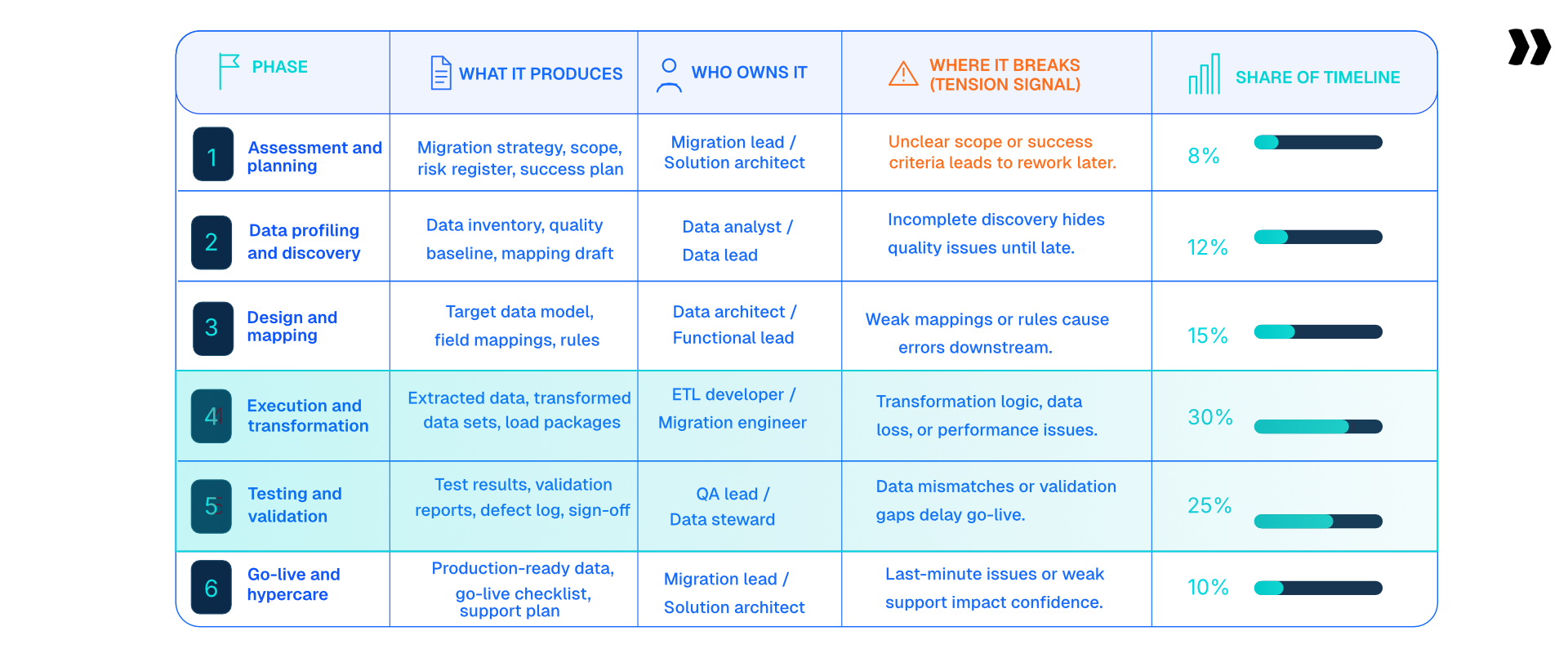
The six phases of a data migration process are assessment and planning, data cleansing and preparation, and design and mapping. Then come execution and transformation, testing and validation, and decommissioning the legacy environment. The phases are well established. What varies is who does the work, and how much of it repeats per customer.
Search for what is the data migration process, and the results mostly return the same six phase labels. Published descriptions stop there. The useful version adds three columns: what each phase produces, who owns it, and where it breaks.
Phases three, four and five carry the heaviest effort weight. All three are rebuilt from scratch for every customer. That is why headcount rarely fixes a slow migration process.
Which phases do data migration tools cover in practice?
Most data migration tools cover three of the six phases. Those are cleansing, mapping and validation, plus the transformation half of phase four. Assessment, loading and decommissioning stay with your team, the customer and the destination system.
Knowing which phases a data migration solution covers separates a useful evaluation from a disappointing one.
This is the section most vendor content skips. It is also the one that decides whether the rest of an evaluation is worth running.
Three and a half phases out of six is the honest ceiling for automated data migration tools today. Any vendor claiming all six is describing a roadmap, not a product.
The reader-facing version is short. When a vendor says migration, ask which of the six phases they mean. Most confusion here comes from one word. It covers all six phases for the buyer and three for the seller.
Most tooling stops in the middle. See where our line actually sits.
What changes when the data comes from a customer?
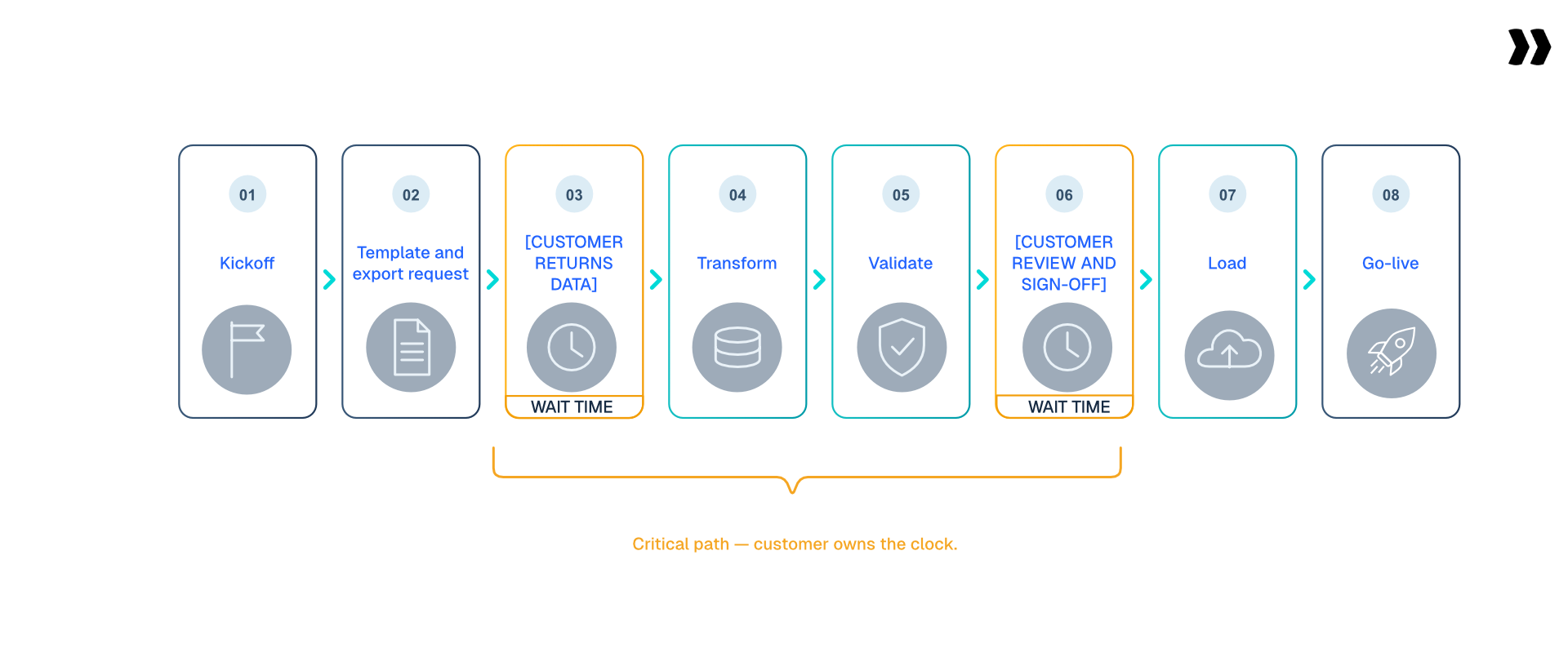
Every standard migration plan assumes you control both systems. During customer onboarding, you control neither the source data nor the person producing it. The plan gains two steps no standard framework includes: waiting for the customer's file, and waiting for the customer's approval. Those two steps usually dominate the calendar.
Published guidance on the data migration process describes an internal IT project. Audit sources, cleanse, map, execute, test, decommission the legacy systems. Read that sequence again and notice what is missing.
There is no customer anywhere in it.
A migration run during onboarding has one sitting in the middle of the critical path. The sequence looks more like this:
- Kickoff and scope agreement with the customer.
- Template and export request sent to the customer.
- The customer returns their data. This is the first bottleneck.
- Transformation and validation by the implementation team.
- Customer review and sign-off on the transformed data. This is the second bottleneck.
- Load into the target system.
- Go-live, then post-load monitoring.
Steps three and five are the only two you cannot staff your way out of. Everything else is capacity, and those two are dependency.
Teams optimize the hours and leave the months alone.
See the waiting made visible instead.
Why the waiting dominates the calendar
The technical work in a migration is measured in hours. A single conversion run takes roughly 36 to 42 hours of ETL effort for a complex dataset.
Getting a completed data workbook back from a customer routinely takes two to three months. Teams optimize the 36 to 42 hours and leave the months alone.
What arrives is rarely one clean file. Expect several versions, headers that change between them, and formats that vary even from the same source system.
Why sign-off has to be documented
Where your team handles data it does not own, an undocumented approval is a liability, not a process gap.
If a record is wrong six months after go-live, the question is who approved it. An email thread is a poor answer. A recorded approval against a specific file version is a good one.
Some services firms go further and refuse to take possession of client data at all, for audit-trail reasons. That is a legitimate position, and it changes the plan without removing the work. Holding clients accountable during onboarding becomes the whole job.
Phase 1: how do you scope a data migration project?

Scoping a data migration means three decisions. Which objects move, how far back the history goes, and where the cutoff sits. Those choices set the timeline more than any technical factor. Teams that leave them open until mapping starts pay twice.
Scope is where most migration projects quietly go wrong. The decisions are not technical, so they get deferred, and then they arrive during mapping when changing them is expensive.
The three scoping decisions
- Which objects: Customers, contacts, projects, tasks, invoices, time entries, attachments. Each one carries dependencies.
- How much history: Some customers need eight or more years for audit readiness. Others take one to two, because older records are not trustworthy.
- Where the cutoff sits: Completed records, in-flight records, or both. In-flight work is the harder case by a wide margin.
History depth is a real trade-off, not a default. More history means more edge cases, more validation failures, and a longer timeline, in exchange for reporting continuity.
The big bang versus phased decision also belongs in this phase. A big bang moves all the data in one cutover. A phased approach moves it in tranches and runs both existing systems in parallel for a period.
One warning worth stating plainly. Running two systems in parallel doubles the reconciliation burden, and several teams cannot afford it operationally. Decide that before you promise it.
Write the scope into the statement of work rather than the kickoff deck. A scope that lives only in a slide is a scope that will move.
Phase 2: what does data cleansing involve?
Data cleansing means deduplication, format standardisation and data profiling before any transformation begins. It also means deciding what not to bring. Legacy exports usually contain data that was already wrong in the source system. Migrating it faithfully reproduces the problem in the new system.
Data profiling comes first. Profiling means reading the file before writing any rules. You are looking at value distributions, null rates, formats, and outliers.
Teams that skip profiling discover the same problems later, during validation, when a fix costs a full re-run.
What poor data quality looks like in a real export
- Duplicate records, and near-duplicates needing fuzzy matching. "Aviation, Inc." and "Aviation Inc" are the same customer.
- Broken formats across phone numbers, dates, addresses, and currency, sometimes six date formats in one column.
- Negative values in fields where a negative is impossible.
- Placeholder dates stamped decades in the past or future.
- Missing required fields, such as a user with time entries and no email address.
- The same person under two email domains, silently splitting their history.
- Large volumes of empty or zero-value rows buried inside an otherwise valid export.
Every item on that list passes a format check and fails a business check. That gap is the reason data quality issues survive into the production environment.
The honest note most guidance omits: cleansing legacy data often means confronting records that were wrong before the migration started. Somebody has to decide what does not travel, and that decision belongs to the customer.
Phase 3: what goes into a field mapping document?
A field mapping document matches every source column to a destination field. It records the data transformation applied and flags fields with no equivalent. Four mapping patterns cover almost everything. They are direct, renamed, composite, and no destination equivalent. The fourth pattern is where migrations stall.
Mapping is where the migration stops being generic. Two customers on the same source system will produce different mapping documents, because they configured that system differently.
The four mapping patterns
- Direct: The source column and the destination field mean the same thing and hold the same format.
- Renamed: The same meaning under a different label. "Product code" and "SKU code" are the classic pair.
- Composite: One source column holds several destination values, or several columns collapse into one.
- No equivalent: A custom field in the source with nowhere to land, which forces a business decision.
Patterns one and two are quick. Patterns three and four consume the phase, and pattern four cannot be resolved without the customer.
A composite example makes it concrete. A single unit description reading "12x28x12 Drive Up No Climate" has to break into six fields. Width, length, height, and three amenity values. That is one rule, and it will be wrong for at least one customer.
The header-variant tax
The same destination field receives three different source spellings across three customers. Somebody re-solves that mapping each time.
What good looks like is an alias library per destination field, written once and reused. That is the first step from a plan toward a methodology.
Record the rationale next to each mapping. Six months later, nobody remembers why a field was dropped, and the project risk register is where that reasoning belongs.
Phase 4: how does ETL apply to a data migration plan?

ETL (extract, transform, load) is the three-step shape of any data pipeline. In a customer data migration, those three steps have three different owners. Extraction usually belongs to the customer or the source system's export. Transformation is the repeatable middle. Loading belongs to the destination system's importer, which sets the format it will accept.
Treating ETL as one word is the most common planning error in this phase. Each letter has a different owner, a different failure mode, and a different fix.
Read the owner column and the planning implication is obvious. Two of the three steps sit outside your team. The only step your own process can speed up is the middle one.
The transformation rule types worth planning for
- Defaults: Fill an empty required field with an agreed value.
- Case and format normalisation: Standardise casing, strip stray characters, fix trailing spaces.
- Splitting compound fields: One column into several, as with a unit description or a full address.
- Concatenation: Several source values into a single destination field, with formatting.
- Picklist translation: Source status values mapped to the destination's accepted set.
- Date and currency coercion: Six date formats in one column resolved to one.
- Computed values: A balance derived by summing two source columns.
- Sign routing: A negative balance moved into a separate prepayment field as a positive value.
Those eight types cover most transformation work in practice. None is hard on its own. Together they are why transforming data consumes a quarter to a third of the timeline.
Load order is the other half of this phase. Records must load in dependency order, so customers before contacts, projects before tasks, and accounts before transactions.
Extract, transform, load. One pipeline, your team reviewing each step.
Connected where a connector exists, CSV export where one is not live yet.
Phase 5: how do you test and validate migrated data?

Data migration testing has two layers. Format validation checks whether a value is the right type. Cross-field and cross-sheet validation checks whether the record makes sense. Destination importers almost always do the first and almost never the second. That is why errors surface after import and not before it.
This phase produces most of the rework on a migration. It is also where the difference between a careful team and a lucky one shows up.
The example worth remembering
A lease record has a commencement date and an end date. Both are valid dates, correctly formatted, and the importer accepts them.
The commencement date falls after the end date. The record is logically impossible, and it loads cleanly.
That single class of error explains why maintaining data integrity is not the same as passing an import. Format checks confirm data integrity at the field level. They say nothing about the relationship between fields.
Nine validation categories to plan for
- Required field presence, including conditionally required fields.
- Data type and format, covering dates, currency, email and phone.
- Value range, catching negatives and impossible dates.
- Picklist conformity against the destination's accepted values.
- Uniqueness, catching duplicate identifiers and repeated emails.
- Cross-field logic, such as a start date preceding an end date.
- Cross-sheet existence, checking that a child record's parent exists.
- Length and truncation limits set by the target environment.
- Business rules specific to the customer, such as one email per record.
The first five are what importers cover. The last four are what teams check by hand, or do not check at all.
The honest state of the art
Most teams spot-check 10 to 20% of records using representative data samples and trust the rest. That is not negligence; it is arithmetic.
Manually reviewing every record in a large export is not a plan. So the practical goal is not full inspection. It is catching every category of error inside a representative sample.
Run validation before load, not after. An error caught in a transformed file costs a re-run. The same error caught in the production environment costs a data correction, a customer conversation, and a delay.
Post-go-live corrections routinely run 15 to 20 days. That figure is the strongest argument for validating early that anyone will give you.
Four of the nine categories are the ones importers miss.
See those four run against your own file.
Phase 6: how do cutover and decommissioning work?
Cutover is the switch from the legacy system to the new system, usually run over a weekend. Decommissioning is the archiving and shutdown of the source system once the new one is stable. Between them sits reconciliation, where record counts and totals are compared before anyone declares the migration complete.
Cutover is a coordination problem more than a technical one. Teams leave on Friday using the existing systems and return on Monday using the new system.
What a cutover sequence looks like
- Freeze changes in the source system at an agreed time.
- Take the final export, including anything created since the test migration.
- Run the transformation and validation against the final file.
- Load in dependency order into the production environment.
- Reconcile by record counts and control totals against the source.
- Obtain formal sign-off from the customer before opening access.
- Monitor for a defined hypercare period, then archive and decommission.
Steps five and six are the ones teams compress when the weekend runs long. They are also the two that decide whether a problem is found by you or by the customer.
The gap data problem
Between the export and the cutover, the customer keeps working. New records are created in the source system that are not in your transformed file.
This is usually called gap data or delta data, and roughly 70% of projects hit it. Most teams handle it manually in a scramble at go-live.
No product in this category solves gap data today, Rocketlane included. The workable mitigation is a short freeze window and a documented top-up pull, not a tool.
Do not decommission the legacy environment on go-live day. Keep it readable until the new system has completed a full reporting cycle. Then archive it under your data protection regulations and retention policy.
What are the most common data migration challenges?
The most common data migration challenges are poor data quality in the source export. Next is mapping logic that lives in one person's head. Add validation that happens after load, customer-owned steps with no deadline, and gap data created between export and cutover. None are technical problems, and all of them disrupt business operations at go-live.
Risk in a migration is rarely about the move itself. Data moves reliably, and outright data loss is uncommon. What fails is everything around the move.
Five of those six are process failures, not tooling failures. That is encouraging, because the process is the part you control without a purchase.
Five of the six are process failures. See what a reusable process looks like.
Security risks and data governance during a migration
A migration is the moment when data is least protected. It leaves a governed system, sits in a spreadsheet on somebody's laptop, travels by email, and lands somewhere else.
Data governance for a migration means three things. Knowing what sensitive data is in the file, controlling who handles it, and recording what happened to it. Treat it as data management with an audit trail rather than a file transfer.
In regulated verticals, this is a hard constraint and not a preference. Healthcare, HR and payments teams often cannot route production data through general-purpose tooling at all.
Ask the question early. Discovering a data protection constraint during cutover week is the most expensive version of finding out.
What the benchmarks say about the cost of getting it wrong
A migration plan is a requirements document under another name. Field mapping is a requirement for work.
Billable utilisation across professional services fell to 66.4% in 2025, an all-time low across 509 firms. SPI Research, 2026 Professional Services Maturity Benchmark. High performers sustain 75% or more.
Migration rework is one of the places that gap opens. Mapping is not clerical work, and phase three is where the hours are won or lost.
Cost of inaction
A migration that slips does not slip alone. The go-live moves and the revenue recognition moves with it. The delivery team stays allocated to a project that should have finished.
Consultancy BenchPress found that a one-point rise in utilisation delivers roughly a 20% rise in operating profit. That holds for teams of 20 and above at average margin levels. Consultancy BenchPress, 2024.
Run that in reverse. Migration rework that pulls a point of utilisation out of delivery is not an inconvenience. It is a margin event.
How long does a data migration take?

A customer data migration inside an implementation commonly runs two to three months. Complex migrations needing multiple passes stretch to 12 to 16 weeks. Migration itself consumes roughly 30 of 70 implementation days. Customers routinely expect it to be faster, and that gap drives most escalations.
Timelines vary by complexity, not by team size. Adding people to a migration that is waiting on a customer file changes nothing.
Read the middle column rather than the right one. Duration follows the number of unknowns in the source data. An unfamiliar source system moves a project up a tier on its own.
What shortens a migration
- Reusing mapping and transformation logic from a previous customer on the same source system.
- Diagnosing a bad file in hours instead of in a weekly call.
- Validating before load, so a failure costs a re-run and not a correction.
- Cutting scope, usually by reducing history depth.
- Adding people, which helps least and is tried first.
The ranking is deliberate. Four of those five reduce round trips and only one adds capacity. That is why staffing a late migration rarely recovers the date.
Who owns data migration, the vendor or the customer?
Ownership splits by phase. Extraction almost always belongs to the customer, because only they can access the source system. Transformation and validation almost always belong to the vendor's implementation team. Sign-off is shared and should be documented, because the customer owns the data and the vendor owns the process.
This question causes more contract friction than any other part of a migration. It is usually left implicit in the statement of work and then argued about in week six.
The pattern across that table is consistent. The customer owns anything requiring authority over the data, and the vendor owns anything requiring knowledge of the target system.
One important variation. Some consulting and services firms will not take possession of client data at all. The reasons are audit trail and liability.
In that model, the vendor supplies the rules, and the customer runs them. It is slower, and it is sometimes the only compliant option. Deciding who owns customer onboarding upstream makes this conversation shorter.
What turns a migration plan into a methodology?
A data migration plan covers one migration. A data migration methodology covers every migration from the same source system. It holds the schema, the alias library, the transformation rules, the validation rules and the known edge cases. The correct unit of reuse is the source system, not the customer.
Most teams organise migration knowledge by customer. That feels natural, and it is the reason nothing compounds.
Two customers leaving the same legacy PSA produce nearly identical column structures. They also share dependency order and data quality problems. Two customers of yours on different source systems will share almost nothing.
So the folder should be named after the source system.
What a source-system methodology contains
- The source schema, including the fields that customers rarely populate.
- An alias library mapping every observed header variant to a destination field.
- The transformation rules, written in language a new consultant can read.
- The validation rules, including the business rules that importers miss.
- The known edge cases, with what was decided and why.
- The dependency and load order for that source system's objects.
A team holding those six artefacts for its top three source systems has a data migration framework. A team holding them for one customer has a folder.
The cold start problem
Every migration from an unfamiliar source system starts from zero. No alias library, no known quirks, no prior mapping.
Someone profiles the export and guesses at what the fields mean. They write new logic, then find the edge cases by hitting them.
Teams rarely record this as a failure because they treat it as the job. The sentence worth internalising: every first migration from a new source system costs full price.
Every first migration from a new source costs full price.
See what it costs the second time, once the playbook exists.
How do you make a data migration plan reusable?

Make the plan reusable by defining rules once against a source system and applying them per customer. The tenth migration from a known source should cost a fraction of the first. The honest limit is that the first one still costs full price. The investment pays back only when the same source system recurs.
Reuse in a migration is not a scripting exercise. It is a decision about what the unit of work is.
Across Rocketlane's aggregated delivery data, the same migration task recurs across an average of 5.1 projects. Roughly 13.5% of migration task types repeat across multiple projects, and one recurring task appeared in nearly 2,900 of them.
The pattern already exists inside most teams. It is not captured anywhere.
Decision routing table
The first row is the one vendors leave out. Below roughly 20 migrations a year from varied sources, a template and a reviewer is the right answer. Tooling will not pay back.
Working out where your team sits on that table? Book a 20-minute Rocketlane walkthrough.
How does Rocketlane structure migration inside the project?
Rocketlane treats migration as a tracked phase of the onboarding project, not a side task in a spreadsheet. Data collection runs through forms and dependencies in the customer portal. Review and sign-off happen against a named task with an owner and a due date. Progress stays visible to both teams at once.
The two bottleneck steps identified earlier are the customer returning their data and the customer approving it. Both are collaboration problems, which is where the front office half of a PSA platform matters.
- A white-labelled client portal with no login friction, so the customer's data task is one click from an email.
- Forms with branching logic that populate project fields, so intake does not arrive as free text in an email thread.
- Task dependencies, so the load task cannot open until the file arrives and validation passes.
- Milestone visibility for both sides, so a delayed customer task is visible as a delay, not a surprise.
- Portfolio reporting across every active migration, so the same blocked step across ten projects is legible as a pattern.
Those five capabilities target the waiting rather than the processing. That is the correct target, because the waiting is where the weeks are.
Rocketlane's own go-live runs 4 to 12 weeks, against 6 to 12 months for legacy PSA platforms. That figure describes implementing Rocketlane, and it is separate from the customer migration timelines above.
Want to see migration tracked as a phase rather than a spreadsheet? See how the Rocketlane client portal works.
The two bottlenecks are customer tasks. Give them an owner and a date.
See migration tracked as a phase, not a spreadsheet.
How does Rocketlane Migration Agent handle the migration pipeline?
Rocketlane Migration Agent runs the pipeline between your customer's source system and yours. It maps fields to a destination schema you define once, applies transformation rules you describe in plain English, validates before anything moves, and loads the validated records. Where a direct connector is not yet live for a source, a CSV or Excel export stands in.
That boundary is worth stating plainly. No tool on the market covers a whole customer data migration today, Rocketlane included.
What it does cover is the part that repeats. The question worth asking any vendor here is whether their rules are reusable per source system or rebuilt per client.
What Rocketlane Migration Agent does
- Describe the transformation in plain English rather than hand-cleaning cells or writing SQL.
- Mapping suggestions generated on upload, against a destination schema defined once.
- Field-level validation, cross-sheet existence checks, and cross-field logic such as a commencement date falling after an end date.
- Per-source-system playbooks. Schema, aliases, and rules defined once and reused for every customer arriving from that system.
- Versioned transformations compare, so a fix one analyst found does not leave when they move to another account.
- Transformation and validation rules written once per source system, then reused for every customer arriving from it.
- Validation of up to 25 million cells per run, stress-tested at 1 to 5 million.
The through-line across that list is repeatability. Each item turns a one-off migration into a schema-aware playbook that the next customer can run against.
Where the line is
Rocketlane Migration Agent runs the full pipeline: it connects to the source system, maps fields to your destination schema, transforms, validates, and loads the records. Where a direct connector is not yet live for a given source, a CSV or Excel export stands in. It does not yet do referential-integrity checks across multiple destination objects at once.
Which systems the migration plan connects to
Rocketlane syncs two-way with Salesforce and HubSpot at the opportunity and project level. A closed deal creates a scoped project without re-keying. Jira sync is two-way on issues and status. HRIS connectors cover BambooHR and Workday for time off, skills, and cost rates.
Connector setup runs inside the 4 to 12 week go-live, not as a separate project. On reporting depth, Nitro Analyst answers portfolio questions in plain language. It cuts reporting prep time by 75% on a 25-person delivery team, so a custom report does not mean a spreadsheet rebuild.
On security and sensitive data
Each migration run executes in an isolated, single-use container. Raw data sits in a file layer and never enters the model's context window.
Certifications cover ISO 42001, ISO 27001, SOC 1, SOC 2, HIPAA and GDPR. Zero data retention applies, with US and EU data residency. ISO 42001 is the AI management system standard.
With vs without Rocketlane
Every row on the left is a repeat cost. Every row on the right converts that repeat cost into a one-time setup against a source system.
What implementation leaders say
Vidwesh Umasankar, Practice Leader, Professional Services at project44, on delivery work that repeats for every customer:
“Today, our team manually creates tenants, assigns roles, and configures environments for every new customer. What's exciting is that the configuration agent can automate this setup, dramatically reducing manual effort and helping us deliver faster implementations.”
The proof
Storable, a self-storage software vendor running implementations on Rocketlane, cut data migration time by 75% with no added headcount. Jennifer McCurdy, Senior Manager of Software Implementation, leads that team.
Bring your messiest source file. We will map, transform, validate and load it.
Around 85% first-run mapping, every change surfaced for review.

Conclusion: what a working data migration plan looks like
The six phases are not controversial. Assessment, cleansing, mapping, transformation, validation and cutover appear in every credible account of the migration process.
What separates a plan that holds from one that slips is narrower than most guidance suggests. Phases three, four and five get rebuilt for every customer. Two of the slowest steps are steps where you wait on somebody else.
So build the plan around those two facts. Make the rules reusable per source system, and make the customer's steps visible, owned, and dated. Data migration success is decided by those two choices more than by any tool.
Everything else in a successful data migration process follows from getting those two right.
Quick summary
- The six phases are assessment, preparation, mapping, transformation, validation and decommissioning. Phases three, four and five carry the heaviest effort, and all three get rebuilt for every new customer.
- A migration during onboarding puts the customer inside the critical path twice: once to send the file, once to approve the result. Those two steps decide your go-live date more than your capacity does.
- Destination importers check format, not logic. Run cross-field and cross-sheet validation before load, because the errors that survive an import are the ones that surface weeks after go-live.
- File migration knowledge by source system, not by customer. Across Rocketlane's aggregated delivery data the same migration task recurs across 5.1 projects on average, and none of that compounds while the folder is named after a client.
- Rocketlane Migration Agent is where that reuse lives. It maps, transforms, validates and loads against a schema you define once, with the rules saved against the source system and re-run for every customer arriving from it. First-run mapping lands around 85% and iterates to 100% with review.
Still rebuilding the same mapping logic for every customer? Book a 20-minute Rocketlane walkthrough.

Authored by

Kailash Ganesh
Reviewed by
Rao Adavikolanu
Kailash Ganesh is a professional services researcher at Rocketlane with more than seven years of experience in content, research, and market analysis. He studies how enterprise PS teams are adopting agentic AI to transform delivery operations, has evaluated every major PSA platform in the category, and writes from the perspective of a practitioner who watches enterprise PS teams make these exact decisions daily.
Table of Contents
Regsiter for the live webinar


Great consultants didn't join your team to spend Fridays writing documentation.
Table of contents
18 of Forbes Cloud 100 chose Rocketlane. The best PS teams aren't waiting around.
FAQs
What is a data migration plan?
A data migration plan is the documented sequence for moving records from a source system into a target system's schema. It sets scope, field mapping, transformation rules, validation rules, cutover timing, and rollback. Its purpose is to make the migration repeatable and auditable and not dependent on one person's memory. A complete plan also names an owner for every step on both sides. Roughly half the steps in a customer data migration belong to the customer, not the vendor.
What are the six phases of the data migration process?
The six phases are assessment and planning, data cleansing and preparation, and design and mapping. Then execution and transformation, testing and validation, and decommissioning the legacy environment. Phases three, four, and five carry the heaviest effort. Those three are also rebuilt from scratch for every new customer. That is why adding people to a slow migration rarely recovers the date.
What is the difference between data migration, data conversion and data integration?
Data migration is a one-time move of data from one system to another. Data conversion is the reformatting step inside that move, changing values so they fit the target schema. Data integration is an ongoing connection that keeps two systems in sync continuously. A migration ends at cutover. An integration does not end, which is why a migration plan needs a decommissioning phase and an integration never does.
How long does a data migration take?
A customer data migration inside an implementation commonly runs two to three months. Complex migrations needing multiple passes stretch to 12 to 16 weeks. Migration itself consumes roughly 30 of 70 implementation days on a typical project. Duration follows the number of unknowns in the source data, not the size of the delivery team. An unfamiliar source system moves a project up a complexity tier on its own.
Who owns data migration during an implementation, the vendor or the customer?
Ownership splits by phase. Extraction almost always belongs to the customer, because only they have rights to the source system. Transformation and validation belong to the vendor's implementation team, which owns the destination schema. Sign-off is shared and should be recorded against a named person and a specific file version. Some services firms will not take possession of client data at all. That changes the model without removing the work.
Why doesn't the destination system's importer catch every data error?
Destination importers validate format, not logic. An importer confirms that a commencement date and an end date are both valid dates. It does not check that the commencement date falls before the end date, so a logically impossible record loads cleanly. Cross-field logic, cross-sheet existence checks and customer-specific business rules are the categories importers miss. Those are the errors that surface after go-live and not before it.
How do you validate data before a migration goes live?
Validate in two layers. Format validation checks types, ranges, required fields and picklist conformity. Business validation checks cross-field logic, cross-sheet existence and rules specific to that customer. Run both against the transformed file before load, not after. Most teams spot-check 10 to 20% of records using representative data samples. The practical goal is a sample covering every category of error, not every record.
What is gap data in a data migration?
Gap data is what the source system creates or changes after the data export and before cutover. The customer keeps working while the transformation runs, so the transformed file is out of date by go-live. Roughly 70% of migration projects encounter it. The workable mitigation is a short change freeze before cutover plus a documented top-up pull. No tool reconciles it automatically today.
How much historical data should you migrate?
It depends on why the history is needed. Teams with audit or reporting obligations often need eight or more years. Teams whose older records are unreliable frequently take one to two years and archive the rest in the legacy system. More history means more edge cases, more validation failures and a longer timeline. Decide history depth during scoping, because changing it after mapping starts means redoing the mapping work.
Which parts of a data migration can be automated?
Cleansing, mapping, transformation, and validation can be automated with current data migration tools. Assessment and decommissioning cannot, and extraction depends on whether a connector exists for that source. Automation pays back when the same source system recurs, because rules defined once are reused per customer. Below roughly 20 migrations a year from varied sources, a good template and a careful reviewer is the right answer. Across Rocketlane's aggregated delivery data, the same migration task recurs across 5.1 projects on average.













Copyright © 2026 Rocketlane Corp. All rights reserved.




















.webp)