Data Migration Risks: 10 Failure Modes From 25+ Implementation Teams


•
•
Summarize blog with






60-sec summary:
- Who is actually causing the delay on your migrations, and why no guide says it out loud.
- Which failure hit 24 of 25+ teams, and why none of them lacked engineers.
- The difference between a migration that succeeded and one that merely finished.
- Why no tool covers a whole migration, including the ones sold to you as end-to-end.
- The one number that tells you in week one whether a migration is already in trouble.

A services team got a customer's data file on the first of the month. The corrected version came back on the fifteenth.
Data migration is the one-time move of records from a source system into a destination system, plus the transformation and validation that make them usable. For implementation teams it is the biggest threat to a go-live date, because it sits on the critical path and almost nothing downstream can start without it.
Teams that fix it reuse rules per source system, cutting TTV (time to value) by 12%. Rocketlane is an agentic AI-powered PSA platform for customer-facing professional services teams, covering both the back office and the client-facing delivery layer.
This guide ranks ten failure modes across 41 implementation teams, names two the counts miss, and gives you a risk assessment, a rollback method and a routing table.
Back to that file. It was wrong in three places, and fifteen days of a sixty day implementation went with it. Nobody did anything wrong. The customer was busy, the request went to the wrong person, and the person who understood the legacy fields was on leave.
That is a data migration risk in practice. Not a corrupted table. A calendar.
Poor data quality costs organizations an average of $12.9 million a year (Gartner), and a migration is where that bill arrives at once. Most migrations do not fail on the technical step. They fail on a source file nobody profiled, dependencies loaded in the wrong order, and errors that surface at import.
Across discovery conversations with 41 implementation teams during 2026, ten data migration pitfalls recur. The most common appeared in 24 of them.
This guide is written for services teams of 50 to 200 people. It fits IT and software services, marketing services and financial services, across the US, Canada, UK and ANZ.
Evaluating platforms instead of practices? Rocketlane's pricing page lists what each plan covers at that team size. Rocketlane vs Kantata puts the two platforms side by side.
What are the types of data migration, and which one does this guide cover?
Data migration is a single phrase covering work with different risk profiles. A team moving racks between facilities and a team loading customer records into a SaaS product both say "migration." Almost none of their risks overlap. Naming the types first keeps this guide honest about where it applies.
The main types of data migration are:
- Storage migration. Moving data between storage systems, arrays, or a new data storage location, with the data model untouched. Risk sits in throughput and system downtime while transferring data.
- Database migration. Moving between one DBMS (database management system) and another. Risk sits in schema differences and data types.
- Application migration. Moving data from one application to another, where data structures rarely line up. This is where transformation risk lives.
- Cloud migration. Moving on-premises data infrastructure into a cloud computing environment, whether that is cloud storage, cloud data stores, or a managed service from a cloud provider. Cloud adoption drives most cloud data migration volume.
- Data center migration. Consolidating or relocating a data center, which mixes storage migration and network work.
- Business process migration. Moving data because the business process changed, such as a merger or a new billing model.
This guide covers application migration, and one flavor of it: moving customer data from a legacy system into a destination product during onboarding or implementation. That includes CRM data migration from legacy systems, ERP and SAP data migration into a new environment, and SaaS data migration between vendor platforms. Anyone searching for ERP data migration best practices or CRM data migration best practices is in the right place. The other types share vocabulary with this one and almost none of its failure modes.
One distinction worth fixing early. Data migration moves data once, from a source to a target. Data integration keeps two systems in sync after the move. Teams that pick data migration tools when they need data integration end up rebuilding.
What are the 10 most common data migration failure modes?
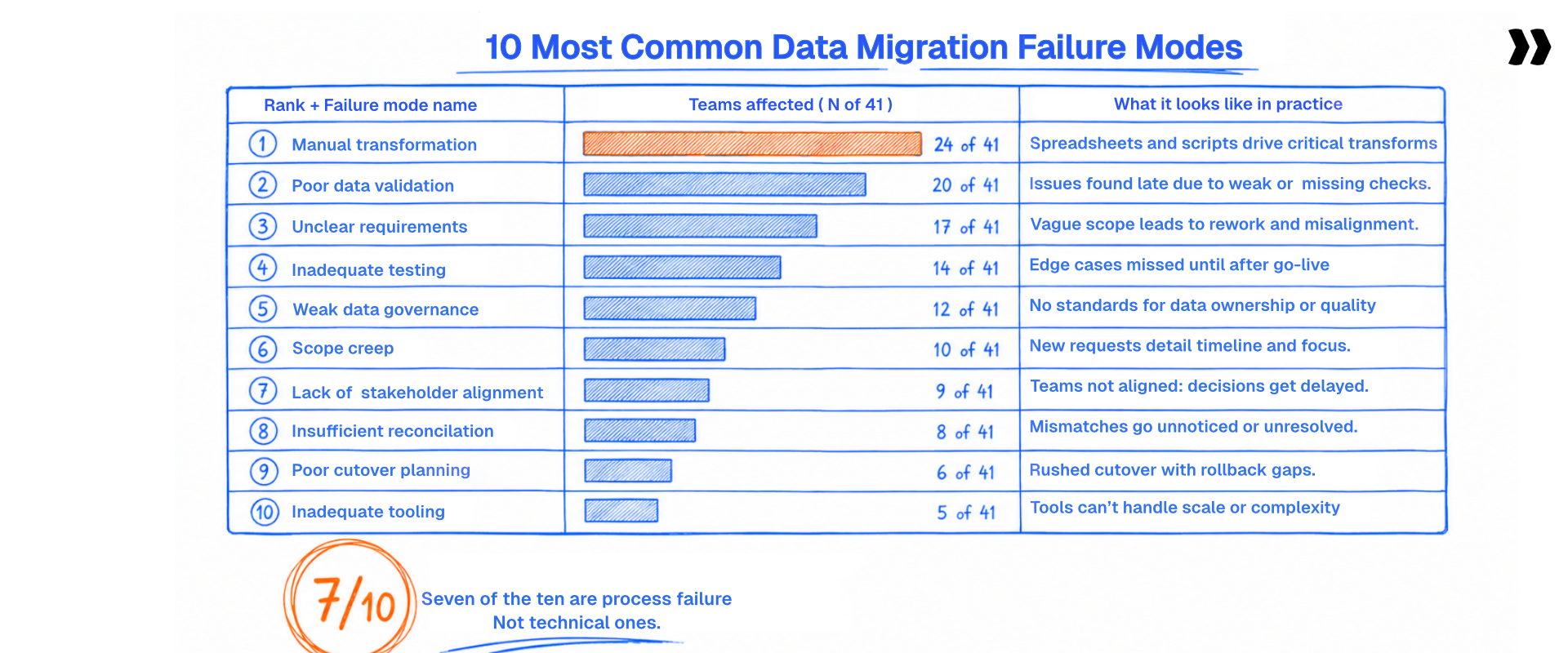
Most articles on data migration pitfalls list what could go wrong. The list below is what 41 teams reported when asked what breaks in practice. The data migration challenges they named rank in an order most guides get backwards.
Across 41 implementation teams, ten failure patterns recur. Ranked by how many teams hit them: manual transformation that does not scale (24), compliance constraints on who is allowed to touch the data (9), missing connectors to source systems (9), no deterministic way to validate a conversion (8), internal tooling that solved part of the problem (8), volume ceilings (7), no customer-facing review step (5), cross-table validation gaps (4), internal migrations treated as a separate category (4), and no shared memory between projects (3).
These counts come from discovery conversations with 41 implementation and professional services teams evaluating migration tooling between April and August 2026. Teams typically hit several of these at once, so the counts add up to more than the sample size.
The effort and duration figures later in this piece come separately from aggregate delivery data across 421 accounts running migration work.
Seven of these ten are process failures. Process is fixable.
Rules defined once per source system, reused on every customer after.
Three of these deserve more than a table row.
- Manual transformation at onboarding scale (24 of 41). A field service software vendor maps every client's export by hand, from a blank sheet, on every project. The work is correct and the work is repeated. Nothing carries forward.
- Compliance constraints (9). An HCM implementation partner cannot take possession of client files at all. Their contracts forbid it. That single constraint rules out most data migration tools before anyone evaluates features.
- No deterministic way to validate (8). Teams sample 10 to 20% of records, confirm those look right, and load the rest. That catches format errors. It does not catch a well-formed value in the wrong column, which is the failure that reaches production.
Seven of the ten are process failures, not technical ones. No one on this list lacks engineers or a data migration plan. They lack a process that survives the next project, the next analyst, and the next data volume. That is the difference between data migration issues you fix once and issues in data migration you fix forever.
Which failures do the counts understate?
Two failures do not appear in the counts above. The first is the cold start on a source system nobody has seen before, which teams report as normal, not as a failure. The second is that no single tool handles every nuance of a migration, which is a market condition, not something a team does wrong.
Both cost more than most of the ranked ten, and neither gets a number here because neither was counted.
The cold start: every unfamiliar source system starts from zero
A customer arrives from a legacy system nobody on the team has worked with: a regional ERP, a homegrown Access database, an old Certinia or Kantata tenant, or a vertical tool with 200 customers worldwide.
There is no alias library, no known quirks, no prior mapping to copy. Someone opens a blank sheet and profiles the export. They work out what the fields mean, write new transformation logic, and find the edge cases by hitting them.
Every first migration from a new source system costs full price. There is no discount for experience you do not have yet.
Teams do not classify this as a failure. They classify it as a job. It surfaces indirectly, as the reason failure mode 1 never gets cheaper. It is also getting worse, because the number of systems customers arrive from keeps growing.
Every vertical tool, every regional competitor, every homegrown platform built in 2009 is another cold start. A team that has solved four source systems is not four tenths of the way done.
The fix is not a better script. The fix is deciding that the unit of reuse is the source system, not the customer. That argument runs through the rest of this guide. It also explains why "we have custom scripts that work for us" holds right up until a new source system appears.
Every first migration from a new source costs full price.
See what it costs the second time, once the playbook exists.
No single tool handles every nuance
There is no tool today that covers a whole customer data migration. Teams end up with a stack. A CSV importer for upload. A script or spreadsheet for transformation. Email for customer review. The destination system's own importer for the load. Sometimes a separate validation passes on top.
The real cost is not the license fees. Every handoff between those tools is a place where data changes hands without an audit trail. Nobody answers "what changed, when, and who approved it" across the whole chain.
The gaps recur in the same places. Transformation tools that do not validate logic. Importers that validate format but not meaning. Nothing that gives the customer a documented way to review their own data. This is not a failure a team commits. It is the shape of the category.
And it is true of us too. Rocketlane covers transformation and validation. Extraction sits with the customer or the source system. Loading sits with the destination. Anyone claiming end-to-end coverage of a customer data migration today is overstating it. A page about failure modes that exempts its own vendor is not worth reading.
Ask every vendor which phases they cover, in order, and where the handoff happens. The risk assessment below turns that question into something you score.
Where does the time go in a data migration project?

Migration delay is rarely processing time. Machines move records in minutes. The calendar goes somewhere else, and knowing where changes what you fix.
Migration delay is waiting: for the customer to send data, to answer a validation question, to return a corrected file. One team lost fifteen days of a sixty day implementation on a single revert cycle.
The time disappears in four places:
- Getting the data at all. Getting a completed data workbook back from a customer routinely takes two to three months. That single dependency explains more delay than any technical cause in this guide.
- Correction round-trips. Each cycle costs days of calendar time and minutes of work. The ratio is the problem.
- Validation and rework. complex conversions that run up to eight hours each
- Post go-live corrections. Implementation teams commonly report 15 to 20 days of data fixes after cutover, which lands on the same people who are already onboarding the next customer.
The underestimation trap is close to universal. One team put it plainly: "We thought it would take one day. On average it takes eighteen."
Aggregate delivery data across 421 accounts running migration work says the same thing at a different scale. The average account logging migration time has around 18 people doing it, and the largest had 948.
Migration pulls in data owners, admins, QA, and project managers, not one engineer with a script. That same data puts typical migration project duration at a median of roughly three months. Customer implementation timelines run two to three months, and stretch past four months for heavy migrations.
So the shortest route to reducing time to value in customer onboarding runs through migration, not through the kickoff deck. Cut correction round-trips, validate the customer's file at upload instead of after import, and reuse transformation rules per source system. Teams doing all three report 12% faster time to go-live.
Here is the part most best practice guides will not say: the bottleneck is usually the customer. You do not control when a file arrives. You control how fast a bad file gets diagnosed and how few round-trips it takes to fix. Every practice in this guide targets one of those two numbers.
You cannot control when the file arrives. You can control the round-trips.
See a bad file diagnosed at upload instead of after import.
How do you run a data migration risk assessment?
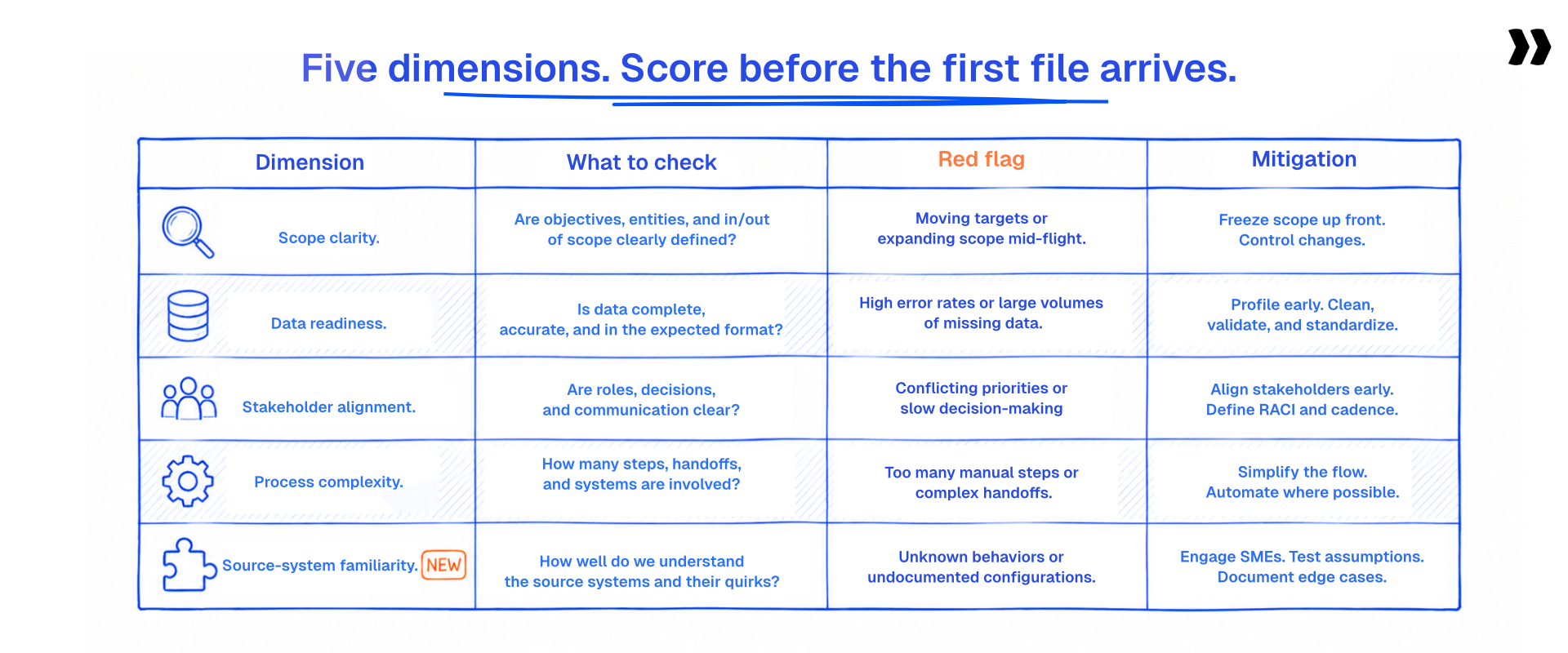
Risk assessment sounds like paperwork until you price a project from a template and find six date formats in one column. It converts unknowns into scoped work while there is still time to scope it.
A data migration risk assessment scores five things before work starts: source data quality, object complexity and dependencies, compliance exposure, cutover pressure, and whether you have migrated from this source system before. Each maps to a mitigation you put in place while you can still use it.
ASSET BLOCK FOR REVIEW (Risk assessment framework):
Twenty minutes with the real export beats a week of planning docs.
Send us one and see what it surfaces.
Two of these dimensions carry most of the surprise. Profile representative data samples before you scope, because most overruns get priced from a template, not from the customer's actual file. Twenty minutes with the real export moves more risk than a week of planning documents.
The fifth dimension is the cold start made operational. A first migration from a new source system and a fifth from a known one are different data migration projects with different data migration requirements. Estimating them the same way is why the first one always overruns.
On stakeholders: the person who knows what the legacy data means is usually not the person who sends it. Find them in week one, by name. Business users who lived in the old system answer in an hour what a support ticket answers in a week.
Score the five dimensions, write the mitigations into the detailed migration plan, and the data migration scope stops being a guess. That five part grid is the whole data migration framework you need at this stage.
It settles the data migration considerations that otherwise surface in week six. Risk management for data migration is mostly this: decide what you do not know, before it decides your timeline.
What do data migration best practices get right, and what do they miss?
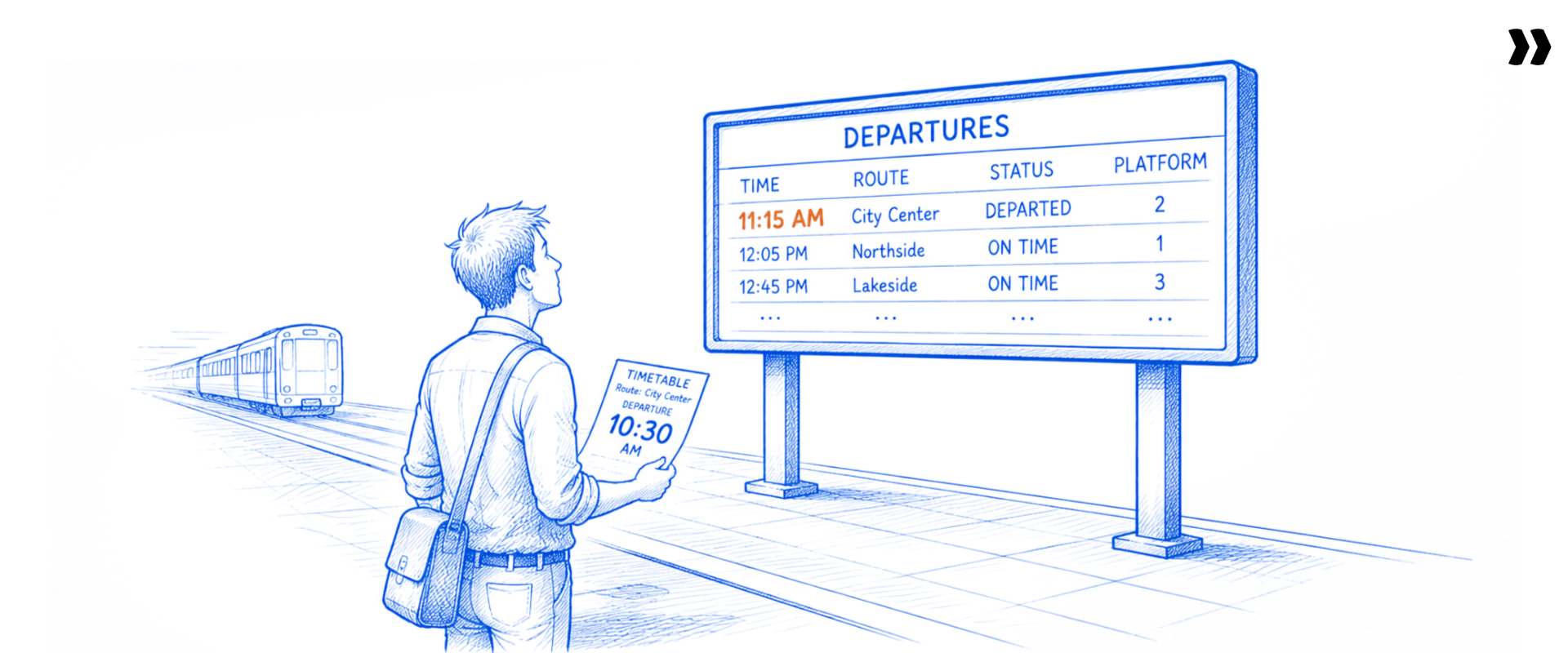
There are eight versions of the standard best practice list on page one of Google. They agree with each other and they are broadly correct.
The standard list is sound. Plan thoroughly. Audit and clean the source file. Map fields before you transform. Back everything up. Test in a staging environment.
Migrate outside business hours to minimize downtime. Monitor after go-live. A team following all seven runs a better migration than a team following none.
It is also incomplete. It describes a single migration, from a system you already understand, using a tool that does not exist. Four gaps follow from that.
It assumes one migration. Implementation teams run the same migration shape dozens of times a year, and some run more than a thousand. Advice that does not compound is advice you re-execute from scratch every project. A data migration methodology built for a one-time enterprise cutover teaches nothing about the second run.
It assumes a familiar source. Every step reads as though you know what the fields mean. "Map data fields" is a five minute task on a known source and a two week task on an unknown one. No checklist has a line for the cold start.
It stops at format validation. "Verify data integrity" in practice means comparing record counts between old and new systems. That confirms nothing left the building. It does not catch data that is well-formed and logically wrong, which is the expensive kind.
It ignores who does the work, and with what. Every practice assumes an available specialist and a tool that covers the phase. Failure modes 2, 3, and 6 are all constraints on capacity and coverage, and none respond to a better checklist.
So the best practices for a data migration project are split into two lists, and most published data migration standards only cover the first. One is the standard hygiene above, which you should follow. The other is the set of decisions that determine whether migration number twelve is cheaper than migration number one: what you capture, what you reuse, and what you measure.
A successful data migration is not the goal on its own. Data migration strategies that skip the second list produce one successful migration and no successful second one. Search best practices for data migration projects and you get the first list; the second one decides whether the work compounds.
One structural choice sits underneath all of it: big bang or phased. That choice drives your rollback plan and your gap data handling.
What should you check in a source data audit before you map?

Every hour spent on a source data audit removes several later. Poor data quality feeds almost every failure downstream.
Profile the source file before writing a single mapping rule. Check four things. Completeness of required fields. Format consistency within each column. Duplicates, both within the file and against the destination. And whether every child record resolves to a parent that exists.
Practitioners name the same small set of data quality issues over and over. They are small, they are silent, and they halt loads:
- A missing @ or a stray period in an email address, which stops a whole import.
- Leading zeros stripped from barcodes and IDs, which Excel does without asking.
- Inconsistent phone formats and missing country codes.
- First and last name in one column in the source, split across two in the target systems.
- Duplicate records and non-unique keys.
- The same field is named differently across two exports from the same source system, which is routine in Salesforce, NetSuite and Zendesk exports.
Then add the data formats problems that surface once you open the file. Six date formats in one column. Currency symbols sitting in numeric fields. Non-breaking spaces introduced by a CSV export. State values mixing full names with abbreviations. Free-text status values where the destination expects a fixed list.
Then check shapes instead of values. Data structures in a legacy system encode assumptions nobody wrote down. One customer record per household, or one per person. Addresses as one field, or five. Data types that look numeric and hold text.
The decision most teams skip: which records not to migrate. Purging obsolete data is a choice, better made deliberately in week one than discovered at cutover. Ten years of closed tickets do not need to become critical data in the new system.
On an unfamiliar source, profiling is not preparation. It is how you learn what the fields mean. Write down what you learned. That document is what makes the next migration from this source cheaper. And agree who owns quality after go-live, since someone has to monitor data quality in the new environment. Data governance that starts at cutover starts too late.
Why is field mapping the most expensive transformation risk?
Mapping is where the hours pile up and the expensive mistakes hide. Teams say the same thing about ETL data migration repeatedly: extract and load are manageable, and the T, data transformation, is where projects drown.
Mapping errors are the most expensive migration failures because they are silent. A field mapped to the wrong destination column produces data that loads cleanly, passes validation, and is wrong in production.
The traps recur across source systems:
- One source column carrying two values, such as a contact name and a company separated by a colon.
- Compound address fields with inconsistent separators between records.
- Identifiers that are alphanumeric in the source and numeric in the destination database management system.
- Custom fields with no equivalent in the target, which forces a business decision, not a technical one.
- Enumerations that overlap but do not match, where "Active" in one system means two different states in the other.
Custom metadata is where professional services migrations break. Billing codes, retainer structures, matter numbers, project hierarchies, engagement types.
Generic guides say to map custom fields with care. The specific failure: these fields encode contract terms, and getting them wrong shows up on an invoice.
Transform data with rules, not one-off edits. Phone formatting, name splitting, date formats, country codes, and case normalization each get encoded once, per source system, and applied every run. A one-off edit fixes today's file.
A rule fixes every file from that source forever. Protect typed data end to end while you are at it: treat IDs and barcodes as text from export to load, or the leading zeros disappear and nobody notices until a customer scans a label.
Doing that is how you maintain data integrity across a schema change instead of hoping for it. On a familiar source you recognize these traps in minutes. On an unfamiliar one you find them by loading and failing. That gap is the cost of the cold start. It is why mappings belong in reusable artifacts, not in spreadsheets in someone's downloads folder.
Data loss in a migration is rarely dramatic. It is a truncated column, an unresolved relationship, and a report wrong for three months. Catching that is the job of validation and testing, covered on our data migration validation and testing guide.
Silent mapping errors load cleanly and stay wrong for months.
Field, cross-field and cross-sheet checks before anything exports.
How do you handle security and compliance risk in data migration?
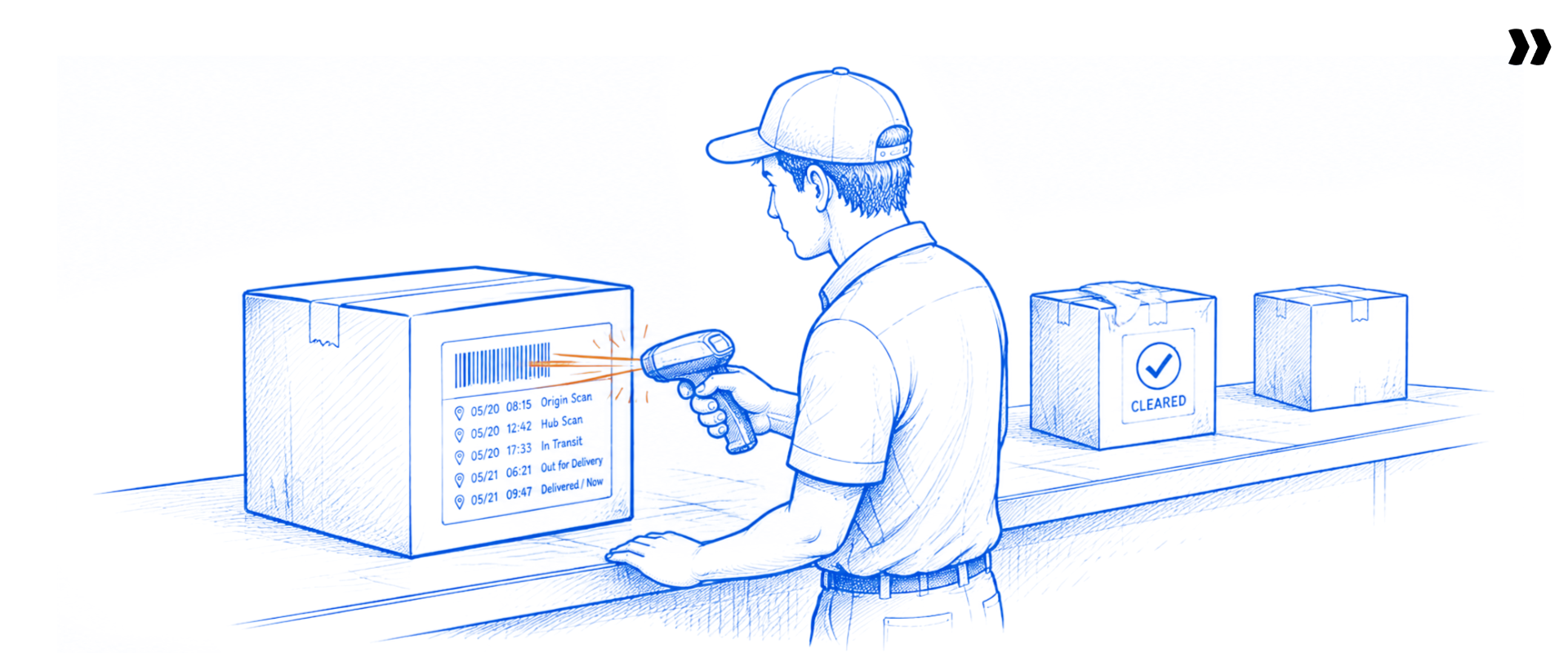
Migration data is usually the most sensitive data a customer holds. It leaves their system, sits somewhere in the middle, and lands somewhere new. Every step is a question a security reviewer will ask, and answering late costs weeks.
Compliance exposure gets assessed before tool selection, not after, because it rules out entire approaches. Nine of the 41 teams reported constraints on who is allowed to handle the data, and for some the constraint is absolute: they are contractually barred from taking possession of client files. That is not a preference to design around. It changes the whole method.
Data security is the whole conversation here. Name what is moving: social security numbers, bank details, payment card data, patient records, employee compensation. Sensitive data in a migration file has none of the access controls it had in the source system, which is why the file is the risk.
The questions a buyer answers internally, before shortlisting a data migration solution:
- Where does the data rest, and in which region?
- Who can see which fields, and how are access controls enforced?
- Is the data used for model training, and is retention zero by default?
- What audit trail exists for every transformation and every approval?
- Do we need a BAA, a DPA, or both, and who signs?
Data protection regulations set the floor, not the ceiling. GDPR and HIPAA tell you what is mandatory, and customers with the biggest data sets ask for more.
The multi-tool reality from the previous section lands here with a cost attached. Every extra tool in the chain is another vendor in the compliance review. A five tool migration stack is five security questionnaires, five data processing agreements, and five places where the audit trail breaks.
For AI-assisted migration, one standard is worth asking about by name. ISO 42001 covers AI management systems, and it sits alongside ISO 27001, SOC 1, SOC 2, HIPAA, GDPR, zero data retention, and US or EU data residency.
Rocketlane holds compliances like ISO 42001 and runs each migration in an isolated, single-use container where the raw data sits in a file layer that never enters the model's context window. Ask any vendor claiming AI migration capability which of those they hold, and where the raw records go.
Secure data migration comes down to sequencing, and this is where data migration security best practices earn their keep. Do the compliance review first and the tool evaluation second, and you evaluate three viable options instead of twelve.
Ask us the five questions in the list above. We answer all five.
What is a data migration rollback plan?

Every guide lists "build a rollback plan" as a bullet. None say what goes in one. That gap is worth closing, because the plan gets written under calm conditions and used under bad ones.
A rollback plan is the documented procedure for restoring the previous state if a migration fails partway. It names what gets restored, who authorizes it, how long the restore takes, and the point after which rollback stops being possible.
Four components:
- A verified backup. Taken is not the same as restorable. Restore it somewhere once, before you need it.
- Decision criteria. Write the specific conditions that trigger a rollback, in numbers, before cutover night. Error rate above X. Load incomplete after Y hours.
- A named owner. One person with the authority to call it, and a deputy. Not a committee.
- The point of no return. Once the destination is live and users are transacting in it, rollback means losing their work. Say when that moment is.
Rollback is straightforward on a big bang cutover and genuinely hard on a phased migration approach, because both systems have been accumulating changes. Phased migrations trade rollback simplicity for smaller blast radius. Know which trade you made.
Dry runs. A pilot run on a live-data subset benchmarks transfer time, error rate, and schema alignment before any of it matters. Use representative data samples, not clean ones, because the point is to find what breaks. On an unfamiliar source system, the dry run is how you discover the schema. This is where test data management earns its keep: a stable, refreshable test set makes the second dry run comparable to the first.
The partial failure problem. When a load fails halfway, teams rarely know what was written and what was not. That is why a rollback plan needs a documented restore point, not a backup file, and it gets worse across a multi-tool chain where no single system holds the full record.
Business continuity is why all of this exists. The customer's business operations do not pause for your cutover, and a migration that leaves them unable to invoice for two days failed, whatever the record counts say.
What is gap data, and how do you handle cutover risk?
Cutover is the one hour everyone plans for and the two weeks nobody plans for. The problem below consumes those two weeks, and most guides never name it.
Gap data is the records created or changed in the source system after the export was taken but before go-live. The customer keeps working in their old system while the migration runs, so by cutover there is a stretch of data that was never in the migration file.
Some teams call it a top-up. At one software vendor it affects roughly 70% of projects. It is not an edge case, and going unnamed in most guides is why teams meet it for the first time on cutover weekend.
The difficulty is not detecting it. It is merging the new data into an already mapped, already transformed dataset without redoing the mapping or overwriting manual corrections made along the way.
Three approaches, honestly weighted:
- Freeze the source. Cleanest option, rarely available. Ask anyway, because a 48 hour freeze solves the whole problem.
- Re-export and re-run. Safe and expensive. Every manual correction made since the first run has to be reapplied.
- Merge the delta. Fastest and hardest to get right. You need a reliable change timestamp and a rule for conflicts.
Coordinate the cutover as a sequence, not an event. Agree on the freeze window, the go or no-go checkpoint, the load order, the smoke tests, and who signs off. Old and new systems both need an owner during that window.
Then plan hypercare. The first two weeks after go-live are when business users find what no validation has been caught, because they are looking at their own records. A migration that leaves 20 days of post migration corrections did not finish on time.
Data migration metrics: how do you know it worked?
Most teams answer this with a feeling. It went fine. It was painful. Neither survives a conversation with a CFO, and neither tells you whether the next one improves.
Five metrics tell you whether a migration succeeded: record count reconciliation between source and destination, error rate at import, number of correction round-trips with the customer, the volume of post go-live data fixes, and whether the next migration from that source system costs less than this one did.
The first two are table stakes. Count reconciliation and error rate confirm data integrity at the format level, and every data migration testing approach starts there. Our guide to data migration validation best practices and data migration testing best practices covers how to validate data integrity across relationships instead of columns, including how the destination processes data it has never seen.
The other three are where the useful signal lives.
Correction round-trips. Few teams track this. It is a leading indicator, visible from day one, and it moves before any other metric. Three round-trips before the first clean file means fifteen days of calendar, and you know that in week one.
Post go-live correction days. Count the days spent fixing migrated data after cutover. When teams report 15 to 20 days of corrections, the migration did not succeed. It finished. Those two outcomes get recorded the same way in most project trackers, which is part of the problem.
Cost per migration by source system. If migration five from a known source costs the same as migration one, nothing is being captured. This is the measurable version of the cold start, and the only metric here that tells you whether your process is improving.
The delivery data shows how far off measurement currently sits. Across 421 accounts running migration work, effort concentrates heavily: a small number of accounts carry the majority of all migration hours. That says complexity drives data migration cost far more than data volume does.
Most practitioners admit nobody measures hours per migration today. The first best practice is to start: a data migration audit reporting five numbers per project beats a dashboard nobody populates.
Most teams stall on tooling, not intent. Reporting on migration effort means exporting timesheets and building a pivot table nobody refreshes, so the measurement dies in month two. Nitro Analyst answers these questions in plain language against live project data: hours per migration by source system, correction round-trips per project, post go-live correction days by account, and margin on migration work this quarter.
It returns the number with the chart and the narrative, saves the question as a reusable report, and reruns it every cycle. No manual export, no BI dependency, and no waiting on an analyst to build a custom view.
Why do the same risks recur on every data migration project?

Every section above describes a problem with a known fix. So why do the same problems appear on the next project, with the same team, three weeks later?
Most migration risk is not specific to a customer. It is specific to a source system. The same source produces the same problems every time, and most teams solve them fresh on every project because the fix lives in someone's head instead of in a reusable process.
The repetition is measurable. In aggregate delivery data, the same migration task recurs across an average of five projects, and one recurring task appeared in 2,913 separate projects. More than 7,000 distinct migration task types repeat across two or more projects.
If it is repeatable, it is automatable.
Tie that back to the failure modes. Mode 1, manual transformation in 24 of 41 teams, is not a technical problem. It is that the work is non-repeatable. Mode 10, no shared memory between projects, is the same problem one level up. The cold start is the same problem one level deeper: the first migration from a new source is expensive because nothing was captured the last time a source was new.
The ranked ten are symptoms. The cold start and the missing all-in-one are the conditions producing them. Fix the symptoms and they come back next quarter. Change the unit of reuse from the customer to the source system, and they stop.
Repeatable means three specific things:
- Transformation and validation rules documented per source system, not per customer.
- Validation that runs identically on every project, so results compare across runs.
- An audit trail that survives the analyst leaving the company.
That is what an automated data migration process looks like, and what teams mean by a data migration factory. It is mostly refusing to throw away what you learned last time.
One caveat. Repeatability is worth building when you see the same source system more than a handful of times. Below that, a good template and a careful reviewer is the right answer, and any vendor telling you otherwise is selling.
One recurring task appeared in 2,913 separate projects.
Change the unit of reuse from the customer to the source system.
Which data migration approach fits your team?
Most guides end without answering the question the reader came with: given my situation, what should I do? Below is the honest routing, including the four situations where the right answer is not us.
The choice turns on two variables: how many migrations you run a year, and whether your bottleneck is transformation or extraction. Match your row, then read the reason before you act on it.
The verdict, stated plainly. If you run customer data migrations repeatedly, from a recurring set of source systems, and transformation and validation are where your hours go, Rocketlane Migration Agent is the right choice for three specific reasons: transformation rules live per source system instead of per customer, the customer reviews and signs off on their own file inside the delivery project instead of over email, and every run leaves a versioned record you can hand an auditor.
If you migrate rarely, or your bottleneck is extraction and not transformation, one of the other six rows is the honest answer and you should take it.
Your first migration is on us. Dozens a year from recurring sources? Send one and see what it costs.
How Rocketlane reduces data migration risk
.png)
No tool covers a whole migration today, ours included. Here is exactly which part ours covers.
Rocketlane handles the transform and validate step of a migration: mapping source fields to a destination schema, applying transformation rules, and validating before anything is exported for load. Extraction from the source system and loading into the destination are handled separately.
Mapped against the failure modes named earlier, and only the ones we address:
- Mode 1, manual transformation that does not scale. Rules get defined once per source system and reused per customer through per-source playbooks. The unit of reuse moves from the customer to the source.
- Mode 7, no customer-facing review step. Customers review and sign off on their own data in the client portal, with the approval recorded against the project instead of sitting in an inbox.
- Mode 10, no shared memory between projects. Versioned transformations with version compare, plus an audit trail of every transformation and validation run.
- The cold start. The second migration from the same source is a repeat run, because the playbook captured the first. The first one still costs real time. The claim is that it costs once, not that it costs nothing.
What this does not solve: source system connectors (mode 3), compliance clearance for handling client files (mode 2), and volume ceilings on the heaviest data sets (mode 6). Three of those sit in the top ten. Test them against your own constraints.
On build versus buy, which roughly a fifth of the teams in the sample had already attempted: building a transformation agent with a modern model is a weekend of promising output and a year of maintenance. The deciding questions are total cost of ownership, the engineering time you would otherwise point at your product, and who maintains it when the person who built it is on a customer project. Teams that build tend to solve speed and not validation, which is failure mode 5, in 8 of 41.
Two questions decide whether any of this becomes repeatable, so both get answered here instead of leaving it to a review site.
Integrations. Rocketlane syncs two-way with Salesforce at field level, including opportunity to project creation, and pushes account signals back into Salesforce. Jira sync is native. HRIS (human resource information system) connections cover BambooHR and Workday for PTO, skills, cost rates and region. Rocketlane's MCP server lets Claude, ChatGPT and Cursor read and write projects, tasks and time entries directly. Connection setup happens inside the standard go-live window instead of a separate integration project.
The ERP boundary. Rocketlane is not a general ledger and does not claim to be one. It runs revenue recognition, billing models, budget burn and margin tracking for services delivery, then hands finance the output. Teams running NetSuite, SAP or another ERP keep it, and the two systems divide along the same line every honest vendor should draw for you before you buy.
The learning curve. Setting up a first source system takes real work: schemas, mapping examples, transformation rules. Teams go live on Rocketlane in 4 to 12 weeks with a playbook library and dedicated onboarding, against 6 to 12 months for legacy PSA platforms. The curve is front-loaded onto the first source system not repeated per customer, which is the whole argument of this page applied to the tool itself.
Rocketlane is an agentic AI-powered PSA platform built for professional services teams, not adapted from a generic ETL tool. It runs the delivery project the migration belongs to, so the migration inherits the project's documents, timeline, and client relationship instead of living in a separate tool.
That is also why the delivery data cited throughout this guide exists. 750+ customers, a 94% G2 recommendation rate, and a $60M Series C led by Insight Partners sit behind it. For wider category context, Gartner's professional services automation market page is a starting point, and SPI Research's 2026 benchmark puts industry billable utilization at 66.4%, an all-time low. That is the number every hour of manual migration work comes out of.
See transform and validate running on your own files. Book a 20 minute walkthrough
Rocketlane Migration Agent: the work execution layer
One more layer is worth naming, because it turns the practices in this guide into something that runs the same way on every project instead of depending on who is staffed.
Rocketlane Migration Agent is part of Nitro, Rocketlane's agentic AI layer. It sits at Level 3, Work Execution, the tier that does delivery work instead of reporting on it, alongside the Documentation Agent and the Workforce Agent.
This is what separates Nitro from a general-purpose model with a file uploaded to it. Nitro runs on first-party delivery context: the project plan, the customer calls, the emails, the timesheets and the financials already inside Rocketlane.
A generic assistant summarizes a spreadsheet you paste into it. Nitro reads the SOW that defines the scope, the call where the customer described their legacy fields, and the timesheet data showing what the last migration from that source cost. That context is what moves it past summarization into decision support and execution.
What it adds beyond a rules engine:
- Mapping suggestions the moment a source file lands, based on examples, not exact field name matches.
- Plain-English corrections at runtime. Ask it to strip commas from last names or format phone numbers with a country code, and it writes and applies the transformation.
- Inline error flagging in a spreadsheet view, with bulk fixes instead of row-by-row editing.
- Per-run version history and reusable configurations per source system.
- Transcript-driven iteration: it acts on what a customer said on a call and produces a new version for confirmation.
The mapping suggestions are how a first migration from an unknown source gets cheaper. The per-source playbook is how the second one does.
Verified numbers: a 50% reduction in the data migration process, a 12% reduction in time to go-live, and 1,000 hours saved per year for a 25 person SaaS delivery team, or 750 for a services team. Validation runs to 25 million cells per run, stress-tested between 1 and 5 million. Storable cut data migration time by 75% with no added headcount, per Jennifer McCurdy, Senior Manager of Software Implementation.
On accuracy, because the objection is fair: expect around 85% on a first run, iterating to 100% with review. Human-in-the-loop is the design, every change surfaces for confirmation, and nothing loads without review. Given that failure mode 4 is a team with no deterministic way to validate at all, that is the point, not a limitation.
Because the agent runs inside the delivery project, the customer collaboration layer and the automation sit in the same place: the customer reviews their own file in the portal, the agent applies the fix, and the project timeline updates from the same event. Delivery managers see migration status next to every other implementation milestone, and forecasting picks up the change without anyone rekeying it.
Which connects back to risk, not features. Fewer correction round-trips. Fewer errors reaching production. A process that survives the analyst going on leave.
Conclusion
Ten failure patterns recur across data migrations, and seven are process failures, not technical ones. Two more never show up in a count, because teams treat the cold start as the job and the missing all-in-one tool as the weather. The most common failure is that the work gets done by hand, every time. The deepest one is that every unfamiliar source system starts from zero, so the learning never compounds.
Teams that stop hitting these risks are not the ones with better checklists. Everyone has the checklist. They are the ones who changed what they reuse: rules per source system instead of per customer, validation that runs the same way every time, and an audit trail that outlives the person who built it.
That is the shift Rocketlane was built for. It runs the delivery project and the migration inside it, so the transformation rules, the customer's sign-off, and the audit trail live where the work already happens instead of in five disconnected tools. Nitro's Migration Agent then does the repeatable parts, with a human confirming every change. The teams gaining most from it are not the ones with the cleanest data. They are the ones who decided that migration twelve should cost less than migration one.
Start with the risk assessment. Five dimensions, one hour, before the first file arrives.
Migration twelve should cost less than migration one. Start with the risk assessment. Then bring us the file it flagged.
Quick summary
- Ten failure patterns recur across data migrations, and seven of them are process failures rather than technical ones.
- The most common is manual transformation that does not scale. It hit 24 of 41 teams.
- Two failures never show up in any count: the cold start on an unfamiliar source system, and the fact that no single tool covers a whole migration.
- Run the risk assessment before the first file arrives. Five dimensions, one hour, and it prevents more than testing after the fact does.
- Rocketlane Migration Agent covers transform and validate, with rules saved per source system so the second migration costs less than the first. Extraction and loading stay with your team.
Table of Contents
Regsiter for the live webinar


Great consultants didn't join your team to spend Fridays writing documentation.
Table of contents
18 of Forbes Cloud 100 chose Rocketlane. The best PS teams aren't waiting around.
FAQs
Why do most customer data migrations fail?
Most fail on process, not technology. Across 41 implementation teams, the most common failure was manual transformation that does not scale, in 24 of them. The work gets done correctly and from scratch every project, so the same errors recur and the cost never drops.
What are the biggest risks in a data migration?
The biggest risks are an unprofiled source file, silent mapping errors, compliance constraints discovered after tool selection, and gap data created while the customer keeps using the old system. Silent mapping errors cost the most, because the data loads cleanly and stays wrong in production for months.
What should be in a data migration risk assessment?
Score five dimensions before work starts: source data quality, object complexity and dependencies, compliance exposure, cutover pressure, and prior experience with this source system. Each maps to a mitigation. Profile a real sample of the customer's file instead of pricing from a template, since that is where most overruns start.
Why does migrating from a new source system take longer?
Because there is no prior mapping, no alias library, and no record of the system's quirks. Someone profiles the export, works out what the fields mean, writes new logic, and finds edge cases by hitting them. Every first migration from a new source costs full price.
Is there a single tool that handles an entire data migration?
No. Teams run a stack: an importer for upload, a script or spreadsheet for transformation, email for customer review, and the destination system's importer for the load. Every handoff between those tools breaks the audit trail. Ask each vendor which phases they cover, in order, and where the handoff happens.
What is a data migration rollback plan and when do you need one?
A rollback plan is the documented procedure for restoring the previous state if a migration fails partway. It names the verified backup, the numeric criteria that trigger a rollback, the person authorized to call it, and the point after which rollback stops being possible. Write one for every production cutover.
How do you run a data migration dry run before go-live?
Run the full transformation and load process on a subset of live data in a staging environment, using representative data samples instead of clean ones. Measure transfer time, error rate, and schema alignment. On an unfamiliar source system, the dry run is how you discover the schema.
What is gap data in a migration?
Gap data is the records created or changed in the source system after the export was taken but before go-live. It affects roughly 70% of projects at one software vendor. The difficulty is merging it into an already transformed dataset without redoing the mapping or overwriting manual corrections.
How do you keep customer data secure during a migration?
Run the compliance review before tool selection, since constraints rule out entire approaches. Nine of 41 teams reported restrictions on who is allowed to handle client files, and some cannot take possession at all. Confirm data residency, field-level access controls, retention policy, and the audit trail against GDPR, HIPAA, SOC 2, and ISO 42001.
How do you reduce time to value in customer onboarding?
Attack migration first, because it gates the go-live date. Migration gates the go-live date, and customer workbook round-trips routinely run two to three months. Validate the customer's file at upload instead of after import, give them a guided review step instead of a blank workbook, and reuse transformation rules per source system. Teams doing this report 12% faster time to go-live.













Copyright © 2026 Rocketlane Corp. All rights reserved.





















.webp)