IT Professional Services Automation: What It Is and How to Get It Right


•
•
Summarize blog with






60-sec summary
- IT professional services automation is a unified platform that connects resource management, project delivery, time tracking, billing, and client reporting in one shared data model, replacing the disconnected tool stacks most IT services firms currently operate.
- The manual coordination ceiling typically hits between 20 and 40 concurrent engagements, when the operational overhead of reconciling data across systems begins compounding faster than the revenue it supports.
- IT services firms without PSA automation consistently make six operational mistakes: reactive resource allocation, inaccurate timesheet data, disconnected project and financial systems, lagging risk signals, manual client reporting, and siloed onboarding handoffs.
- Well-automated IT PS operations deliver real-time utilization, project-level margin visibility, and client portal access without any manual reconciliation step.
- AI-native PSA platforms introduce a third capability layer beyond automation: agentic intelligence that actively monitors delivery, detects risk patterns before they escalate, and executes operational tasks autonomously.

Introduction
It is 8:47 AM on a Monday. The Head of PS at a 60-person IT managed services firm has four browser tabs open: a spreadsheet for utilization, a project management tool for project status, a billing system for revenue numbers, and the CRM for client health. She has been copying numbers between them for 40 minutes.
The CFO's question is sitting in her inbox: "What is our current billable utilization?" She cannot answer it without manually reconciling all four systems first. She closes two tabs and starts over.
This is the manual coordination ceiling. It lands at a predictable point: somewhere between 20 and 40 concurrent client engagements, when the data required to run the business exists in enough places that producing a single accurate number takes longer than acting on it should.
IT professional services automation (PSA) is the operational answer. It is also widely misunderstood, inconsistently implemented, and frequently confused with project management software that happens to have a billing module.
IT professional services automation is actually the use of a unified agentic execution platform to coordinate and automate the core operational functions of an IT services firm: resource allocation, project delivery, time tracking, billing, and client reporting. Professional Services Automation (PSA) platforms connect these functions in a single shared data model so that project status, utilization, financial health, and client visibility all update from the same source.
IT services firms operating without PSA automation spend a disproportionate share of leadership time on coordination overhead. According to PMI's Pulse of the Profession, organizations waste an average of $97.4 million for every $1 billion invested due to poor project performance (PMI). For IT services firms, that waste compounds through manual reconciliation runs, unbilled hours, and project margin that only becomes visible at month-end.
This guide is for delivery leaders, PS directors, and operations heads at IT services firms who are past the spreadsheet phase and ready to understand what real PSA automation looks like in practice.
What is IT professional services automation?
IT professional services automation (IT PSA) is the use of software built for how services firms run to unify and automate the core operational functions of an IT services firm: resource allocation, time tracking, project delivery, billing, and client reporting.
It replaces disconnected tools and manual coordination with a single operational system where all project, financial, and client data updates from a shared data model.
IT services is a distinct use case from generic PSA deployment. The delivery models are more complex: fixed-price, time-and-materials, staff augmentation, managed services, and retainers often run simultaneously on the same team.
The compliance requirements are more specific, covering IR35 for contractor classification, GDPR requirements around time records, and multi-currency billing for global engagements. And the client visibility expectations are higher: enterprise and mid-market IT buyers increasingly expect portal-native project access, not Friday-afternoon PDF status reports.
What IT PSA replaces is predictable: a spreadsheet for expense tracking, a project management tool for task status, a separate billing or accounting system for revenue, a CRM for client health, and email threads for client communication.
Each tool is defensible in isolation. Together, they produce a coordination problem that grows with team size.
The four operational layers a PSA platform unifies are resource management (who is working on what, at what capacity, and with what skills), time and billing (what hours are logged, at what rates, against which budgets), project delivery (what is the task-level status of every active engagement), and client visibility (what each client can see about their project in real time). When these layers share a data model, the Head of PS answers the CFO's question in 30 seconds.
A standalone project management tool adapted for billing cannot produce real-time project-level margin data or enforce timesheet compliance at point of entry.
Four tools, each defensible. Together, a coordination problem.
See resource, time, delivery and client data update from one model.
The three pressures that made manual coordination untenable?
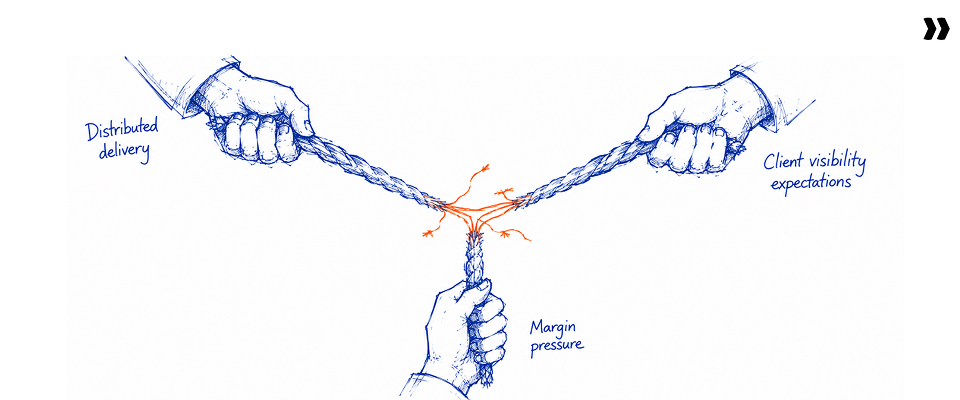
Three converging pressures have made manual PS coordination untenable for IT services firms that want to scale past 30 to 50 FTEs: distributed delivery models creating coordination overhead that spreadsheets cannot handle reliably, client expectations shifting toward real-time portal-native visibility, and CFO-level scrutiny on project-level margins increasing sharply since 2022.
The first pressure is structural. Offshore, nearshore, and hybrid delivery models are now the operational baseline for most IT services firms, not a cost-saving experiment. Multi-time-zone resource allocation, multi-currency billing, and split-team delivery require automated coordination across time and geography.
The second pressure is client-driven. Enterprise and mid-market IT buyers now compare the visibility they get from IT service providers against what they see from leading SaaS implementations. A PDF report compiled on Fridays is a client satisfaction risk, not a reporting strategy.
Clients expect to check project status, review open tasks, and communicate with delivery teams through a structured portal, not by emailing a project manager and waiting.
The third pressure is financial. Competitive pricing compression in cloud managed services, digital transformation engagements, and staff augmentation has tightened operating margins across the IT services sector. Firms that cannot see project-level profitability in real time cannot intervene when a fixed-price engagement trends toward a loss. According to SPI
Research's 2024 PS Maturity Benchmark, the average professional services firm operates at a net project margin of under 25%, leaving almost no room for untracked scope creep or unbilled time (SPI Research).
The manual coordination ceiling is lower than most IT leaders expect. Most IT services firms hit it at 30 to 50 FTEs: the point where a Head of PS can no longer hold the full picture of resource allocation, project status, and client health in their head without a system doing the tracking. Above that threshold, decisions made on incomplete operational data are not exceptions. They are the rule.
The 6 operational mistakes IT services firms make without PSA

The six most common operational mistakes are: treating resource allocation as a project-start task instead of a pipeline-stage process; trusting self-reported weekly timesheet data; operating project health and financial health on separate systems; using the weekly status meeting as the primary risk signal; producing client reports manually; and creating a hard handoff between onboarding and delivery instead of treating them as a continuous workflow.
These mistakes are structural, not individual. They happen when a coordination system designed for a smaller operation tries to run a larger one.
- Treating resource allocation as a project-start problem. Resources get assigned at kickoff instead of at scope sign-off. No pipeline-stage visibility means consultants end up double-booked or sitting idle by the time the project launches. At 20 or more concurrent engagements, this creates utilization gaps that only surface at month-end, when it is too late to fix them.
- Trusting self-reported timesheet data. End-of-week time entry is reconstructed memory, not an accurate record. The Friday-afternoon recap of a full week's work introduces inaccuracies that compound into billing discrepancies, understated utilization, and unreliable project profitability data. Firms making operational decisions from this data work from wrong inputs.
- Running project health and financial health on disconnected systems. Project managers see task status. Finance sees revenue lines. Neither sees the relationship between the two without a manual reconciliation run. Fixed-price project margin is invisible until month-end. By then, scope creep that went untracked has already eroded it.
- Using the status meeting as the primary risk detection mechanism. The risk that surfaces in a Monday status meeting is already late. High-performing IT services firms use leading indicators: milestone slippage velocity, blocked task accumulation, and budget burn rate relative to delivery completion. Lagging signals like status updates mean clients often discover problems before account managers do.
- Manual client reporting. Compiling a client-facing project status report takes 3 to 5 hours per engagement per month. At 30 concurrent projects, this is a material overhead that produces a retrospective view. The client sees the project as it was when the report was compiled, not as it is now.
- Creating a handoff between onboarding and delivery. In IT services, client onboarding is the first delivery phase. Teams that operate onboarding and delivery on separate tool stacks create a data gap at the handoff: resource assignments made in the onboarding system do not carry into the delivery system, time tracking starts late, and client visibility resets. The handoff is where early-engagement satisfaction drops most sharply.
These six are not people problems. They are system problems.
See what changes when each one becomes structurally harder to commit.
What does poor IT PS operational hygiene actually cost?

Poor operational hygiene in IT services firms produces three compounding costs: unbilled time from unrecorded hours that cannot be invoiced, margin leakage on fixed-price engagements from scope creep that goes untracked, and late-signal client escalations because project health is not measured in real time.
The consequence chain is worth following through.
When timesheet compliance is low, utilization data is inaccurate. When utilization data is inaccurate, resource allocation decisions are made on wrong inputs. When resource allocation decisions are wrong, teams end up over-hired in some roles and under-staffed in others. That structural imbalance shows up as margin erosion, but only at quarter-end, after the decisions that caused it are impossible to reverse.
When project and financial systems are disconnected, fixed-price margin is visible only at month-end. By the time a project shows a loss on the finance team's spreadsheet, the scope overage that created it happened weeks ago. There is no recovery path. The loss is structural.
When client reporting is manual and retrospective, the client discovers project risks before the account manager does. The account manager's Monday status update describes what was happening on Friday. The client's frustration with a delayed milestone began on Tuesday. The escalation that follows is not about the milestone. It is about trust.
Firms that can see project status in real time catch slippage while it is still recoverable. Firms working from a weekly status deck find out after the fact.
Delivery leads we speak with typically estimate that 30 to 50 percent of project manager time goes to non-billable administrative work, including status reporting, data reconciliation across systems, and timesheet correction cycles (SPI Research, 2024 — spiinc.com). That is time not spent managing delivery, resolving blockers, or protecting margin.
These costs are not the result of individual performance failures. They are structural outputs of a coordination system that was not designed for the scale and complexity the firm now operates at.
What does a well-automated IT PS operation actually look like?

A well-automated IT PS operation has a single source of truth for three things: who is working on what at what utilization rate, where every project stands against its financial plan, and what each client can see about their engagement in real time. None of those three views requires a manual reconciliation step to produce.
The practical difference is visible on a Monday morning.
The resource manager opens the platform. She sees current utilization by role, team, and project. She sees which resources become available in the next three weeks based on project phase completions already in the system.
She identifies that a solution architect is available 10 days before the next confirmed project needs one. She makes the assignment. No spreadsheet. No emails to project managers asking about bandwidth. No conflict discovered at kickoff.
The CFO runs a project margin report. It shows actual versus planned margin for every live engagement, updated to yesterday's time records. Two projects trend toward margin underperformance. He flags them for the delivery team before month-end. The data took 30 seconds to produce.
The client logs into the project portal using a magic link, no password required. She sees the current task completion rate, the milestone schedule, and the deliverables completed in the past week. She has a question about a timeline change. She sends it directly through the portal. The project manager responds without scheduling a call, without compiling a status report, and without copying three people on an email thread.
These are not aspirational scenarios. They describe the operational baseline for IT services firms that have implemented unified PSA automation correctly.
The margin report took thirty seconds to produce.
Two projects trending down, caught before month-end instead of after it.
What are the best practices for IT PS automation implementation?
The IT services firms that implement PS automation most successfully share three practices: they define the data architecture before configuring any tool, they involve finance as an implementation stakeholder from the first day, and they run a six-to-eight-week parallel period where old and new systems operate simultaneously to validate data quality before full cutover.
Seven practices that separate successful implementations from expensive restarts:
- Define your data architecture before you open the configuration panel. The most expensive PSA implementation mistakes are structural: a task code taxonomy that does not match billing categories, resource types that do not map to utilization rules, billing rules that conflict with revenue recognition requirements. These are impossible to fix after 30 projects are live on the system.
- Start with time tracking, not project management. Time data is the foundation of every downstream output: utilization, billing, margin, and client reporting. If time data is wrong, everything built on it is wrong. Automate time capture first, with native governance enforcement instead of self-reporting, and get the data clean before adding other layers.
- Make a PS leader the implementation owner, not IT. An IT department can configure a PSA technically. It typically cannot configure it operationally. The billing rule structures, utilization measurement standards, and client visibility settings require PS domain knowledge. The implementation owner should be the Head of PS or equivalent, supported by IT for technical configuration.
- Involve finance from week one. PSA automation touches revenue recognition, billing, and margin reporting. Finance leaders introduced after configuration starts find structural mismatches that are expensive to correct. Involve them at requirements, before the first configuration decision is made.
- Run a parallel period. Six to eight weeks where the old system and the new system run simultaneously. Compare outputs. Identify where the new platform's data diverges from the old, and determine which is accurate. The parallel period surfaces configuration errors before they affect billing or client reporting.
- Define your utilization measurement standard upfront. Billable versus total utilization? By role, by seniority, by project type? The utilization number is used differently by resource managers, finance, and the CEO. Before go-live, the firm must agree on a single definition because the platform will produce one number and everyone needs to interpret it the same way.
- Build governance before you scale. Timesheet policies, approval workflows, escalation rules, and budget threshold alerts are ten times easier to configure in week two of implementation than to retrofit after 40 active projects are running on the system. Governance is infrastructure, not an afterthought.
Governance is infrastructure, not an afterthought.
Ten times easier in week two than retrofitted across forty live projects.
How does AI change what PS automation can do for IT services firms?
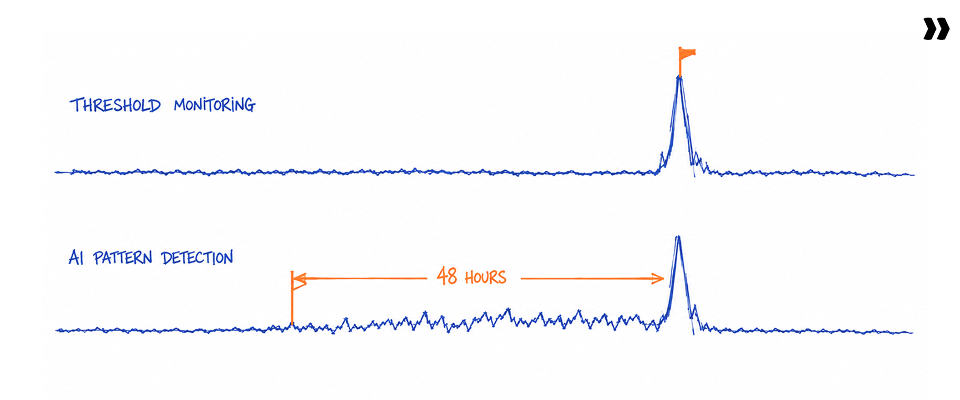
AI introduces three capabilities that rules-based PSA automation cannot replicate: proactive risk detection that identifies delivery patterns preceding escalation before they surface in a status meeting, governance enforcement that catches timesheet and billing policy violations at point of entry without manager follow-up, and agentic intelligence that converts SOW documents into project plans, auto-generates client status updates, and recommends resource reallocation grounded in live project data.
Rules-based PSA automation is passive. It records what happened and makes that data accessible. That is a real improvement over spreadsheets, but it is not the same as intelligence in PS operations.
Level 1: Automated data capture and reporting. The platform eliminates manual reconciliation and produces real-time dashboards that keep utilization, project health, and financial data visible without a reporting run. Most PSA tools marketed as "automated" operate at this level.
Level 2: Governance automation. Policies get enforced by the system at the point of entry. A timesheet entry that violates a billing rule gets caught before submission. An approval workflow triggers automatically based on a budget threshold being crossed. No manager follow-up required. The system catches errors before they compound.
Level 3: Agentic intelligence. This is the shift from merely tracking work to actively executing it. The system detects risk patterns in delivery data before they surface as escalations. It proposes resource reallocation based on current project health. It generates client status updates automatically from task completion data. It converts a statement of work into a structured project plan in minutes.
For IT services firms ready for Level 3 automation, platforms like Rocketlane, which introduced a dedicated agentic AI framework called Nitro embedded across all three levels of PS operations, have made this capability accessible at the 25 to 150-person team scale, not just for enterprise deployments.
What should IT services firms look for when evaluating PS automation tools?
The five evaluation criteria that matter most for IT services firms are: native time tracking with governance enforcement, project and financial data integrated in a single data model, resource management with pipeline-to-utilization visibility, a real-time client-facing project portal, and AI capabilities that are native to the PS data layer rather than bolted on from a third-party tool.
1. Purpose-built for professional services, not adapted from project management. Generic project management tools adapted for PS create structural data gaps. Billing rules, utilization tracking, revenue recognition, and client reporting have different data requirements than task management. Evaluate whether the platform was designed for PS operations from the ground up, or whether PS features are a layer added to a task management core.
2. Native time tracking with governance enforcement. Third-party time tracking integrations break at the margin. The billing rule in one system is not always the same rule applied in the other. Native time tracking with governance enforcement at the point of entry is the only reliable path to time data that can be trusted for billing, utilization reporting, and margin tracking.
3. Project and financial health in a single data model. Milestone completion, budget consumption, and revenue recognition must update simultaneously. Evaluate whether the platform produces project-level margin data in real time without requiring exports to a separate finance system.
4. Resource management with pipeline-to-project visibility. Resource allocation must begin at the pipeline stage, not at project kickoff. Evaluate whether the platform shows capacity by role and seniority 30 to 60 days out, and whether those forecasts update automatically as project phases complete and new opportunities enter the pipeline.
5. A client portal with real-time visibility. The client portal is a baseline expectation at the mid-market and enterprise level. Evaluate whether the portal updates from live project data instead of manual uploads, and whether it supports client-driven interaction such as questions, task completions, and document access, not just read-only reporting.
One question surfaces more risk than any feature demo.
Does a task completion update the budget burn in real time, with no export step?
Which IT services firms benefit most from PS automation, and which should wait?

The routing point for a full PSA is the moment the firm runs more than one delivery model simultaneously and tracks more than 20 people's time across concurrent engagements. Below that threshold, lighter-weight tooling is workable. Above it, manual coordination overhead grows faster than revenue.
What should IT services leaders know before they buy PS automation?
Three things IT services leaders consistently underestimate before PSA implementation: data preparation requirements, which must be defined before configuration begins; change management for timesheet adoption, where senior consultants are typically the most resistant cohort; and the value of a parallel-run period, where six to eight weeks of running old and new systems simultaneously catches configuration errors before they affect billing.
1. Data readiness is the single biggest implementation risk
The quality of PSA output is limited by the quality of the data architecture the firm brings to the implementation. A task code structure designed for one billing model will not work for a mixed fixed-price and time-and-materials firm.
Resource categories that do not map to billing rates will not produce accurate utilization data. Spend two to three weeks auditing and cleaning the firm's current data structure before selecting or configuring a platform. Define what goes in before deciding which system to configure it in.
2. Timesheet adoption requires explicit change management, not training alone
The biggest PSA implementation failures are adoption failures. Senior consultants with years of billing from memory are the most resistant cohort.
The change management program must address the specific objection ("I've done this for 15 years without a governance agent") with a business consequence framing ("We cannot produce accurate client invoices without accurate daily records"). Training on the tool is necessary but not sufficient.
3. Implementation support matters as much as product capability
An IT services firm can configure a PSA independently. Configuring it well requires PS operational domain knowledge alongside technical skill. Platforms that include dedicated implementation support, standard onboarding playbooks calibrated to PS firm types, and a committed customer success manager through the first quarter significantly reduce time-to-value compared to platforms that treat implementation as a separate billable engagement.
"I have done this for fifteen years without a governance agent."
The objection is fair. So is the invoice you cannot produce without the record.

Why Rocketlane is built for IT professional services automation
Rocketlane is an agentic AI-powered PSA platform built for customer-facing professional services teams. It unifies project delivery, resource management, financial visibility, client collaboration, and AI-powered execution in a single platform.
Trusted by 750+ professional services teams with a 94% G2 recommendation rate, Rocketlane closed a $60 million Series C in March 2026 as revenue more than doubled year over year. The platform creates a shared operational layer where utilization, project health, margins, and client visibility are available in real time without manual reconciliation.
Unified delivery, resource, and financial operations
Rocketlane runs project execution, resource allocation, time tracking, billing, and margin management from a shared data model. Delivery leaders, resource managers, finance teams, and executives work from the same operational system instead of maintaining separate reporting layers.
Project health and financial health stay connected throughout the entire project lifecycle. A task completion in the delivery view updates budget consumption in the finance view simultaneously, with no middleware step and no manual reconciliation.
Rocketlane supports fixed-fee, time-and-materials, managed services, retainers, and hybrid engagement models running simultaneously on the same team, which is the real operating reality for most IT services firms.
Resource management built for growing IT services firms
Heat maps give delivery leaders centralized visibility into resource availability, utilization, and future capacity. Skills-based staffing matches consultants to client projects based on expertise, availability, and cost rate. Soft allocations for pipeline opportunities and hard allocations for confirmed work run in parallel, so capacity forecasts reflect both current commitments and incoming demand.
Resource planning updates dynamically as projects move through delivery phases. Over-allocation becomes visible weeks before it affects a go-live date, not the morning of.
Client collaboration as a native capability
Rocketlane's unbranded client portal gives clients real-time visibility into their active engagements. Shared milestones, tasks, approvals, documents, and discussions remain accessible throughout delivery. Clients use magic-link access: no username, no password, no friction at the point of entry.
Clients get answers without requiring project managers to compile and distribute status updates. Unlimited client users participate without creating operational overhead for the PS team.
Project governance and delivery standardization
Standardized project templates improve delivery consistency across teams without requiring every project manager to follow the same mental checklist. Milestone tracking, dependency management, and structured RAID management reduce execution risk across the portfolio.
Governance processes stay consistent regardless of which project manager runs the engagement. That consistency matters most when a firm doubles headcount and cannot rely on institutional knowledge passed informally across the team.
Native integrations across the IT services tech stack
Rocketlane integrates natively with Salesforce for sales-to-delivery handoffs, Jira for engineering team coordination, HRIS systems like BambooHR for staffing and capacity accuracy, and financial management systems for billing and revenue recognition. No middleware dependency is required for the core integrations, which means one less system to maintain and one less failure point between data sources.
How Rocketlane Nitro transforms IT professional services automation
Nitro is Rocketlane's agentic AI layer embedded directly inside the PSA platform. It represents the shift from merely tracking work to actively executing it. While traditional PSA automation records activity and makes data accessible, Nitro actively participates in delivery operations through three capability levels: Operations AI, Delivery AI, and Work Execution.
Across Rocketlane deployments, Nitro automates 95% of manual configuration work and 90% of manual project setup, which is where most of the coordination load sits.
Level 1: Operations AI
Nitro Analyst answers operational questions using live project, financial, resource, and utilization data. Delivery leaders ask natural-language questions: which projects are at risk this quarter, what is the current blended utilization, which accounts have missed two consecutive milestones. Answers come in seconds without building a report or running a spreadsheet.
The Timesheet Governance enforces compliance at the point of entry instead of during the manager review cycle. Policies are defined in plain English: "Do not allow more than 8 hours logged per day without a note." The agent validates every entry against the policy before submission. Violations are flagged with a specific explanation. Managers stop spending time reviewing and correcting timesheets after the fact.
Outcome: portfolio answers in seconds, without building a report.
Level 2: Delivery AI
Project Governance monitors budget consumption, milestone velocity, and delivery risk indicators continuously across every project in the portfolio. Projects approaching budget overruns or schedule slippage are identified automatically, before they surface in a status meeting.
Nitro Signals surfaces early warning indicators from project activity and customer engagement patterns. Communication gaps, stalled tasks, repeated blockers, and stakeholder disengagement get flagged before they become client-facing escalations.
Two signal types operate independently: Project Signals monitor within active delivery engagements, and Project Signals monitor cross-project and external signals like call transcripts and email sentiment.
Nitro Meetings captures project discussions, action items, blockers, and decisions automatically. Meeting intelligence flows directly into project records without manual documentation effort, integrating with Gong or Rocketlane's native recording.
Outcome: proactive governance, not reactive firefighting.
Level 3: Work Execution
The Workforce Agent converts statements of work into structured project plans automatically. Tasks, dependencies, resource requirements, and delivery phases are generated from project scope documentation, reducing the non-billable project setup work that typically consumes the first week of every engagement.
Teams using this capability reduce project setup time by 90 percent and start delivery on day one instead of day five.
One IT implementation team previously spent the first two hours of every project manually creating a plan from a statement of work. After deploying the Workforce Agent, that same work takes under 10 minutes. Delivery begins on day one.
The Documentation Agent creates and maintains delivery documentation throughout the project lifecycle: kickoff notes, handoff documentation, status summaries, and operational records are generated automatically from meeting transcripts and project activity. Institutional knowledge stays attached to the project instead of living inside individual consultants' inboxes.
Rocketlane Migration Agent transforms and validates customer data, flagging mapping errors and conflicts before they become go-live blockers: validating data against the target schema in real time, flagging mapping errors and conflicts before they become go-live blockers, and producing a reusable migration playbook for the next customer on the same platform.
Outcome: delivery starts on day one, not day five.
AI-powered resource and capacity intelligence
Rocketlane's Resource Management Agent surfaces staffing recommendations that factor in availability, skills, utilization, cost rates, and delivery requirements simultaneously. Capacity risks become visible weeks before they affect delivery schedules. Resource planning moves from reactive allocation to proactive optimization, supporting both growth planning and margin management at the same time.
Outcome: right resource, right project, right cost, in seconds.
Two hours building a plan from a SOW. Now under ten minutes.
Delivery starts on day one instead of day five.
Is your IT services firm ready to automate PS operations in 2026?
IT services firms that outgrow manual coordination face a structural decision: keep absorbing the operational overhead of disconnected tools, or implement a unified PS automation layer that turns utilization, margin, and project health from lagging reports into real-time operational instruments.
The routing logic is clear. Under 20 FTEs, lightweight tools work. Above 20 FTEs with multiple delivery models running simultaneously, coordination overhead begins compounding faster than the revenue it supports. Above 50 FTEs, PSA automation is no longer a competitive advantage. It is a baseline operating requirement.
The firms that implement it early configure it correctly, adopt it fully, and scale into it cleanly. The firms that wait implement it under duress, configure it around a backlog, and spend the first year cleaning up data problems that a parallel-run period would have caught.
Rocketlane brings together back-office operations and front-office client delivery in a single agentic execution platform, designed for IT services teams at the 25 to 150-person scale. The same team handles more projects, margins stay visible in real time, and clients see their work in progress without anyone compiling a report to show them.
Related reading: Automated time tracking for professional services | Best PSA software for IT services teams
Quick summary
- IT professional services automation (PSA) unifies resource management, time tracking, project delivery, billing, and client reporting in a single shared data model, replacing the disconnected tool stacks most IT services firms operate before outgrowing them.
- The manual coordination ceiling typically hits at 30 to 50 FTEs: the point where producing a single accurate operational number requires reconciling four or more systems by hand.
- The six most common operational mistakes without PSA, including reactive resource allocation, inaccurate timesheet data, and disconnected project-financial systems, are structural outputs of a coordination system not designed for current scale.
- Successful implementation requires defining the data architecture before configuration begins, involving finance from day one, and running a six-to-eight-week parallel period to validate data quality.
- AI-native PSA platforms introduce a third capability tier beyond rules-based automation: agentic intelligence that proactively detects risk, enforces governance at point of entry, and executes delivery work autonomously.
Table of Contents
Regsiter for the live webinar


Great consultants didn't join your team to spend Fridays writing documentation.
Table of contents
18 of Forbes Cloud 100 chose Rocketlane. The best PS teams aren't waiting around.
FAQs
IT professional services automation, defined
IT professional services automation (IT PSA) is the use of software built for how services firms run to unify and automate the core operational functions of an IT services firm: resource allocation, time tracking, project delivery, billing, and client reporting, replacing disconnected tools with a single shared operational system.
How is IT PSA different from generic project management software?
Project management software handles task status. IT PSA integrates task management with native time tracking, billing rules, utilization measurement, revenue recognition, and client visibility in one data model. A PM tool cannot produce real-time project-level margin data or enforce timesheet compliance at point of entry.
What are the signs an IT services firm needs PSA automation?
Five signals: utilization data requires a manual spreadsheet run to produce; fixed-price project margin is only visible at month-end; resource double-booking is discovered at kickoff instead of at scope sign-off; client status reports are compiled manually each week; and more than 15 concurrent engagements are running on the team.
How long does it take to implement PSA automation in an IT services firm?
A structured implementation typically runs 8 to 12 weeks: two to three weeks for configuration and data architecture setup, four to six weeks for parallel running and data validation, then go-live. Firms that skip the parallel period typically spend that time correcting billing and utilization errors post-launch.
What data does an IT services firm need to prepare before PSA implementation?
Four data assets: a task code taxonomy mapped to billing categories, resource category definitions mapped to utilization rules and billing rates, the billing rule hierarchy covering all active engagement models, and existing project and client data for migration. Audit and clean these before any configuration begins.
How does PSA automation improve timesheet compliance and billing accuracy?
Native governance enforcement catches policy violations at point of entry, before inaccurate records reach the billing cycle. Self-reported weekly timesheets produce reconstructed estimates. Daily entry with automated validation produces actual records. The downstream difference shows up in billing accuracy, utilization reliability, and fewer manager correction cycles.
What is the difference between rules-based PSA automation and agentic AI in PS operations?
Rules-based PSA records activity and enforces predefined workflows. Agentic AI operates in three layers: Level 1 automates reporting and governance, Level 2 monitors delivery and surfaces risk signals proactively, and Level 3 executes workflow steps autonomously, converting SOWs to project plans, generating documentation, and flagging resource conflicts before they affect delivery.
Does PSA automation work for IT services firms with mixed delivery models?
Yes. Unified PSA platforms support fixed-price, time-and-materials, managed services, retainers, and staff augmentation running simultaneously. Each model applies its own billing rules, revenue recognition logic, and utilization calculation within the same data model, which is the core reason point solutions fail at this use case.
What is the ROI of PS automation for a mid-sized IT services firm?
ROI comes from three sources: time recovered from manual coordination (status reporting, timesheet reconciliation, and resource allocation), billable hours recovered from previously unrecorded time, and margin improvement from real-time visibility into fixed-price project performance. According to SPI Research, top-performing PS firms achieve utilization rates 15 to 20 points higher than average performers (SPI Research, 2024 — spiinc.com).
Which IT services firms benefit most from PS automation in 2026?
Firms with 20 or more concurrent engagements, two or more delivery models running simultaneously, and 15 or more people whose time is tracked across those engagements benefit most. Firms under 15 FTEs with a single delivery model can operate effectively on lightweight tooling. The scaling threshold is the moment operational coordination consumes more leadership capacity than delivery decisions do.













Copyright © 2026 Rocketlane Corp. All rights reserved.




















.webp)